Defining Items at the SetID Level
Before processing an inventory item in a PeopleSoft application, you must define the item within the system. Items are defined at the setID level first; then they are defined at the business unit level.
To establish an item ID and the corresponding attributes for a setID, use the Define Item (ITEM_DEFIN) component. You can either define new item attributes or modify item-attribute default or template information, which you set up by using the pages that are accessed from the Define Controls menu.
Use the Define Item component to establish lot-controlled or serial-controlled components.
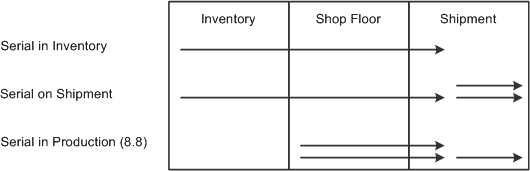
This diagram illustrates how the PeopleSoft application handled serial processing prior to release 8.8:
Image: How the PeopleSoft applications handled serial processing prior to Release 8.8
How the PeopleSoft applications handled serial processing prior to Release 8.8
This topic discusses how to:
Define general item information.
Define additional item attributes.
Define item dimensions.
Define material usage attributes.
Establish item tracking and lot-control attributes.
Establish item shipping and handling attributes.
Define configuration attributes for an item.
Pages Used to Define Items at the SetID Level
|
Page Name |
Definition Name |
Navigation |
Usage |
|---|---|---|---|
|
Define Item - General: Common |
INV_ITEMS_DEFIN1 |
|
Define general item information at the setID level. |
|
Define Item - Item Image |
INV_ITEM_IMAGE_SEC |
Click the Item Image link on the Define Item - General: Common page. |
Maintain an image of an item. |
|
Define Item - Manufacturer's Item |
ITM_MFG_SP |
Click the Manufacturers link on the Define Item - General: Common page. |
Define information about the item's manufacturer. |
|
Define Item - General: Classifications |
INV_ITEMS_DEFIN4 |
|
Define additional item attributes. |
|
Define Item - General: Dimensions |
INV_ITEMS_DEFIN3 |
|
Define item dimensions such as weight, volume, size and color. |
|
Define Item - General: Usage |
INV_ITEMS_DEFIN8 |
|
Define material usage attributes for an item at the setID level. |
|
Define Item - Inventory: Tracking/Description |
INV_ITEMS_DEFIN2 |
|
Establish tracking item and lot-control attributes. |
|
Define Item - Inventory: Shipping/Handling |
INV_ITEMS_DEFIN5 |
|
Establish item shipping and handling attributes. |
|
Define Item - Substitutes |
INV_ITEMS_DEFIN7 |
|
Establish or maintain substitute items. |
|
Define Item - Configuration |
INV_ITEMS_DEFIN6 |
|
Define configuration attributes for an item if you are using PeopleSoft Product Configurator. |
|
Define Item - Custom: Character |
INV_ITEMS_DEFIN9 |
|
Define alphanumeric field values at the setID level for item attributes that are unique to the enterprise. |
|
Define Item - Custom: Numeric |
INV_ITEMS_DEFIN10 |
|
Define numeric field values at the setID level for item attributes that are unique to the enterprise. |
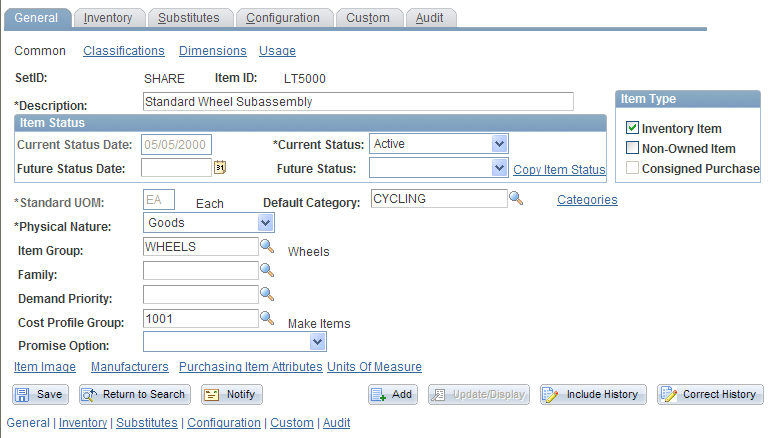
Define Item - General: Common Page
Use the Define Item - General: Common page (INV_ITEMS_DEFIN1) to define general item information at the setID level.
Image: Define Item - General: Common page
This example illustrates the fields and controls on the Define Item - General: Common page. You can find definitions for the fields and controls later on this page.
Define Item - General: Classifications Page
Use the Define Item - General: Classifications page (INV_ITEMS_DEFIN4) to define additional item attributes.
Define Item - General: Dimensions Page
Use the Define Item - General: Dimensions page (INV_ITEMS_DEFIN3) to define item dimensions such as weight, volume, size and color.
Define Item - General: Usage Page
Use the Define Item - General: Usage page (INV_ITEMS_DEFIN8) to define material usage attributes for an item at the setID level.
Image: Define Item - General: Usage page
This example illustrates the fields and controls on the Define Item - General: Usage page. You can find definitions for the fields and controls later on this page.
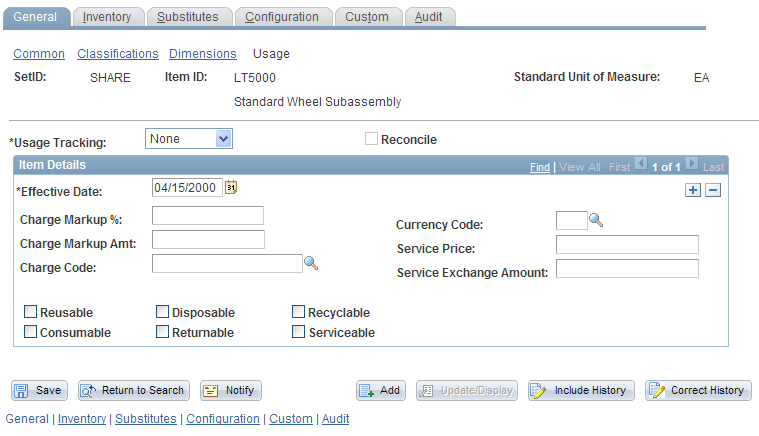
Note: The values that you enter on this page become default values on the Define Business Unit Item - General: Usage page.
Define Item - Inventory: Tracking/Description Page
Use the Define Item - Inventory: Tracking/Description page (INV_ITEMS_DEFIN2) to establish tracking item and lot-control attributes.
Image: Define Item - Inventory: Tracking/Description page
This example illustrates the fields and controls on the Define Item - Inventory: Tracking/Description page. You can find definitions for the fields and controls later on this page.

The values for Lot Control, Serial Control, and Ship Serial Control are entered as default values from the Item Default Values page.
Warning! After lot, serial, ship-serial, and stage-date control flags are set and you begin to put stock away, these fields are unavailable for entry—you cannot modify them.
Note: The shelf life, availability lead time, and retest lead time are default values for the business unit level. You can modify these values on the Define Business Unit Item - Inventory: Shipping/Handling page.
Define Item - Inventory: Shipping/Handling Page
Use the Define Item - Inventory: Shipping/Handling page (INV_ITEMS_DEFIN5) to establish item shipping and handling attributes.
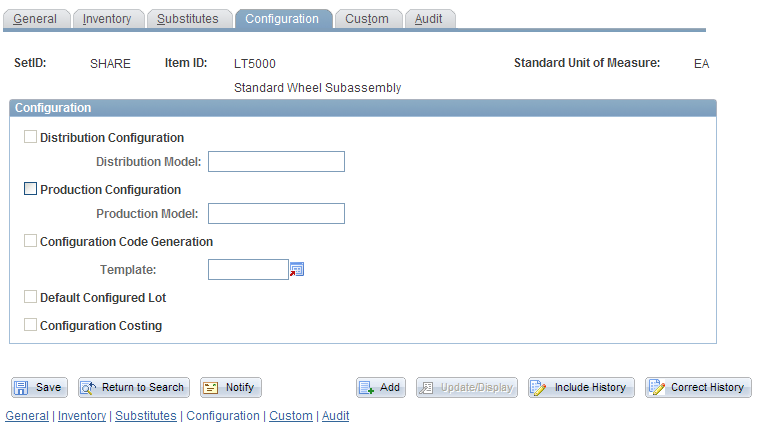
Define Item - Configuration Page
Use the Define Item - Configuration page (INV_ITEMS_DEFIN6) to define configuration attributes for an item if you are using PeopleSoft Product Configurator.
Image: Define Item - Configuration page
This example illustrates the fields and controls on the Define Item - Configuration page. You can find definitions for the fields and controls later on this page.