
Defining Detail Calendars
To define Detail Calendars, use the Detail Calendar component (DETAIL_CALENDAR).
This section discusses how to:
Enter detail calendar periods.
Enter depreciation detail periods.
Pages Used to Define Detail Calendars
|
Page Name |
Definition Name |
Navigation |
Usage |
|---|---|---|---|
|
Calendar Periods |
DETAIL_CALENDAR1 |
|
Detail calendars, each identified by a unique alphanumeric code, define how many accounting periods are in your fiscal year and the beginning and ending dates for each period. They determine the accounting period to which you post journal entries and other transactions. |
|
Depreciation |
DETAIL_CALENDAR2 |
|
Set up depreciation allocations per calendar period. |
Calendar Periods Page
Use the Calendar Periods page (DETAIL_CALENDAR1) to define detail calendars, each identified by a unique alphanumeric code, and specify how many accounting periods are in your fiscal year and the beginning and ending dates for each period.
They determine the accounting period to which you post journal entries and other transactions.
Image: Calendar Periods page (1 of 2)
This example illustrates the fields and controls on the Calendar Periods page (1 of 2). You can find definitions for the fields and controls later on this page.
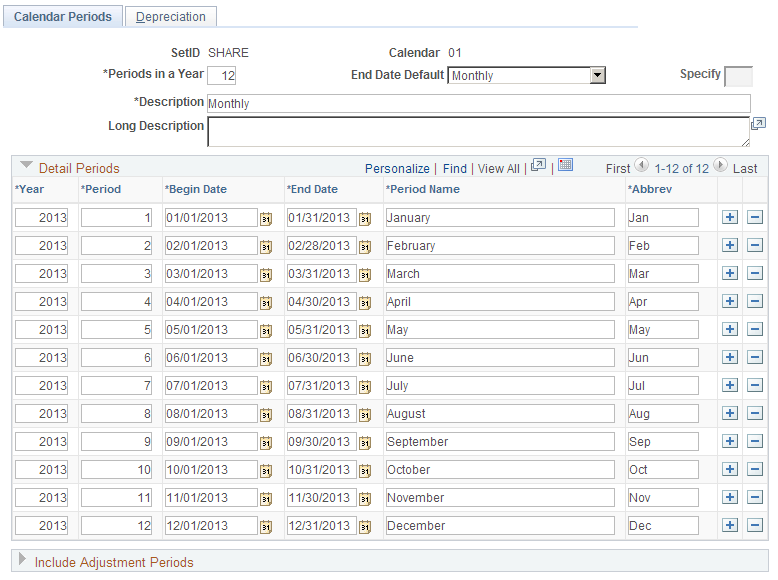
Image: Calendar Periods page (2 of 2)
This example illustrates the fields and controls on the Calendar Periods page (2 of 2). You can find definitions for the fields and controls later on this page.

You can define a detail calendar from scratch, or you can use a base calendar, defined in Calendar Builder, to create a detail calendar and further define it using the Calendar Periods page.
Calendar Periods - Depreciation Page
Use the Calendar Periods - Depreciation page (DETAIL_CALENDAR2) to set up depreciation allocations per calendar period.
Image: Depreciation page
This example illustrates the fields and controls on the Depreciation page. You can find definitions for the fields and controls later on this page.

Use this page of a detail calendar if you are using Asset Management. In each calendar that you establish, define the number of periods across which to allocate annual depreciation.