
Defining Ledgers for a Business Unit
Because ledgers and calendars are stored in tables, you can share them with business units. This enables business units to share common ledger definitions while retaining their own unique calendars and closing schedules.
To define ledgers for a business unit, use the Ledgers For A Unit component (BUSINESS_UNIT_LED). Use the EM_BUS_UNIT_LED component interface to load data into the tables for this component.
This section discusses how to:
Define ledgers for a business unit.
Define journal edit error options for a ledger group.
Define default currency options for a ledger.
Define default journal post options for a ledger.
Define default approval options for a ledger.
Define default Commitment Control ledger options.
Note: Deselect all check boxes on the Installation Options - Products page for products that you have not licensed and are not using. As delivered, all check boxes for all products whether licensed or unlicensed are selected on the Products page and this can result in unnecessary setup for the unlicensed products. For example, if General Ledger is selected on the Products page and you have not licensed the product, there are fields that are only applicable to General Ledger that are then available for input of values on the ledgers for a unit page.
Pages Used to Define Ledgers for a Business Unit
|
Page Name |
Definition Name |
Navigation |
Usage |
|---|---|---|---|
|
Ledgers For A Unit - Definition |
BUSINESS_UNIT_LED1 |
Set Up Financials/Supply Chain, Business Unit Related, General Ledger, Ledgers For A Unit, Definition |
Identifies the detail ledgers, ledger groups, and calendars used by this business unit and identifies specific characteristics for each ledger. |
|
Open Period |
OPEN_PERIOD_SINGLE |
Select a detail ledger, and click the Update Open Periods link. |
Identify open periods and adjustment periods based on the ledger group and transaction type. |
|
Include Account Types posted to ADB Ledger |
BU_LED_ADBACCT_SEC |
Click the Filter link on the Ledgers For A Unit - Definition page. |
Select account types to post to the ADB ledger. |
|
Ledgers For A Unit - Journal Edit Options |
BUSINESS_UNIT_LED2 |
Set Up Financials/Supply Chain, Business Unit Related, General Ledger, Ledgers For A Unit, Journal Edit Options |
Define how the system processes journal error processing for the ledger. |
|
Balance Suspense ChartFields |
BUL_JE_BS_CFS_SEC |
Click the Balance Suspense ChartFields link on the Ledgers For A Unit - Journal Edit Options page. |
If you select Suspend for journal balance error, specify the suspense account for journal balance errors here. |
|
Edit Suspense ChartFields |
BUL_JE_ES_CFS_SEC |
Click the Edit Suspense ChartFields link on the Ledgers For A Unit - Journal Edit Options page. |
If you select Suspend for journal edit error, specify the suspense account for journal edit errors here. |
|
Amount Suspense ChartFields |
BUL_JE_AS_CFS_SEC |
Click the Amount Suspense ChartFields link on the Ledgers For A Unit - Journal Edit Options page. |
If you select Suspend for journal edit error, specify the suspense account for journal amount errors. |
|
Ledgers For A Unit - Currency Options |
BUSINESS_UNIT_LED3 |
Set Up Financials/Supply Chain, Business Unit Related, General Ledger, Ledgers For A Unit, Currency Options |
Specifies the currency default options for the specified ledger for this business unit. |
|
Ledgers For A Unit - Journal Post Options |
BUSINESS_UNIT_LED6 |
Set Up Financials/Supply Chain, Business Unit Related, General Ledger, Ledgers For A Unit, Journal Post Options |
Specifies journal post options for posting and unposting the journals that apply to the specified ledger. |
|
Ledgers For A Unit - Approval Options |
BUSINESS_UNIT_LED4 |
Set Up Financials/Supply Chain, Business Unit Related, General Ledger, Ledgers For A Unit, Approval Options |
Specifies default journal approval options for the specified ledger. |
|
Ledgers For A Unit - Commitment Control Options |
BUSINESS_UNIT_LED5 |
Set Up Financials/Supply Chain, Business Unit Related, General Ledger, Ledgers For A Unit, Commitment Control Options |
Specifies the default ledger options for the specified Commitment Control ledger. |
Ledgers For A Unit - Definition Page
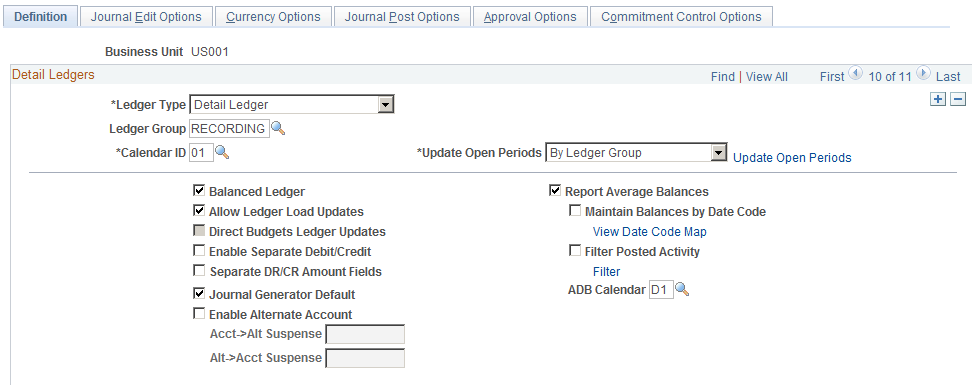
Use the Ledgers For A Unit - Definition page (BUSINESS_UNIT_LED1) to identify the detail ledgers, ledger groups, and calendars used by this business unit and identify specific characteristics for each ledger.
Image: Ledgers For A Unit - Definition page
This example illustrates the fields and controls on the Ledgers For A Unit - Definition page. You can find definitions for the fields and controls later on this page.
Warning! While you can also use the Ledgers For A Unit - Definition page to remove ledgers for a given business unit, you cannot remove a ledger if journal entries have already been posted for that business unit.
Ledgers For A Unit - Journal Edit Options Page
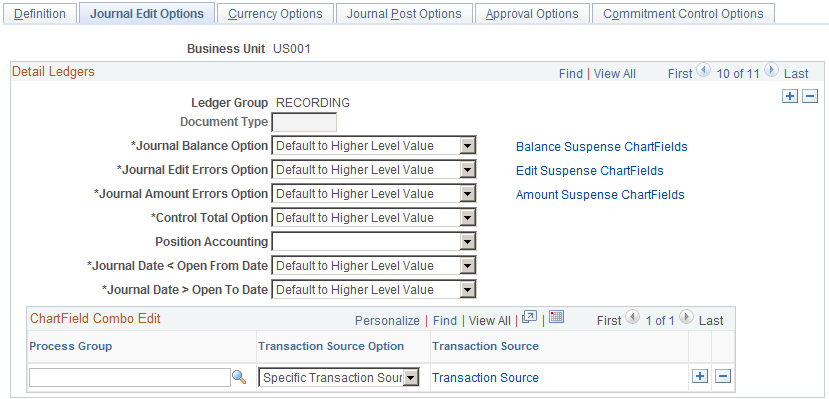
Use the Ledgers For A Unit - Journal Edit Options page (BUSINESS_UNIT_LED2) to define how the system processes journal error processing for the ledger.
Image: Ledgers For A Unit - Journal Edit Options page
This example illustrates the fields and controls on the Ledgers For A Unit - Journal Edit Options page. You can find definitions for the fields and controls later on this page.
Note: If you define error processing at the ledger level, it overrides all error handling that you specify at the business unit level for journals using only the selected ledger.
Defining Currency Options for a Ledger
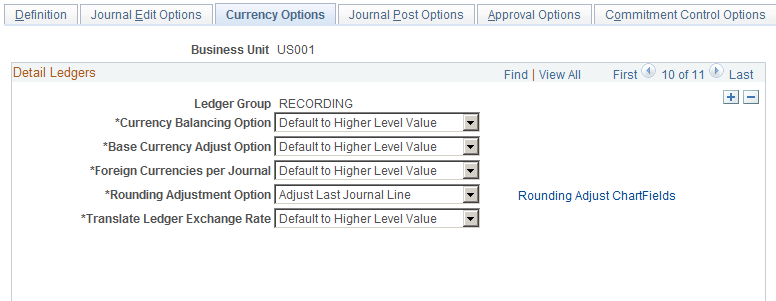
Use the Ledgers For A Unit - Currency Options page (BUSINESS_UNIT_LED3) to specify the currency default options for the specified ledger for this business unit.
Image: Ledgers For A Unit - Currency Options page
This example illustrates the fields and controls on the Ledgers For A Unit - Currency Options page. You can find definitions for the fields and controls later on this page.
Ledgers For A Unit - Journal Post Options Page
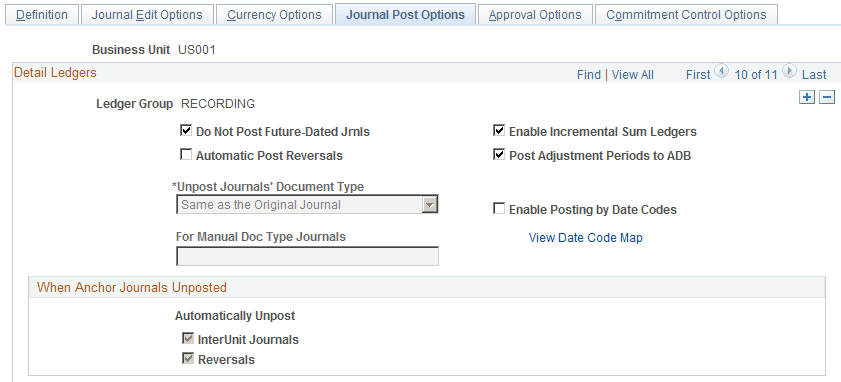
Use the Ledgers For A Unit - Journal Post Options page (BUSINESS_UNIT_LED6) to specify journal post options for posting and unposting the journals that apply to the specified ledger.
Image: Ledgers For A Unit - Journal Post Options page
This example illustrates the fields and controls on the Ledgers For A Unit - Journal Post Options page. You can find definitions for the fields and controls later on this page.
Ledgers For A Unit - Approval Options Page
Use the Ledgers For A Unit - Approval Options page (BUSINESS_UNIT_LED4) to specify default journal approval options for the specified ledger.
Image: Ledgers For A Unit - Approval Options page
This example illustrates the fields and controls on the Ledgers For A Unit - Approval Options page. You can find definitions for the fields and controls later on this page.
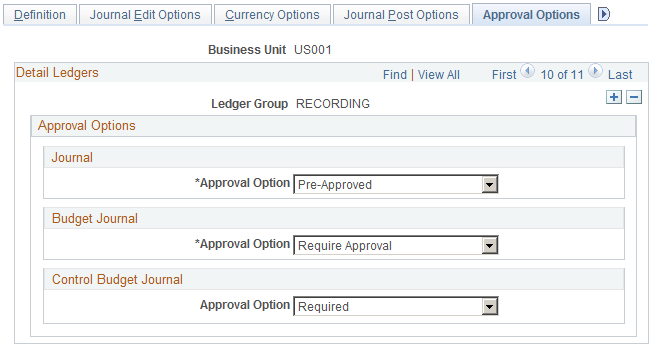
You have the option to use either the Virtual Approver method or Approval Framework method for the journal approval and standard budget journal approval processes. You select the approval methodology for the respective journal approval on the Installation Options - General Ledger page.
See Installation Options - General Ledger Page.
The selection choices on the Approval Options page depend upon which approval methodology that you select to use on the Installation Options - General Ledger page. If you select the Virtual Approver method, the Business Process Name and Approval Rule Set fields appear on the page. When using the Approval Framework method, these fields are not visible, since the Approval Framework provides its own Business Process and Approval Rule Set to communicate with PeopleTools.
See Understanding Configurable Workflow.
SeeSetting Up Journal Entry Approval in PeopleSoft Workflow
Note: You can define the approval options at the business unit, ledger group or source level. When you define approval options at the source level, they override any approval handling that you specified at the business unit or ledger group levels for journals using that source only.
Control Budget Journal
Enable the Approval Framework approval workflow process for Commitment Control budget journals at the ledger level, You can also define the approval options at the business unit or source level. Options are:
Default to Higher Level: Select to use the approval option that you define on the business unit General Ledger Definition - Approval Options page.
Not Required: (default) Select if you do not want to enable approval workflow for Commitment Control budget journals at the ledger level.
Required: Select to enable approval workflow for Commitment Control budget journals at the ledger level.
For more information, see Note ID 1369486.1 on Oracle's My Oracle Support (https://support.oracle.com).
Ledgers For A Unit - Commitment Control Ledger Options Page
Use the Ledgers For A Unit - Commitment Control Options page (BUSINESS_UNIT_LED5) to specify the default ledger options for the specified Commitment Control ledger.
Image: Ledgers For A Unit - Commitment Control Options page
This example illustrates the fields and controls on the Ledgers For A Unit - Commitment Control Options page. You can find definitions for the fields and controls later on this page.
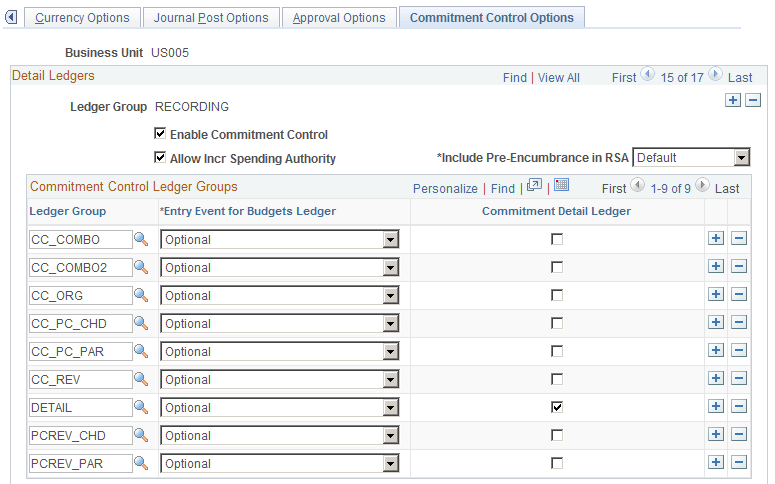
Use this page to enable Commitment Control for the ledger group and associate commitment control ledger groups with the ledger group. This page is described in the PeopleSoft Commitment Control documentation.