
Defining Ship To Locations
To define ship-to codes, use the Ship To Codes component (SHIP_TO_CODES).
This section provides an overview of defining ship-to locations and discusses how to:
Create ship to locations.
Specify ship to location sales and use tax defaults and exceptions.
Specify ship to location supplier order locations.
Pages Used to Define Ship To Locations
|
Page Name |
Definition Name |
Navigation |
Usage |
|---|---|---|---|
|
Ship To Locations |
SHIPTO_HDR |
|
Create ship to location IDs that designate existing location IDs as places where you receive goods from suppliers. You must specify an existing location ID as the ship to ID. |
|
Sales/Use Tax |
SUT_DFLT_TBL |
Click the Sales/Use Tax link on the Ship To Locations page. |
Specify default sales and use tax information for each ship to location. The sales and use tax rates are normally based on the final destination of the shipment (the ship to location). Indicate exceptions to the normal tax rate for each ship to location, and indicate whether the tax exception status is Active or Inactive. |
|
ShipTo Supplier Order Location |
SHIPTO_VNDR_LOC |
Click the Supplier Order Location link on the Ship To Locations page. |
Specify a supplier order location for a ship to location, and indicate the applicable sales and use tax for the supplier order location. |
Understanding Ship To Locations
When you define the general options for the PeopleSoft system, you set up location definitions to store address information for the various locations of the organization. You can identify these locations as ship to locations, which are places where you receive goods from suppliers.
You can assign ship to locations to PeopleSoft Purchasing requesters and buyers to create default shipping information for requisition and purchase order schedules. This default information passes through the system when you create transaction documents. For example, the system passes the requisition ship to location to the purchase order schedules when the requisition is sourced.
You can also update the PeopleSoft Purchasing user preferences to create default shipping information for requisitions and purchase orders.
In the PeopleSoft Purchasing system, the ship to location carries the sales and use tax (SUT) information, specifying how sales and use taxes are handled for items shipped to that location. Normally, the SUT is based on the ship to location or the ultimate use of the items. However, different geographic locations have different SUT regulations. For this reason, different locations and different items can be taxed at varying rates. PeopleSoft Purchasing enables you to indicate tax exception information for each ship to location. You can also specify various combinations of ultimate use, supplier location, item category, and item ID data that are either taxable or nontaxable. When you create a purchase order or voucher, the system uses the SUT default information to determine the appropriate tax rate. The system uses the data that most closely matches the purchase order schedule line or voucher line.
The ship to location also carries supplier order location information so that you can associate specific supplier locations with each ship to location. This enables you to order goods from the closest or preferred supplier location. For example, suppose that most of the offices are located on the East Coast of the U.S. You normally order from the supplier's New York location, but you also have one office on the West Coast. For this office, you might want to place the orders with the supplier's San Francisco location. To do this, specify a supplier order location for the San Francisco office.
Note: In some cases, suppliers support only a single ship to location per purchase order. The PeopleSoft Purchasing system allows you to specify—at the business unit, supplier, or individual purchase order level—whether a purchase order may have multiple ship to locations or only one ship to location. The option to support one ship to location on a purchase order directs the Create Purchase Orders Application Engine process (PO_CREATE) or the PO Calculations Application Engine process (PO_CALC) to either split purchase orders by ship to location or allow only one ship to location on online purchase orders.
Note: When you need purchased goods drop-shipped to a one-time use site that is not one of the existing locations, you define a one-time ship-to address in either the requisition or the purchase order using the One Time Address Default page (header-level) and the One Time Address page (schedule-level). Because you use this address only once, you do not need to create a new location or ship-to location.
Ship To Locations Page
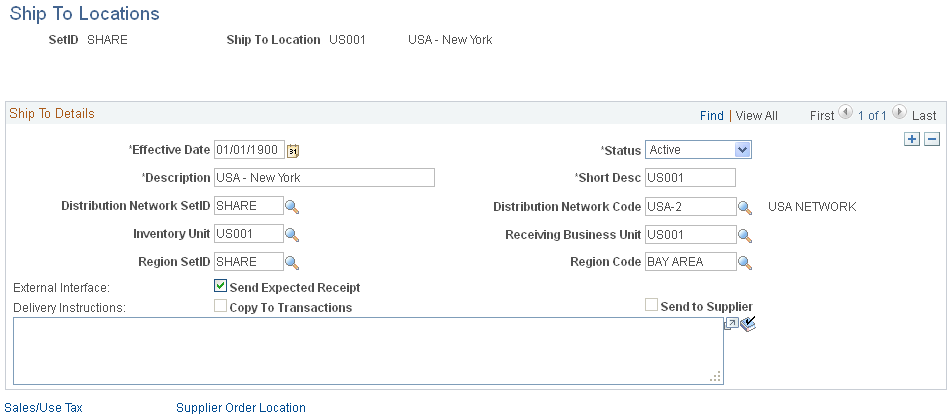
Use the Ship To Locations page (SHIPTO_HDR) to create ship to location IDs that designate existing location IDs as places where you receive goods from suppliers.
You must specify an existing location ID as the ship to ID.
Image: Ship To Locations page
This example illustrates the fields and controls on the Ship To Locations page. You can find definitions for the fields and controls later on this page.
| GLN (global location number) |
Displays, if available, the global location number that is specified for the corresponding ship to location on the Location Detail page. |
Ship To Details
Sales/Use Tax Page
Use the Sales/Use Tax page (SUT_DFLT_TBL) to specify default sales and use tax information for each ship to location.
The sales and use tax rates are normally based on the final destination of the shipment (the ship to location).Indicate exceptions to the normal tax rate for each ship to location, and indicate whether the tax exception status is Active or Inactive.
Tax Exception
Calculation Parameters
Calculation parameters are applicable only to Taxware and Vertex, providing these third-party tax applications with tax calculation rules for the ship to location. These applications use the GeoCode for the ship to location to apply these rules to the appropriate tax calculation algorithms. They may also use the GeoCode for the order acceptance location, ship from location, and (Taxware only), the place of order origin.
| Include VAT |
Indicates that the VAT amount must be taxed and added to the net extended amount before calculating SUT. This field is informational only. Tax applicability of VAT amounts is determined as part of VAT setup. See Understanding VAT. |
| Include Freight |
Indicates that the freight amount must be taxed and added to the net extended amount before calculating SUT. This option is used for Taxware only. |
| Include Discount |
Indicates that PeopleSoft calculates any applicable discount and passes the discount amount to Taxware or Vertex. |
| Include Misc Charges (include miscellaneous charges) |
Indicates that any other charges must be taxed and added to the net extended amount before calculating SUT. |
Sales/Use Tax Info
When creating sales and use tax information in this section of the page, you must first create at least one row that will represent the default sales and use tax information for the ship to location. Each ship to location has to have either a row that is Taxable with no qualifiers (ultimate use code, category, item ID, supplier ID, and supplier location) or a row that is Exempt with no qualifiers. After you create the default sales and use tax information you can then create additional sales and use tax information with the specific qualifiers (ultimate use code, category, item ID, supplier ID, and supplier location). The system will use the default sales and use tax information if no specific sales and use tax information exists for a ultimate use code, category, item, supplier, or supplier location.
Use these fields to specify further tax information for the ship to location. The value in the Sales/Use Tax Applicability field must match the value in the Exception Type field as follows:
If the exception type is Direct Pay, then SUT applicability must be Direct Pay.
If the exception type is Exempt, then SUT applicability must be Exempt.
If the exception type is None, then SUT applicability must be Taxable.
These rules apply to PeopleSoft, Taxware, and Vertex calculations. All values are copied to the payables voucher.
ShipTo Supplier Order Location Page
Supplier Order Location