
Defining Resource Requirements for a Work Order Task
To define work order task requirements use the Work Order (WM_WO) component.
This section discusses how to:
Define labor resource requirements for a work order task.
Modify the labor qualifications profile.
Specify inventory resource requirements for a work order task.
Identify purchase and on-hand resource requirements for a work order task.
Define tool resources for a work order task.
Pages Used to Define Resource Requirements for a Work Order Task
|
Page Name |
Definition Name |
Navigation |
Usage |
|---|---|---|---|
|
Requirements |
WM_WO_TASK_RQMT |
|
Set up a work order task and identify resource requirements. |
|
Labor Qualifications |
WM_TASKLBRQUAL_SEC |
Click the Qualifications View link on the Labor Requirements - Details grid. |
Review and modify the qualification profile set up for a craft specified as a requirement in a work order task. |
|
Delivery Instructions |
WM_WO_DELIVERY_SEC |
Click the Delivery Instructions link. |
Enter the instructions for how and where you want an inventory item delivered in order to perform a work order task. |
|
Copy from Equipment Parts List |
WM_EPL_SELECT_SEC |
Click the Equipment Parts List button above the Inventory Requirements grid on the Requirements page.
|
Select items or materials from one or more Equipment Parts List templates to use as resources in a work order task. |
|
Add to Equipment Parts List |
WM_EPL_UPDATE_SEC |
|
Add inventory items and purchased non-inventory and open description items to an equipment parts list (EPL). |
|
Work Order Supplemental Data |
WM_TSK_SD_SEC |
Click the Supplemental Data link in the Requirements page to display the Work Order Supplemental Data page. |
Displays any supplemental data that has been set up for this work order task. |
|
Work Order Task Notes |
WM_TSK_NOTES |
Click the Notes link in the Requirements page to display the Work Order Task Notes page. |
Add or review any notes related to this work order task. |
Labor Requirements in the Requirements Page
Use the Requirements page (WM_WO_TASK_RQMT) to set up a work order task and identify resource requirements.
Image: Requirements page - Labor Requirements - Details tab
This example illustrates the fields and controls on the Requirements page - Labor Requirements - Details tab. You can find definitions for the fields and controls later on this page.

Labor Requirements - Details
Select the Labor Requirements - Details tab.
Labor Requirements - Timetable
Select the Labor Requirements - Timetable tab.
Image: Requirements page - Labor Requirements Timetable tab
This example illustrates the fields and controls on the Requirements page - Labor Requirements Timetable tab. You can find definitions for the fields and controls later on this page.

Labor Requirements - Estimated Cost
Image: Requirements page - Labor Requirements Estimated Cost tab
This example illustrates the fields and controls on the Requirements page - Labor Requirements Estimated Cost tab. You can find definitions for the fields and controls later on this page.

| Cost Rate and Billing Rate |
View or modify the default rates. The default values are derived from the work order business unit or shop. |
| Billing Amount and Cost |
Click the Save button for the system to calculate these amounts by multiplying the total number of hours for the task times the rates and the number (quantity) of craft resources required. This calculation is used to determine whether the labor requirements are necessary. See Understanding Overall System Setup Parameters for PeopleSoft Maintenance Management. See Work Order Business Unit Defaults and Default Hierarchies. |
| Currency |
View the default currency. The default value is derived from the currency specified in the work order business unit. |
Labor Requirements - Crew Assignments
Select the Labor Assignments - Crew Assignments tab.
Image: Requirements page - Labor Requirements Crew Assignments tab
This example illustrates the fields and controls on the Requirements page - Labor Requirements Crew Assignments tab. You can find definitions for the fields and controls later on this page.

Labor Requirements - Crew Timetable
Select the Labor Assignments - Crew Timetable tab.
Image: Requirements page - Labor Requirements Crew Timetable tab
This example illustrates the fields and controls on the Requirements page - Labor Requirements Crew Timetable tab. You can find definitions for the fields and controls later on this page.

Labor Qualifications Page
Use the Labor Qualifications page (WM_TASKLBRQUAL_SEC) to review and modify the qualification profile set up for a craft specified as a requirement in a work order task.
Image: Labor Qualifications page
This example illustrates the fields and controls on the Labor Qualifications page. You can find definitions for the fields and controls later on this page.

The system automatically copies the qualification profile associated with a selected craft. You can add and modify the competencies and qualifications associated with this profile. You can also search for and copy another profile's attributes using the following options.
See Understanding Qualification and Employee Data in PeopleSoft Maintenance Management.
Inventory Requirements in the Requirements Page
Use the Inventory Requirements page to view the inventory requirements.
Image: Requirements page - Inventory Requirements Details tab
This example illustrates the fields and controls on the Requirements page - Inventory Requirements Details tab. You can find definitions for the fields and controls later on this page.

Inventory Requirements - Details
Select the Inventory Requirements - Details tab.
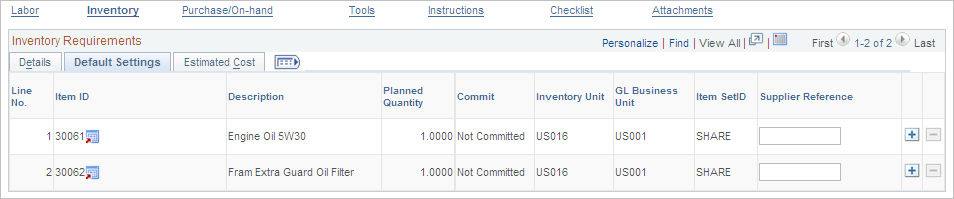
Inventory Requirements - Default Settings
Select the Inventory Requirements - Default Setting tab.
Image: Requirements page - Inventory Requirements Default Settings tab
This example illustrates the fields and controls on the Requirements page - Inventory Requirements Default Settings tab. You can find definitions for the fields and controls later on this page.
Inventory Requirements - Estimated Cost
Select the Inventory Requirements - Estimated Cost tab.
Image: Requirements page - Inventory Requirements Estimated Cost tab
This example illustrates the fields and controls on the Requirements page - Inventory Requirements Estimated Cost tab. You can find definitions for the fields and controls later on this page.

Purchase/On-Hand Requirements in the Requirements Page
Use the Purchase/On-Hand Requirements in the Requirements page .to view the purchase/on hand requirements.
Image: Requirements page - Purchase/On-Hand Requirements Details tab
This example illustrates the fields and controls on the Requirements page - Purchase/On-Hand Requirements Details tab. You can find definitions for the fields and controls later on this page.

Purchase/On-Hand Requirements - Details
Select the Purchase/On-Hand Requirements - Details tab.
Purchase/On-Hand Requirements - Default Settings
Select the Purchase/On-Hand Requirements - Default Settings tab.
Image: Requirements page - Purchase/On-Hand Requirements Default Settings tab
This example illustrates the fields and controls on the Requirements page - Purchase/On-Hand Requirements Default Settings tab. You can find definitions for the fields and controls later on this page.

| GL Unit |
Displays GL business unit value associated with the work order business unit. |
| Item SetID |
Displays default SetID value based on the work order business unit associated with the item table. |
Purchase/On-Hand Requirements - Estimated Cost
Select the Purchase/On-Hand Requirements - Estimated Cost tab.
Image: Requirements page - Purchase/On-Hand Estimated Cost tab
This example illustrates the fields and controls on the Requirements page - Purchase/On-Hand Estimated Cost tab. You can find definitions for the fields and controls later on this page.

Tool Requirements tabs Page
Access the Tool Requirements tabs. (Click the Tools link in the Requirements page to display the Tool Requirements tabs.)
Tool Requirements - Details
Select the Details tab.
Image: Requirements page - Tool Requirements Details tab
This example illustrates the fields and controls on the Requirements page - Tool Requirements Details tab. You can find definitions for the fields and controls later on this page.

Tool Requirements - Timetable
Select the Tool Requirements - Timetable tab.
Image: Requirements page - Tool Requirements, Timetable tab
This example illustrates the fields and controls on the Requirements page - Tool Requirements, Timetable tab. You can find definitions for the fields and controls later on this page.

Tool Requirements - Estimated Cost
Select the Tool Requirements - Estimated Cost tab.
Image: Requirements page - Tool Requirements, Estimated Cost tab
This example illustrates the fields and controls on the Requirements page - Tool Requirements, Estimated Cost tab. You can find definitions for the fields and controls later on this page.
