When a report package is ready for review, an Oracle Enterprise Performance Reporting Cloud Service web interface message notifies reviewers that they can begin their work.
For example:
Review is required for Management Reports - Review Cycle 2
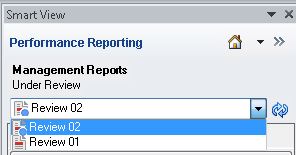
In this example, “Review Cycle 2” signifies that you will select “Review 02” in the Content Selector in Smart View.
 To select a review instance in Smart View:
In the Smart View Panel, verify that the required review instance is selected in the Content Selector.
When you first open a report package, the active review instance is selected by default.
In Figure 74, Example of Review Instances in the Content Selector, “Review 01” and “Review 02” are the available options. The dot next to “Review 02” signifies that this review instance is active and ready for your review comments. Notice that there is no dot next to “Review 01.” This signifies that the review instance is closed to new review comments; however, you may open “Review 01” to view it.
If not already selected, select the required review instance.
When you select a review instance, your screen should resemble Figure 73, A Portion of an Example Review Instance in Smart View.
You can now begin working with review comments in the review instance.