You can edit a thread entry when it is the last entry in the thread that you posted.
You can delete a comment that you posted. You can also delete a comment thread entry that you posted when it is the last entry in the thread.
 To edit or delete a comment:
From the comment list in the Smart View Panel, click a comment that you started.
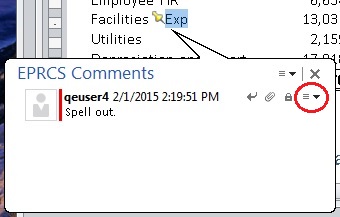
Click the drop-down list arrow as shown in Figure 106, Comment Text Box with Drop-Down List Circled, and then select Modify.
Note:
You can add URLs, text formatting, and attachments to comments. See Attaching Supporting Files and Customizing Comment Text.
To delete a comment, select either the comment or the last entry in a comment thread, then click the drop-down list arrow shown in Figure 106, Comment Text Box with Drop-Down List Circled for the comment or the thread entry, and then select Delete.
Note:
You can only delete the last entry in a thread. Deleting the last entry does not delete the entire comment thread.
To cancel modifications, click the Cancel or Close button,
 in the EPRCS Comments text box.
 , to update the comment.