EZTask - Task Sheet - Task Sheet Details - Actions
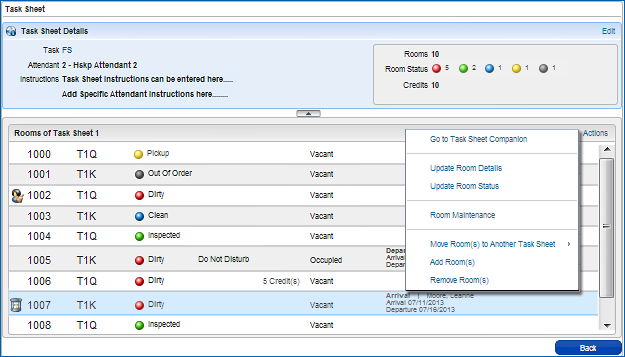
Hover over the items in the Actions menu in the image below for more information on each action.
Actions
You can perform the following actions on the individual task sheets. From either the Summary or Detail view, select the Task Sheet that you want to manage, and then select the Actions link.
To enable the actions that are room specific (i.e.Update Room Details, Update Room Status, Room Maintenance,Move Room(s) to Another Task Sheet, Remove Room(s)), first select the record containing that room.
Action... |
Description... |
Go to Task Sheet Companion |
Opens the Task Companion. |
Update Room Details |
Updates the Credits and Instructions for the selected room(s). |
Update Room Status |
Updates the Status for the selected room(s). Option is not available for Out of Order / Out of Service rooms. |
Room Maintenance |
Resolve, Edit, Delete, or Create a New Maintenance request for the selected room. Note that only one room at a time can be selected for this option to be available. |
Move Room(s) to Another Task Sheet |
Option to move the selected room(s) to another existing Task Sheet. |
Add Room(s) |
Option to add room(s) to the selected Task Sheet. Note that the same room can appear on multiple task sheets. |
Remove Room(s) |
Option to remove the selected room(s) from this Task Sheet. |
 Quick Links