Batch Deposit
 Prerequisites
 PARAMETERS
Credit Bill
Generate Credit Bills for Folios
Sell Currency
Ability to sell Foreign Currency
Restrict Cash/Check Payment Reversal
When Active, users will not be allowed to make negative cash or check payments
Foreign Currency Codes
- Ability to handle Foreign Currency Payments, perform Currency Exchanges, Configure Foreign Currencies, use the Currency Calculator and Quote Rates in different currencies
Batch Posting
Activate Batch Postings functionality
ROLES / TASK PERMISSIONS
Commissions
 Folio History
Receipt History
Post It
Open Cashiers
Batch Deposit allows you to process multiple reservation deposits in a single batch. It submits each credit card in the batch for payment authorization. After receiving authorization, the card is charged for the reservation.
|
|
|
|
|
|
|
Currently there are no videos for this topic.
|
|
|
|
Searching for Batch Deposit Reservations
Search locates reservations held by deposits. You can search by property alone or in combination with other search fields. Use Search Options to add or remove search fields from use.
You can sort the display of reservations by the following:
- All - Displays all reservations (with and without required deposits).
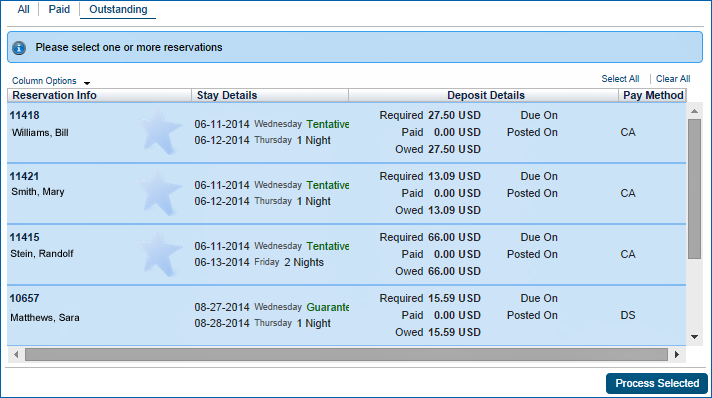
- Paid - Displays reservations with credit card deposit amounts partially authorized.
- Outstanding - Displays reservations requiring authorizations on full amounts owed.
Processing Batch Deposits
- Select one or more reservations showing deposits owed.
- Select Process Selected.
- The Batch Deposit Status screen displays. A status message appears for each reservation processed.


Copyright © 2015, Oracle and/or its affiliates. All rights reserved.
Legal NoticesVersion 9.0.1.20


 Screen Details
 Videos and Tutorials


 FAQs
FAQs