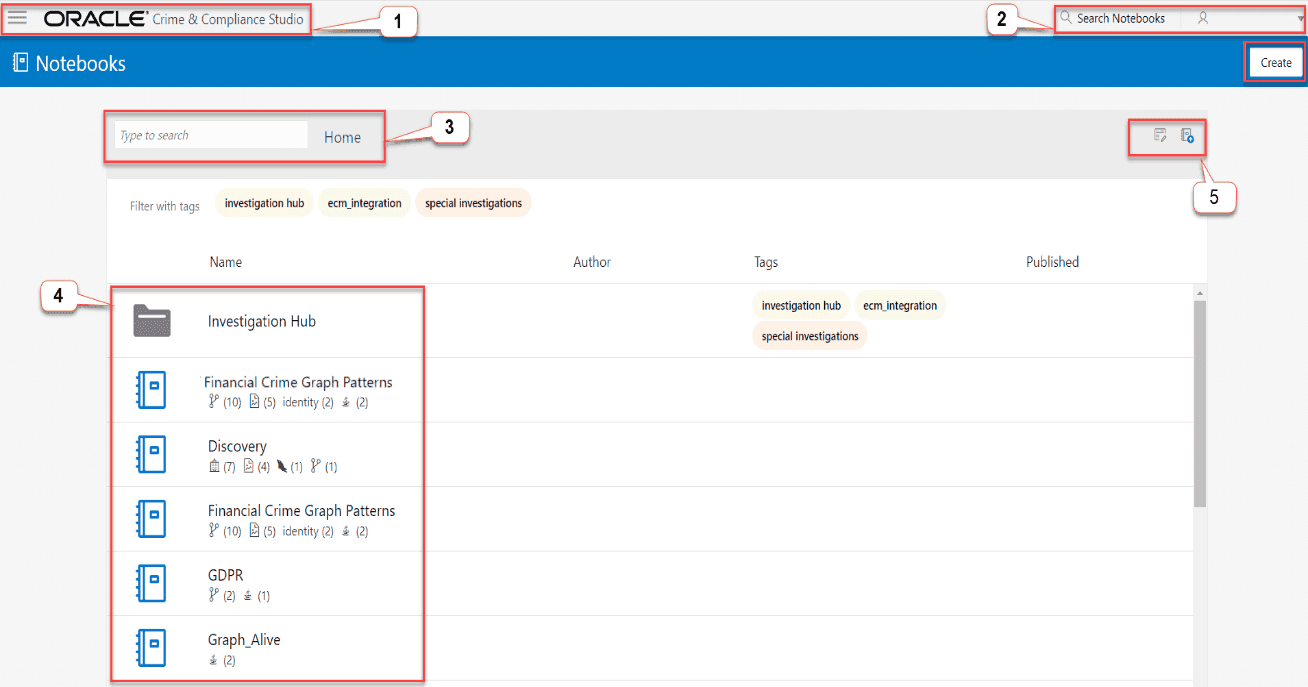
The FCC Studio Workspace displays the Out of the Box Notebooks for your financial use cases and analysis. It also provides you functionalities such as, Import, Export, Create, and Delete Notebooks.
In the Workspace, you can specify the details to filter and search for Notebooks and then perform the related actions such as, Import, Export, Create, and Delete.
Figure 4: FCC Studio Workspace
The following table describes the call-outs that are illustrated in the Workspace figure.
Table 1: Out-of-the-Box Notebooks in FCC Studio
Call-outs |
Description |
1 |
Home and Menu Navigation icon: When you click the Home and Menu Navigation options, the available menu items are listed as follows: · Graphs · Tasks · Ruleset NOTE: If you are not an Administration user, you will not have the items such as, Interpreters, Tasks, Permission, and Ruleset. |
2 |
Search Notebooks: To quickly search your notebook, specify the details in the Search Notebooks field. For more information, see Searching your Notebook on the Workspace. |
3 |
Filter Notebook: You can do a quick filter and search your notebook that are available in the FCC Studio Workspace. For more information, see Filtering your Notebook |
4 |
Notebooks: The list of notebooks that are available out of the box and the notebooks that you have created or imported are also listed. For more information, see About Notebooks. |
5 |
Quick Actions: To quickly do a batch, import, export, and delete operations, you can choose the quick actions in the Workspace. For more information, see Quick Actions |