Known Issues
The following table lists Known Issues and provides the Service Request ID number, a description of the issue, any workaround, when the issue occurred, and when Oracle fixed the issue. This table includes issues from previous releases that either remain open or are resolved in this release. Issues from previous releases that do not appear here do not apply to this release. You can also find information about resolved issues in the Build Notes for this release.
| ID Number | Description | Found In | Fixed In |
|---|---|---|---|
|
30563508 |
When attempting to run "Set Initial Configuration" from the GUI, the system may hang for as long as 5 minutes while displaying the message box shown below. 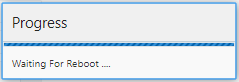
Work-around: If the OECB does not reboot in 5 minutes, refresh the browser, log back into the GUI, and run Set Initial Configuration again. |
PCZ3.2.0 | |
|
29582306 |
The Dial pattern's "Delete All" function
does not work properly, causing system disruption including system reboot.
Work-around: Delete the entire plan using the "Delete Dial Plan" function and recreate your Dial plan with the appropriate Dial patterns. |
PCZ3.2.0 | |
|
30509697 |
An OECB configured with 1 million user
database entries stops accepting new calls for ~90 seconds after performing a
save and activate.
Work-around: Configure systems with user databases that approach 1 million entries during a maintenance window. In addition, Oracle recommends using the OECB's ACLI paste-config command or the automatic CSV import feature to perform uploads of these large user databases and avoid system interruption. |
PCZ3.2.0 | |
|
The GUI does not allow you to edit a user database entry that contains an Address of Record. Work-around: Delete the entry and add it as a new entry with the changes that you want. |
PCZ3.1.0 | PCZ3.1.0p2 and PCZ3.2.0 | |
| No ID number |
If you want to establish a High Availability pair that uses IP addresses other than the defaults, perform the following procedure. Use this procedure regardless of whether the ECBs run on virtual or physical systems. The IP addresses you use must be available and valid in your network. If not, you must directly connect the two ECBs before performing this procedure to establish the HA pair initially. Note
Procedure
|
PCZ3.0.0 | |
| No ID number |
If you see mapping errors after upgrading, for example errors about redundancy or media traffic, you may need to swap interface addresses. Work-around: Compare the MAC addresses on your Virtual Machine
(VM) to those on your hardware. If the addresses are different, you need to
swap interface addresses. Set the addresses on the hardware to match those from
your VM. Use the
swap command from
the ECB command line.
|
PCZ3.0.0 | PCZ3.1.0 |



