This guide assists you to prepare, upload, and load data into the application staging tables. An application specific data is prepared in the .csv (comma-separated value) format in the specified templates. A Pre-authenticated URL provided in the Object Storage helps you to access and upload data (.csv) files onto Object Storage using standard HTTP utility like cURL. Data from the Object Storage is processed into the staging tables by executing the application specific data loading batch using Scheduler Service.
OFS FCCM Cloud Service Data Loading Service Administrator or Administrators prepare, load, and process data into the staging tables.
· Must have knowledge of Extract, Transform, and Load (ETL) process to prepare data in the .csv format.
· Must have knowledge of an HTTP utility such as cURL.
· Must be mapped to the Application Administrator group (SCHEDULERADMINGRP) if intended to execute the data processing jobs from the application.
Before you start a using data loading service, you must understand the following concepts and terminologies:
· Data File: This service expects data in a specific template in the .csv format. If the size of the file exceeds 100MiB, then it is recommended to split the files. This assists you to upload data swiftly into Object Storage. Furthermore, the data loading service expects the files to follow a particular naming convention. For more information on the naming convention of files, file split, tables, and templates, see Preparing Data.
· Object Storage: The OFS FCCM Cloud Service uses Oracle Object Storage to store the .csv files. A PAR URL helps you to access Object Storage. Every Object Storage has buckets and they are containers for storing objects in a compartment within an Object Storage. For example, Standard Storage Bucket and Archive Storage Bucket. The maximum size for an uploaded object is 10 TiB. Object parts must be no larger than 50 GiB.
§ Standard Storage Bucket: The standard storage bucket is used to move and access data daily. This bucket is configured to store data for seven days. After seven days, the data files are archived into an Archive Storage Bucket.
§ Archive Storage Bucket: The Archive storage bucket is used to access data rarely. Data files in this bucket are retained for one year. After one year, the archived data files are auto deleted from this bucket.
· Objects: All data, regardless of the content type are stored as objects in the Object Storage. For example, log files, .csv files, and so on.
· Bucket: A bucket is a logical container that stores objects. Buckets can serve as a grouping mechanism to store related objects together.
· Pre-authenticated requests: A pre-authenticated (PAR) URL request allows you to access Object Storage. Using this PAR URL you can upload data into the Object Storage using the standard HTTP utility like cURL. The PAR URL is refreshed after every seven days. For more information, see Loading Data Files.
· cURL: A standard HTTP utility used to transfer data using URLs.
· Staging Tables: These tables contain business data such as transaction, account, customer details. Staging is the process of preparing business data taken from the business applications before moving into the processing layer.
· Scheduler Service: A service that assists to define jobs for tasks to execute on a scheduled time and date by running the batches/jobs. This service also helps to monitor the jobs. For more information, see Processing Data.
· Batch processing: A mechanism to associate related jobs/ tasks in a group or batch in the Scheduler Service.
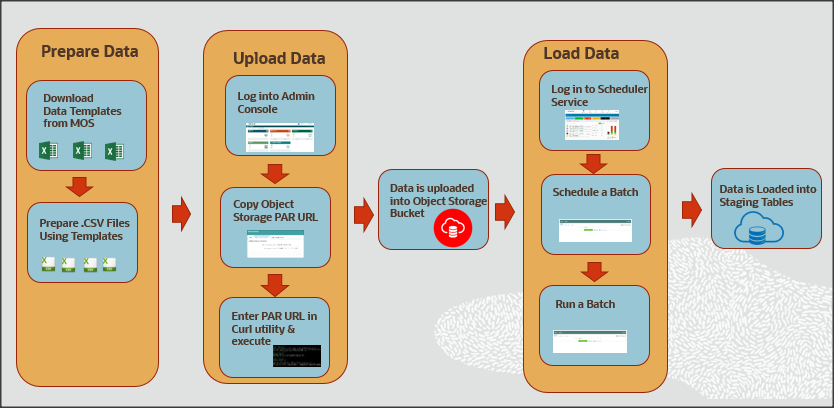
The following illustration provides the workflow of the OFS FCCM Cloud Service Data Loading Service.
Description for the Data Loading workflow
The primary job of a Data Administrator is to prepare, upload, and load data into the application staging tables. As a Data Administrator, you must download specified data templates from the My Oracle Support page. Then export the bank's data into specified templates in the .csv format using the ETL process every day. If the .csv file is bigger than 100MiB, it is recommended to split them into two or more files for swift upload. For example, < filename>_1 .csv, < filename>_2.csv, < filename>_3.csv, and so on. This helps to load data swiftly into the application staging tables.
Log in to Admin Console and go to the Object Storage Standard pane. Copy the Object Storage Standard bucket Pre-authenticated (PAR) URL. Open an HTTP utility such as cURL and enter the data file path, PAR URL, and name of the .csv file and then execute it. Data is uploaded into the Object Storage Standard bucket. After the successful upload of data, a message is displayed as < HTTP/1.1 200 OK> in the cURL utility. The Object Storage Standard bucket stores data for seven days. After seven days, data is auto archived in the Object Storage Archive Bucket. You must note that the PAR URL is refreshed after seven days.
To process data files from the Object Storage Standard Bucket to the staging tables, log in to Scheduler Service, go to Schedule Batch, and then select the AMLDataloading batch. Run the batch based on the requirement, for example, daily, weekly, and so on. Business data is loaded into the application staging tables successfully.
The following table serves as a quick reference to the Data Loading Workflow.
Workflow |
Description |
Prepare the business data in the required format using the specified templates to load into the application staging area. This section also explains the type of data files you are required to create, the size of data files, and the template in which you must provide the data. |
|
After you prepare data in the required templates in the .csv format, you must use the PAR URL that is mentioned in the Object Storage to access the bucket. Enter the details of the .csv file path, PAR URL, and the .csv file name in the HTTP utility such as cURL to upload data files into the Object Storage. The PAR URL, which you use to access the Object Storage is refreshed every seven days. Multiple users can load data into the Object storage concurrently from different locations. You can modify the .csv data files and upload them using the same PAR URL. The modified data files overwrite the previously loaded data files in the Object Storage |
|
Data that is uploaded into the Object Storage is loaded into the application staging tables. The Scheduler Service allows you to process data from the Object Storage to staging tables by scheduling and running batches. |