Siebel on Azure
Unlock Agility: Deploying Siebel CRM on Azure with the Siebel Installer
Summary
The cloud revolution continues, and organizations are increasingly looking to migrate critical enterprise applications like Siebel CRM to flexible and scalable platforms like Microsoft Azure. But how do you navigate this transition smoothly? One effective approach involves leveraging the Siebel Installer for Siebel Cloud Manager (SCM). This method allows you to deploy Siebel CRM directly onto a Kubernetes cluster within Azure. Let's explore how this works and the benefits it offers.
Overview
The cloud revolution continues, and organizations are increasingly looking to migrate critical enterprise applications like Siebel CRM to flexible and scalable platforms like Microsoft Azure. But how do you navigate this transition smoothly? One effective approach involves leveraging the Siebel Installer for Siebel Cloud Manager (SCM). This method allows you to deploy Siebel CRM directly onto a Kubernetes cluster within Azure. Let's explore how this works and the benefits it offers.
Modernizing Siebel with Kubernetes on Azure
This deployment strategy focuses on running Siebel CRM within Azure Kubernetes Service (AKS) using the familiar Siebel Installer for SCM. Here's a high-level look at the process:
- Foundation on AKS: The core idea is to deploy Siebel components within Kubernetes pods managed by AKS.
- Siebel Installer: You utilize the Siebel Installer (Helm-based) for SCM to manage the deployment process.
- Bring Your Own Resources (BYOR): It's important to note that with this method, SCM doesn't manage the underlying Azure infrastructure. You are responsible for provisioning and configuring the necessary Azure resources. This includes setting up networking (VNet, Subnets, NSG), the AKS cluster itself, Load Balancers, Azure Files for Network File Systems, Azure Container Registry (ACR), and the Oracle Database.
- Prerequisites: You'll need specific tools and configurations in place, such as a Linux VM (Ubuntu 20.04+, RHEL 8+, OEL 8.0+) with sufficient disk space, Helm (v3.8+), and Docker or Podman client installed.
Key Benefits of Using the Siebel Installer on Azure
Choosing this deployment method offers several advantages:
- Deployment Flexibility: This approach isn't just for new Siebel deployments ("greenfield"). You can also use it to "lift-and-shift" your existing Siebel CRM installations, complete with customizations, onto a modern, Kubernetes-orchestrated platform in Azure.
- Lower Implementation Effort: Compared to migrating entire Oracle Resource Manager (ORM) stacks from OCI to Azure, using the Siebel Installer directly on AKS generally involves less initial effort.
- Leverages Kubernetes: By deploying on AKS, you benefit from the scalability, resilience, and orchestration capabilities inherent in Kubernetes.
- Modern DevOps Practices: The solution supports integration with GitOps tools like FluxCD for automated deployments and utilizes standard monitoring tools like Prometheus and Opensearch for observability.
- Database Options: You have choices for your database setup, including running Oracle DB on an Azure VM or potentially connecting to an Oracle Autonomous Database (ADB) in OCI via interconnect.
- Less Cloud Provider Lock-in: While running on Azure, the core Siebel Installer SCM method is less tightly coupled to a specific cloud provider's infrastructure automation compared to migrating provider-specific Terraform stacks.
Get Started with Siebel on Azure
Deploying Siebel CRM on Azure using the Siebel Installer for SCM offers a streamlined path to modernize your CRM infrastructure, leveraging the power of Kubernetes and the Azure cloud. It provides flexibility for both new and existing Siebel customers looking to enhance agility and scalability.
Proposed Deployment architecture
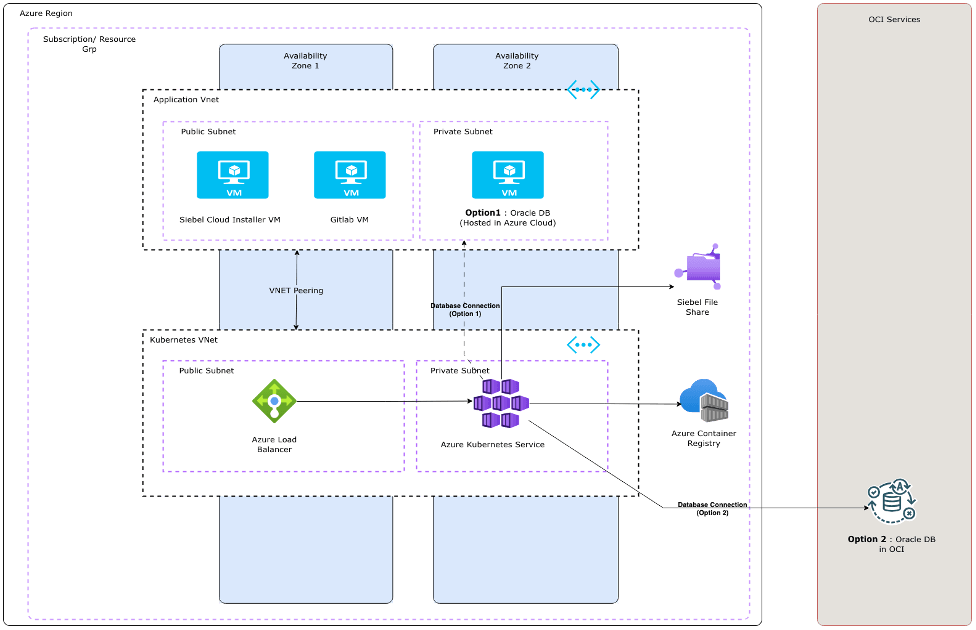
Key Steps for Siebel Deployment on Azure via SCM Installer
While the previous section highlighted the benefits, let's look at the high-level phases involved in deploying Siebel CRM on Azure Kubernetes Service (AKS) using the Siebel Installer for Siebel Cloud Manager (SCM), keeping in mind the "Bring Your Own Resources" (BYOR) model:
-
Prepare the Azure Infrastructure (BYOR):
- Virtual Network (VNet): Set up your Azure VNet and required subnets.
- Kubernetes Cluster (AKS): Provision an Azure Kubernetes Service (AKS) cluster according to your requirements.
- Container Registry (ACR): Create an Azure Container Registry (ACR) instance to store necessary container images.
- Database: Provision your chosen Oracle Database solution (e.g., Oracle DB on an Azure VM).
- File Storage: Set up Azure Files (NFS) for the Siebel File System.
- Load Balancer: Configure an Azure Load Balancer or Application Gateway as needed.
- Compute: Ensure you have the necessary Linux VMs (like Ubuntu 20.04+, RHEL 8+, OEL 8.0+) set up for any management or utility tasks.
- Permissions: Ensure the user account performing the deployment has appropriate Owner roles and permissions within the Azure Resource Group.
- Set Up the SCM Environment:
- Install Prerequisites: On your management/deployment VM, ensure you have Helm (version 3.8 or later) and a Docker or Podman client installed.
- Configure Access: Set up kubectl access to your AKS cluster and login access to your ACR.
- Execute the Siebel Installer for SCM:
- Follow the Siebel Cloud Manager documentation (using the Helm-based installer) to deploy the Siebel components onto your prepared AKS cluster. This typically involves configuring deployment parameters specific to your Azure environment (database connection details, file system mounts, registry locations, etc.).
- Configuration and Verification:
- Post-deployment, perform necessary Siebel configuration steps.
- Verify the deployment, ensuring all components are running correctly and accessible via the configured load balancer/ingress.
- Optionally, configure observability tools like Prometheus and Opensearch if needed.
Important Considerations
This outlines the major phases. The actual execution involves detailed configuration steps within Azure and the Siebel SCM installer.
- As this is a BYOR deployment, you are responsible for managing the underlying Azure infrastructure resources.
- Always refer to the official Oracle Siebel Cloud Manager deployment documentation (like the one mentioned in the High-Level Steps for Deploying Siebel CRM Using Siebel Cloud Manager) and Azure documentation for specific commands, settings, and best practices.
Get Your Copy of the Whitepaper Here!
For more insights or design partnerships, reach out to us at siebel_coe_grp@oracle.com

Sayooj O
December 2025

Rosmin Siby
December 2025