Siebel Analytics
Overview
Building analytics for a Siebel CRM deployment often requires teams to prepare data models, ETL processes, subject areas, and dashboards before they can begin reporting on Sales, Service, and Marketing activity. This setup work can delay access to a usable analytics environment and add effort to ongoing data-refresh operations.
The Siebel Analytics Sample Application provides a starting point for deploying Siebel CRM and Oracle Analytics. It includes pre-built artifacts for extracting and loading transactional data into an analytical data warehouse, then making curated data available to reporting and dashboard layers. It provides out-of-the-box analytical capabilities across Sales, Service, and Marketing.
Artifacts delivered
- Pre-built analytical artifacts, including data models, ETL mappings and workflows, metadata repositories, KPIs, reports, and sample dashboards for Siebel CRM functional areas.
- Oracle Data Integrator (ODI) adapters that extract transactional data from the Siebel OLTP database and load it into predefined schemas in the analytical data warehouse.
- Sample dashboards and reports that show operational and strategic metrics and illustrate the delivered analytics content.
Pre-built subject areas
The sample application includes 35 pre-built subject areas: Marketing (8), Sales (17), and Service (10).
| Marketing | Sales | Service |
|---|---|---|
| CRM B2B Customers | CRM Opportunity Contact | CRM Agreements |
| CRM B2C Customers | CRM Quotes | CRM Assets |
| CRM Campaign Launch | CRM User Adoption and Alignment Current | CRM Orders |
| CRM Campaign Performance | CRM Siebel Forecasting | CRM Contract and Service Invoice |
| CRM Events | CRM Opportunity Sales Stage Snapshot | CRM Email Response |
| CRM Lead to Order | CRM Customer Overview | CRM Customer Satisfaction |
| CRM Leads | CRM User Adoption and Alignment Summary | CX Service Requests |
| CRM Planning | CRM Sales Activity | CRM Activities |
| CRM Customer Data Quality | CRM Products | |
| CRM Pipeline | CRM Service Requests | |
| CRM Historical Pipeline | ||
| CRM Quota Management | ||
| CRM Orders | ||
| CRM Price | ||
| CRM Price Waterfall | ||
| CRM Price Waterfall – Quotes | ||
| CRM Price Waterfall – Orders |
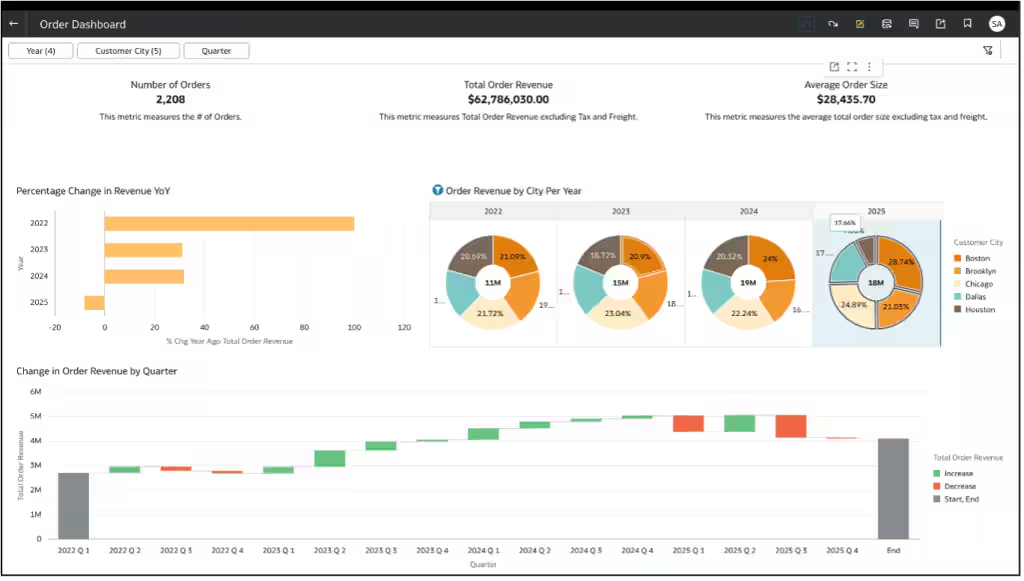
Sample dashboard
The sample dashboard illustrates the pre-built analytics content and gives teams a practical starting point for presenting business metrics.
Demonstration
Watch the video below to see a product demonstration of the Siebel Analytics Sample Application.
Key Benefits
The Siebel Analytics Sample Application helps teams establish a useful analytics environment faster, while retaining a framework they can tailor for their business requirements.
- Use the pre-built artifacts, including ETL scripts, data warehouse schemas, and sample dashboards, to accelerate analytics adoption.
- Use predefined subject areas across Sales, Service, and Marketing to build dashboards and analytics with minimal additional setup.
- Follow technical white papers that provide step-by-step guidance for ingesting the artifacts into Oracle Data Integrator, Oracle Analytics Cloud, or Oracle Analytics Server.
How it works
You can deploy the Siebel Analytics Sample Application in stages, using the pre-built content as a foundation and extending it to meet business requirements.
- Import pre-built ETL components. Import the ODI repository containing ETL mappings, packages, and load plans. Predefined load plans support Sales, Marketing, and Service subject-area loads individually or in combination.
- Configure source and target connections. Connect the Siebel transactional (OLTP) database, analytical data warehouse, and Oracle Analytics Cloud so the semantic model can access curated warehouse data and ETL processes can refresh it.
- Deploy the pre-built semantic model. Import it into Oracle Analytics Cloud to map the physical data warehouse schema to business-friendly logical entities and presentation objects, exposing the 35 delivered subject areas.
- Load sample analytics content. Import the supplied workbooks and dashboards to gain immediate visibility into key business metrics.
- Customize analytics and dashboards. Use Oracle Analytics Cloud's drag-and-drop interface with the delivered measures, dimensions, and visualizations to address organization-specific reporting needs.
- Use Oracle Analytics Cloud AI capabilities. Its built-in AI capabilities can help accelerate dashboard creation, provide visualization recommendations, and simplify data exploration. These capabilities complement, rather than form part of, the sample application's delivered artifacts.
- Extend delivered data models. Add custom tables and fields, ETL logic, dashboards, and reporting layers as needed while retaining the pre-built framework.
- Operationalize enterprise analytics. Schedule ETL load plans for regular refreshes and publish dashboards to business users; continuously enhance the solution with additional subject areas, custom KPIs, and advanced analytics.
Prerequisites
- There is no Siebel CRM release dependency.
Conclusion
The Siebel Analytics Sample Application provides pre-built artifacts and technical documentation to help teams establish an analytics environment and begin building dashboards for Sales, Service, and Marketing.
To access the sample application, log a Service Request in My Oracle Support under Siebel CRM and reference 28841956 in the SR summary. The patch includes sample artifacts and technical documentation to help teams set up the environment and import the artifacts.