F.3 MapViewerのWMTSサービスの準備
MapViewerのWMTSサービスを使用するための準備は、次の主要ステップに従います。
F.3.1 事前定義済ジオメトリ・テーマの準備
getFeatureInfoサービスで事前定義済ジオメトリ・テーマから地物情報を取得する必要がある場合、1つ以上の<field>子要素を持つ<hidden_info>要素を使用する必要があります。<field>要素のcolumn属性がgetFeatureInfoレスポンスで返されます。
<hidden_info>要素は、<styling_rules>要素である必要があります。次に例を示します。
<?xml version="1.0" standalone="yes"?>
<styling_rules>
  <hidden_info>
        <field column="NAME" name="name"/>
        <field column="MAINPAGE" name="mainpage"/>
  </hidden_info>
  .
  .
  .
</styling_rules>
事前定義済ジオメトリ・テーマでのスタイリング・ルールの使用の詳細は、「事前定義済空間ジオメトリ・テーマのスタイリング・ルール」を参照してください
親トピック: MapViewerのWMTSサービスの準備
F.3.2 ベース・マップの準備
WMTSテーマを使用できるようにベース・マップ(テーマの集合体)を準備するには、ベース・マップにテーマを追加します。
ベース・マップへのテーマの追加の詳細は、「マップ」を参照してください。
WMTSテーマの詳細は、「WMTSテーマ」を参照してください。
親トピック: MapViewerのWMTSサービスの準備
F.3.3 タイル層の準備
wmtsConfix.xmlポリシー・ファイルに制約がない場合は、MapViewerのタイル層がMapViewer WMTSサーバーのWMTS層になります。たとえば、例F-2でDEMO_MAPというベース・マップが作成されている場合、そのベース・マップを使用してタイル層を作成できます。この項には、次の例が含まれています。各例では、OGC WMTS 1.0.0実装標準の付属書Eに見られるよく知られたスケール・セットを使用しています。
これらの例では、ピクセル・サイズが0.28mmであるOGC WMTS 1.0.0の実装標準に応じて、<tile_dpi>および<tile_meters_per_unit>要素が指定されています。座標(空間参照)系がWGS84の場合、赤道上の1度は111319.49mです。
例F-9 スケール・セットGlobalCRS84Scaleのタイル定義
insert into user_sdo_cached_maps values(
'WMTS_E1',
'wmts annex e1 scale set for GlobalCRS84Scale',
'',
'YES',
'YES',
'<map_tile_layer name="WMTS_E1" image_format="PNG" http_header_expires="168.0" concurrent_fetching_threads="3">
   <internal_map_source base_map="DEMO_MAP" data_source="MVDEMO" />
   <coordinate_system srid="8307" minX="-180" maxX="180" minY="-90" maxY="90"/>
   <internal_map_source base_map="DEMO_MAP" data_source="MVDEMO" db_tile_table=""/>
   <cache_storage root_path=""/>
   <coordinate_system srid="8307" minX="-180" maxX="180" minY="-90" maxY="90"/>
   <tile_image width="256" height="256"/>
   <tile_dpi value="90.7142857"/>
   <tile_meters_per_unit value="111319.49079327358"/>
   <zoom_levels levels="21" min_scale="100" max_scale="5.0E8">
      <zoom_level scale="5.0E8" tile_width="321.9561978791382" tile_height="321.9561978791382"/>
      <zoom_level scale="2.5E8" tile_width="160.9780989395691" tile_height="160.9780989395691"/>
      <zoom_level scale="1.0E8" tile_width="64.39123957582764" tile_height="64.39123957582764"/>
      <zoom_level scale="5.0E7" tile_width="32.19561978791382" tile_height="32.19561978791382"/>
      <zoom_level scale="2.5E7" tile_width="16.09780989395691" tile_height="16.09780989395691"/>
      <zoom_level scale="1.0E7" tile_width="6.439123957582764" tile_height="6.439123957582764"/>
      <zoom_level scale="5.0E6" tile_width="3.219561978791382" tile_height="3.219561978791382"/>
      <zoom_level scale="2.5E6" tile_width="1.609780989395691" tile_height="1.609780989395691"/>
      <zoom_level scale="1.0E6" tile_width="0.6439123957582763" tile_height="0.6439123957582763"/>
      <zoom_level scale="5.0E5" tile_width="0.32195619787913815" tile_height="0.32195619787913815"/>
      <zoom_level scale="2.5E5" tile_width="0.16097809893956908" tile_height="0.16097809893956908"/>
      <zoom_level scale="1.0E5" tile_width="0.06439123957582764" tile_height="0.06439123957582764"/>
      <zoom_level scale="5.0E4" tile_width="0.03219561978791382" tile_height="0.03219561978791382"/>
      <zoom_level scale="2.5E4" tile_width="0.01609780989395691" tile_height="0.01609780989395691"/>
      <zoom_level scale="1.0E4" tile_width="0.006439123957582764" tile_height="0.006439123957582764"/>
      <zoom_level scale="5.0E3" tile_width="0.003219561978791382" tile_height="0.003219561978791382"/>
      <zoom_level scale="2.5E3" tile_width="0.001609780989395691" tile_height="0.001609780989395691"/>
      <zoom_level scale="1.0E3" tile_width="6.439123957582763E-4" tile_height="6.439123957582763E-4"/>
      <zoom_level scale="5.0E2" tile_width="3.2195619787913813E-4" tile_height="3.2195619787913813E-4"/>
      <zoom_level scale="2.5E2" tile_width="1.6097809893956906E-4" tile_height="1.6097809893956906E-4"/>
      <zoom_level scale="1.0E2" tile_width="6.439123957582763E-5" tile_height="6.439123957582763E-5"/>
   </zoom_levels>
</map_tile_layer>',
'DEMO_MAP','');
例F-10 スケール・セットGlobalCRS84Pixelのタイル定義
insert into user_sdo_cached_maps values(
'WMTS_E2',
'wmts annex e2 scale GlobalCRS84Pixel',
'',
'YES',
'YES',
'<map_tile_layer name="WMTS_E2" image_format="PNG" http_header_expires="168.0" concurrent_fetching_threads="3">
   <internal_map_source base_map="DEMO_MAP" data_source="MVDEMO"/>
   <coordinate_system srid="8307" minX="-180" maxX="180" minY="-90" maxY="90"/>
   <tile_image width="256" height="256"/>
   <tile_dpi value="90.7142857"/>
   <tile_meters_per_unit value="111319.49079327358"/>
   <zoom_levels levels="19" min_scale="1104.360027711047" max_scale="795139219.9519541">
      <zoom_level scale="795139219.9519541" tile_width="512.000000" tile_height="512.000000"/>
      <zoom_level scale="397569609.9759771" tile_width="256.000000" tile_height="256.000000"/>
      <zoom_level scale="198784804.9879885" tile_width="128.000000" tile_height="128.000000"/>
      <zoom_level scale="132523203.3253257" tile_width="85.333333" tile_height="85.333333"/>
      <zoom_level scale="66261601.66266284" tile_width="42.666666" tile_height="42.666666"/>
      <zoom_level scale="33130800.83133142" tile_width="21.333333" tile_height="21.333333"/>
      <zoom_level scale="13252320.33253257" tile_width="8.5333333" tile_height="8.5333333"/>
      <zoom_level scale="6626160.166266284" tile_width="4.2666666" tile_height="4.2666666"/>
      <zoom_level scale="3313080.083133142" tile_width="2.1333333" tile_height="2.1333333"/>
      <zoom_level scale="1656540.041566571" tile_width="1.0666666" tile_height="1.0666666"/>
      <zoom_level scale="552180.0138555236" tile_width="0.3555555" tile_height="0.3555555"/>
      <zoom_level scale="331308.0083133142" tile_width="0.2133333" tile_height="0.2133333"/>
      <zoom_level scale="110436.0027711047" tile_width="0.0711111" tile_height="0.0711111"/>
      <zoom_level scale="55218.00138555237" tile_width="0.0355555" tile_height="0.0355555"/>
      <zoom_level scale="33130.80083133142" tile_width="0.0213333" tile_height="0.0213333"/>
      <zoom_level scale="11043.60027711047" tile_width="0.00711111" tile_height="0.00711111"/>
      <zoom_level scale="3313.080083133142" tile_width="0.00213333" tile_height="0.00213333"/>
      <zoom_level scale="1104.360027711047" tile_width="7.111111E-4" tile_height="7.111111E-4"/>
   </zoom_levels>
</map_tile_layer>',
'DEMO_MAP',
'');
例F-11 スケール・セットGoogleCRS84Quadのタイル定義
insert into user_sdo_cached_maps values(
'WMTS_E3',
'wmts annex e3 scale set GoogleCRS84Quad',
'',
'YES',
'YES',
'<map_tile_layer name="WMTS_E3" image_format="PNG" http_header_expires="168.0" concurrent_fetching_threads="3">
   <internal_map_source base_map="DEMO_MAP" data_source="MVDEMO"/>
   <coordinate_system srid="8307" minX="-180" maxX="180" minY="-90" maxY="90"/>
   <tile_image width="256" height="256"/>
   <tile_dpi value="90.7142857"/>
   <tile_meters_per_unit value="111319.49079327358"/>
   <zoom_levels levels="19" min_scale="2132.729583849784" max_scale="559082264.0287178">
      <zoom_level tile_width="360.0000" tile_height="360.0000" scale="5.590822640287178E8"/>
      <zoom_level tile_width="180.0000" tile_height="180.0000" scale="2.795411320143589E8"/>
      <zoom_level tile_width="90.0000" tile_height="90.00000" scale="1.3977056600717944E8"/>
      <zoom_level tile_width="45.0000" tile_height="45.00000" scale="6.988528300358972E7"/>
      <zoom_level tile_width="22.5000" tile_height="22.50000" scale="3.494264150179486E7"/>
      <zoom_level tile_width="11.2500" tile_height="11.25000" scale="1.747132075089743E7"/>
      <zoom_level tile_width="5.6250" tile_height="5.62500" scale="8735660.375448715"/>
      <zoom_level tile_width="2.8125" tile_height="2.81250" scale="4367830.1877243575"/>
      <zoom_level tile_width="1.40625" tile_height="1.40625" scale="2183915.0938621787"/>
      <zoom_level tile_width="0.703125" tile_height="0.703125" scale="1091957.5469310894"/>
      <zoom_level tile_width="0.3515625" tile_height="0.3515625" scale="545978.7734655447"/>
      <zoom_level tile_width="0.17578125" tile_height="0.17578125" scale="272989.38673277234"/>
      <zoom_level tile_width="0.087890625" tile_height="0.087890625" scale="136494.693366386"/>
      <zoom_level tile_width="0.0439453125" tile_height="0.0439453125" scale="68247.34668319"/>
      <zoom_level tile_width="0.02197265625" tile_height="0.02197265625" scale="34123.6733415"/>
      <zoom_level tile_width="0.010986328126" tile_height="0.010986328126" scale="17061.8366707"/>
      <zoom_level tile_width="0.0054931640633" tile_height="0.0054931640633" scale="8530.91833539"/>
      <zoom_level tile_width="0.00274658203168" tile_height="0.00274658203168" scale="4265.45916769"/>
      <zoom_level tile_width="0.001373291015841" tile_height="0.001373291015841" scale="2132.72958384"/>
   </zoom_levels>
</map_tile_layer>',
'DEMO_MAP',
'');
例F-12 スケール・セットGoogleMapsCompatibleのタイル定義
insert into user_sdo_cached_maps values(
'WMTS_E4',
'wmts annex e4 scale set',
'',
'YES',
'YES',
'<map_tile_layer name="WMTS_E4" image_format="PNG" http_header_expires="168.0" concurrent_fetching_threads="3">
   <internal_map_source base_map="DEMO_MAP" data_source="MVDEMO"/>
     <coordinate_system srid="3857" minX="-20037508" maxX="20037508" minY="-20037508" maxY="20037508"/>
       <tile_image width="256" height="256"/>
       <tile_dpi value="90.7142857"/>
       <tile_meters_per_unit value="1"/>
       <zoom_levels levels="19" min_scale="2132.729583849784" max_scale=" 559082264.0287178">
         <zoom_level tile_width="4.0075016692E7" tile_height="4.0075016692E7" scale="5.5908226403E8"/>
         <zoom_level tile_width="2.0037508346E7" tile_height="2.0037508346E7" scale="2.7954113201E8"/>
         <zoom_level tile_width="1.0018754173E7" tile_height="1.0018754173E7" scale="1.3977056601E8"/>
         <zoom_level tile_width="5009377.086486" tile_height="5009377.086486" scale="6.9885283004E7"/>
         <zoom_level tile_width="2504688.543243" tile_height="2504688.543243" scale="3.4942641502E7"/>
         <zoom_level tile_width="1252344.27162" tile_height="1252344.27162" scale="1.747132075089E7"/>
         <zoom_level tile_width="626172.135810" tile_height="626172.135810" scale="8735660.3754487"/>
         <zoom_level tile_width="313086.067905" tile_height="313086.067905" scale="4367830.1877243"/>
         <zoom_level tile_width="156543.033952" tile_height="156543.033952" scale="2183915.0938621"/>
         <zoom_level tile_width="78271.5169763" tile_height="78271.5169763" scale="1091957.5469311"/>
         <zoom_level tile_width="39135.7584882" tile_height="39135.7584882" scale="545978.77346554"/>
         <zoom_level tile_width="19567.8792441" tile_height="19567.8792441" scale="272989.38673277"/>
         <zoom_level tile_width="9783.93962204" tile_height="9783.93962204" scale="136494.69336638"/>
         <zoom_level tile_width="4891.96981102" tile_height="4891.96981102" scale="68247.346683193"/>
         <zoom_level tile_width="2445.98490551" tile_height="2445.98490551" scale="34123.673341596"/>
         <zoom_level tile_width="1222.99245275" tile_height="1222.99245275" scale="17061.836670798"/>
         <zoom_level tile_width="611.496226378" tile_height="611.496226378" scale="8530.9183353991"/>
         <zoom_level tile_width="305.748113189" tile_height="305.748113189" scale="4265.4591676995"/>
         <zoom_level tile_width="152.874056594" tile_height="152.874056594" scale="2132.7295838498"/>
       </zoom_levels>
</map_tile_layer>',
'DEMO_MAP',
'');
親トピック: MapViewerのWMTSサービスの準備
F.3.4 wmtsConfig.xmlポリシー・ファイルでのタイル層の公開
タイル層を公開するには、mapViewerConfig.xmlと同じ場所に保存されているwmtsConfig.xmlポリシー・ファイルの<public_datasources>要素を編集し、情報を追加できます。例F-13は、データソースMVDEMOの5つのタイル(TEST_EL、WMTS_E1、WMTS_E2、WMTS_E3およびWMTS_E4)およびデータソースTILSMENVのすべてのタイル層を公開するためのエントリを示しています。
例F-13 タイル層の公開
<public_datasources>
  <public_datasource name="MVDEMO">
    <tile_layers>
      <tile_layer name="TEST_TL"/>
      <tile_layer name="WMTS_E1"/>
      <tile_layer name="WMTS_E2"/>
      <tile_layer name="WMTS_E3"/>
      <tile_layer name="WMTS_E4"/>
    </tile_layers>
  </public_datasource>
  <public_datasource name="TILSMENV" include_all_tile_layers="TRUE">
</public_datasources>
親トピック: MapViewerのWMTSサービスの準備
F.3.5 MapViewer WMTSサービスの検証
MapViewer WMTSサービスが適切に機能していることを確認するステップは次のとおりです。
-
MapViewerサーバーを再起動して、データソースからタイル層定義を取得し、WMTSポリシー・ファイルを適用します。
-
タイル層が公開され、すべてのスケール・セットが期待どおりに表示されることを確認するには、次の形式でGetCapabilitiesリクエストを発行します。
http://<url>:<port>/mapviewer/wmts?REQUEST=GetCapabilities&SERVICE=WMTS&VERSION=1.0.0
親トピック: MapViewerのWMTSサービスの準備
F.3.6 WMTS準拠のカスタム・タイル層を作成するためのヒント
この項では、MapViewer内部タイル層を作成するために準備されたベースマップをMapViewerのWMTSサービスに対して公開するのに役立つヒントをいくつか説明します。
次のステップを実行して、MapViewerでOGC WMTS準拠のタイル層を作成できます。この手順では、次のことを前提とします:
- ベースマップ
BMTESTはすでに存在します。 - 新しいタイル層の名前は
TL_28351です。 - SRIDは28351で、単位はメートルです。
- 基準スケール・シリーズは、
[500_000, 250_000, 100_000, 50_000, 25_000, 10_000, ……, 500, 250, 100, 50]と設定されています。 - 新しいタイル層のスケール・シリーズは、基準スケール・シリーズのサブセットです。
- 次のステップに示すように、最小スケールを決定します。
- 次に示すように、MapBuilderのユーザー・インタフェースのドロップダウン・リストから「スケール」を選択します。
- 次に示すように、MapBuilderのユーザー・インタフェースのドロップダウン・リストから「スケール」を選択します。
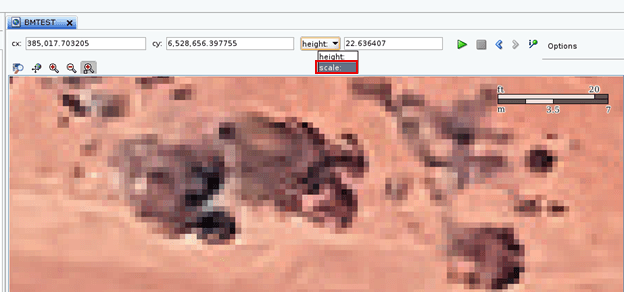
前述のステップに従って、OGC WMTS準拠のカスタム・タイル層を定義するために必要なパラメータを計算しました。次に、Oracle Map Builderツール、MapViewerの管理コンソール、またはマップ層のXML定義を含むSQLスクリプト文字列のいずれかを使用して、このタイル層定義を作成できます。
OGC WMTS準拠のカスタム・タイル層を作成する例を次に示します。マップ層のXML定義は、次のようにSQLスクリプトで参照されます:
INSERT INTO user_sdo_cached_maps VALUES(
'TL_28351',
'OGC WMTS compliant tile layer',
'',
'YES',
'YES',
'<map_tile_layer name="TL_28351" image_format="PNG" http_header_expires="168.0" concurrent_fetching_threads="3" fetch_larger_tiles="false"
    persistent_tiles="true">
   <internal_map_source base_map="BMTEST" bgcolor="none" out_of_bounds_color="#ffffff"/>
   <tile_storage root_path=""/>
   <coordinate_system srid="28351" minX="382582" maxX="389750" minY="6523739" maxY="6530907"/>
   <tile_image width="256" height="256"/>
   <tile_dpi  value="90.7142857"/>
   <tile_meters_per_unit  value="1"/>
   <zoom_levels levels="10" min_scale="100" max_scale="100000">
      <zoom_level scale="100000"/>
      <zoom_level scale="50000"/>
      <zoom_level scale="25000"/>
      <zoom_level scale="10000"/>
      <zoom_level scale="5000"/>
      <zoom_level scale="2500"/>
      <zoom_level scale="1000"/>
      <zoom_level scale="500"/>
      <zoom_level scale="250"/>
      <zoom_level scale="100"/>
   </zoom_levels>
</map_tile_layer>',
'BMTEST',
'');
親トピック: MapViewerのWMTSサービスの準備