Using Fluid Approvals to Approve Tuition Reimbursement Requests
Fluid Approvals supports the following Tuition Reimbursement approval transaction types:
Pre-Authorize Tuition: When a person creates a request that needs to be pre-approved prior to an organization agreeing to pay for training.
Reimburse Tuition: When a person creates a reimbursement request for the actual training cost.
This topic discusses how to approve tuition reimbursement transaction requests using Fluid Approvals.
For using the common Pending Approvals and Approvals History pages, see Using PeopleSoft Fluid User Interface Self-Service Approval Transactions.
|
Page Name |
Definition Name |
Usage |
|---|---|---|
|
Pending Approvals - Pre-Authorize Tuition or Reimburse Tuition Page |
EOAWMA_TXNHDTL_FL |
Review and take action on tuition reimbursement-related requests. |
Use the Pending Approvals - Pre-Authorize Tuition or Reimburse Tuition page (EOAWMA_TXNHDTL_FL) to review and take action on tuition reimbursement-related requests.
Note: The approver must be assigned the Tuition Reimbursement Approver role.
Navigation:
From the approvals pages, select a Tuition Reimbursement - Pre-Authorize Tuition or Reimburse Tuition row on the Pending Approvals page.
This example illustrates the Pending Approvals - Pre-Authorize Tuition page.
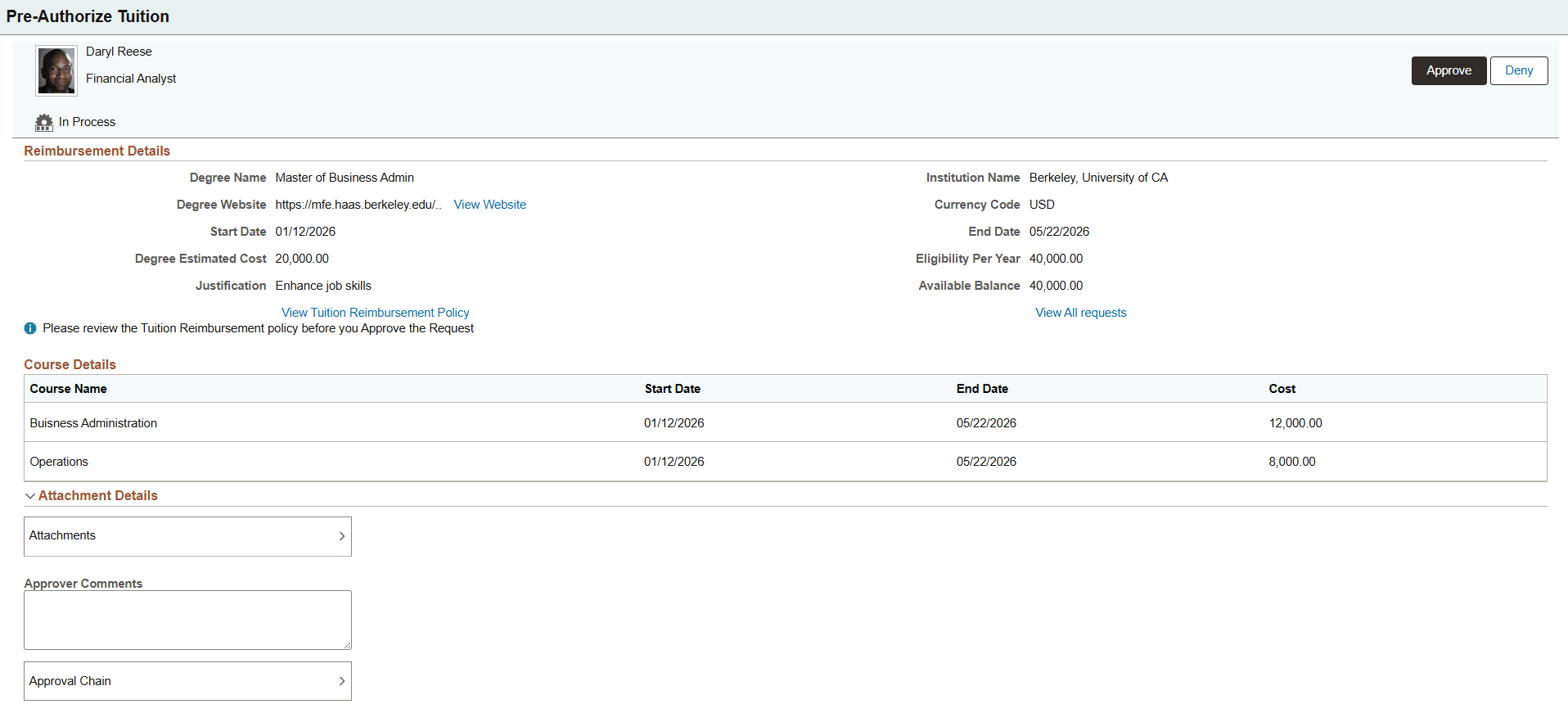
Pre-Authorize Tuition requests are not submit to payroll for reimbursement. It's purpose is to pre-approve future training and assure the employee that the organization is willing to cover reasonable costs.
After a Pre-Authorize Tuition request is approved, requesters will use the Tuition Reimbursement (Landing) Page and select the Start Reimbursement button for a pre-approved request to access the Tuition Reimbursement (View Summary) Page. This will allow them to enter the final costs and information when the training is complete so they can then submit a reimbursement request.
This example illustrates the Pending Approvals - Reimburse Tuition page.
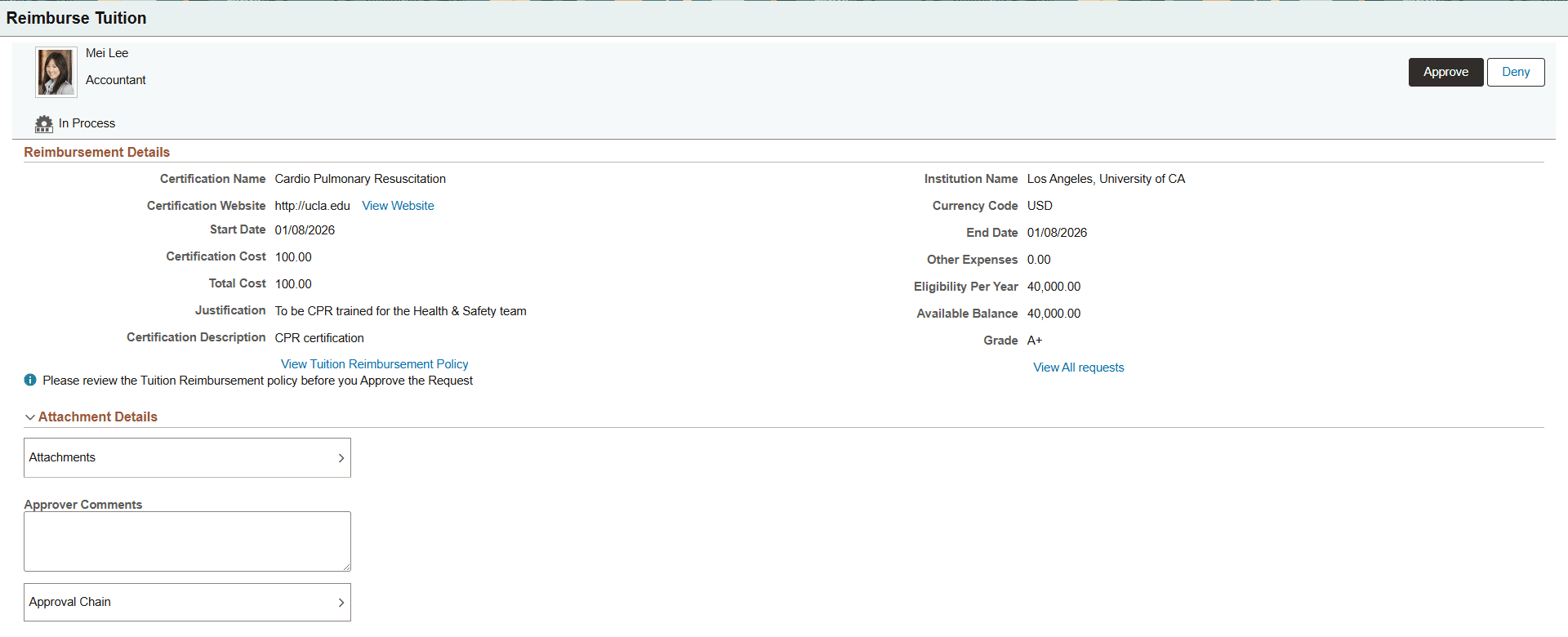
After a Reimburse Tuition request has been approved, the administrator will use the Process Tuition Reimbursement Page to submit all expenses to the payroll system.
Approval Options
The approval options on this page are common to all fluid approval transactions, as described in the documentation for the Pending Approvals - <Transaction Details> Page.
|
Field or Control |
Description |
|---|---|
|
Approve and Deny |
Use these buttons to take action on the requested approval. If a request is not acceptable, select to deny the request. A person will need to create a new reimbursement request if new or different information is needed. |
Reimbursement Details
This section displays the summary information of the request.
|
Field or Control |
Description |
|---|---|
|
View Website link |
View the website for the course or program that the employee will or has taken. |
|
View Tuition Reimbursement Policy link |
Select this link to access the tuition reimbursement policy. This link is defined on the Company Level Configuration Page. |
|
View All requests link |
Select this link to access the Tuition Reimbursement (Landing) Page where you can view all reimbursement requests for this employee. |
Course Details
This section displays information about the courses, their length, and estimated or actual cost.
Other Expenses
This section displays for Reimburse Tuition requests and shows the additional costs for training, if applicable.
Attachment Details
|
Field or Control |
Description |
|---|---|
|
Attachments |
Select this item to open the Attachments page, where you can review the attachment associated with this request, if any. |
Approver Comments and Approval Chain Sections
|
Field or Control |
Description |
|---|---|
|
Approver Comments |
Enter any comments related to the approval action you take. |
|
Approval Chain |
Select this item to open the Approval Chain page, where you can review information about the status and approvers for the transaction. |