Autonomous AI Database (Serverless)
This topic explains how to modify resources for Oracle Autonomous AI Database Service.
Backup Autonomous AI Database
For more information, see the Backup and Restore documentation.
Tags
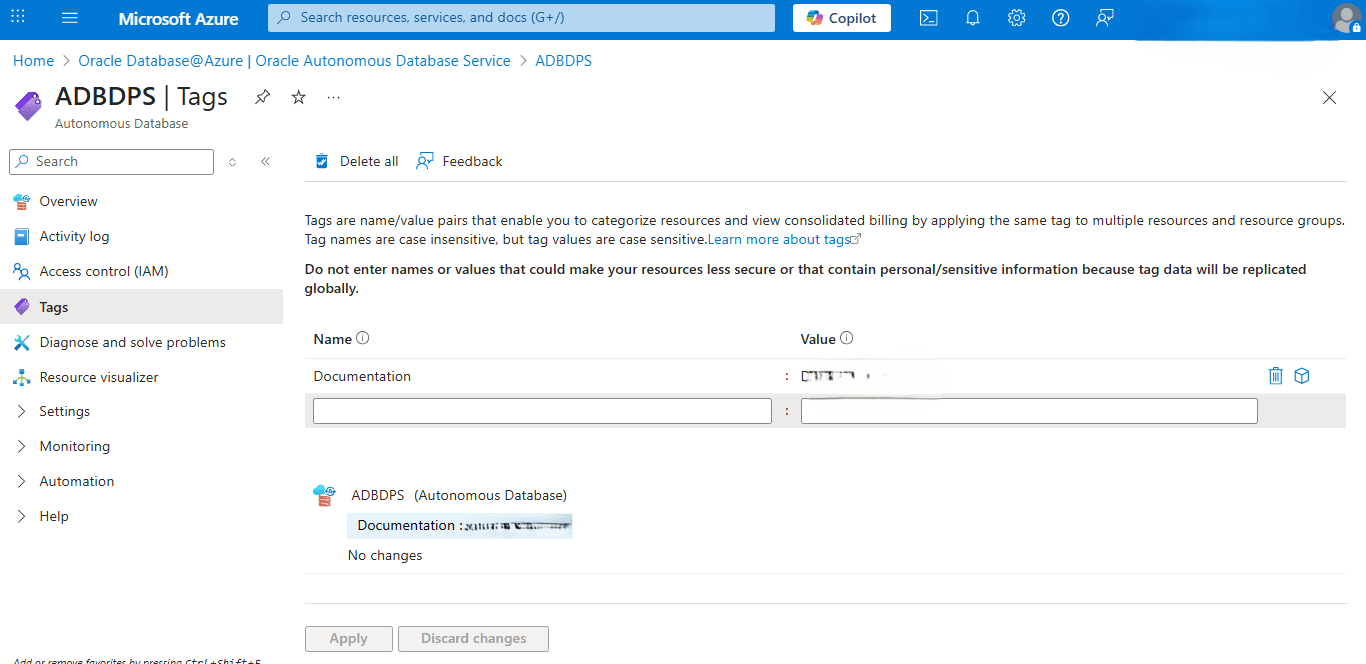
These are steps to modify tags of Autonomous AI Database Services.
-
From the Azure portal, select Oracle AI Database@Azure.
-
From the left navigation menu, select Oracle Autonomous AI Database.
-
Select your Autonomous AI Database that you are using.
-
From the left navigation menu , select the Tags link.
-
You can add, remove or modify Tags based on the requirements.
Auto Start and Stop Schedule
These are the steps to schedule the automatic start and stop of your Autonomous AI Database from the Azure portal.
-
From the Azure portal, select Oracle AI Database@Azure.
-
From the left menu, select Oracle Autonomous AI Database.
-
From the Name column, select your database that you are using.
-
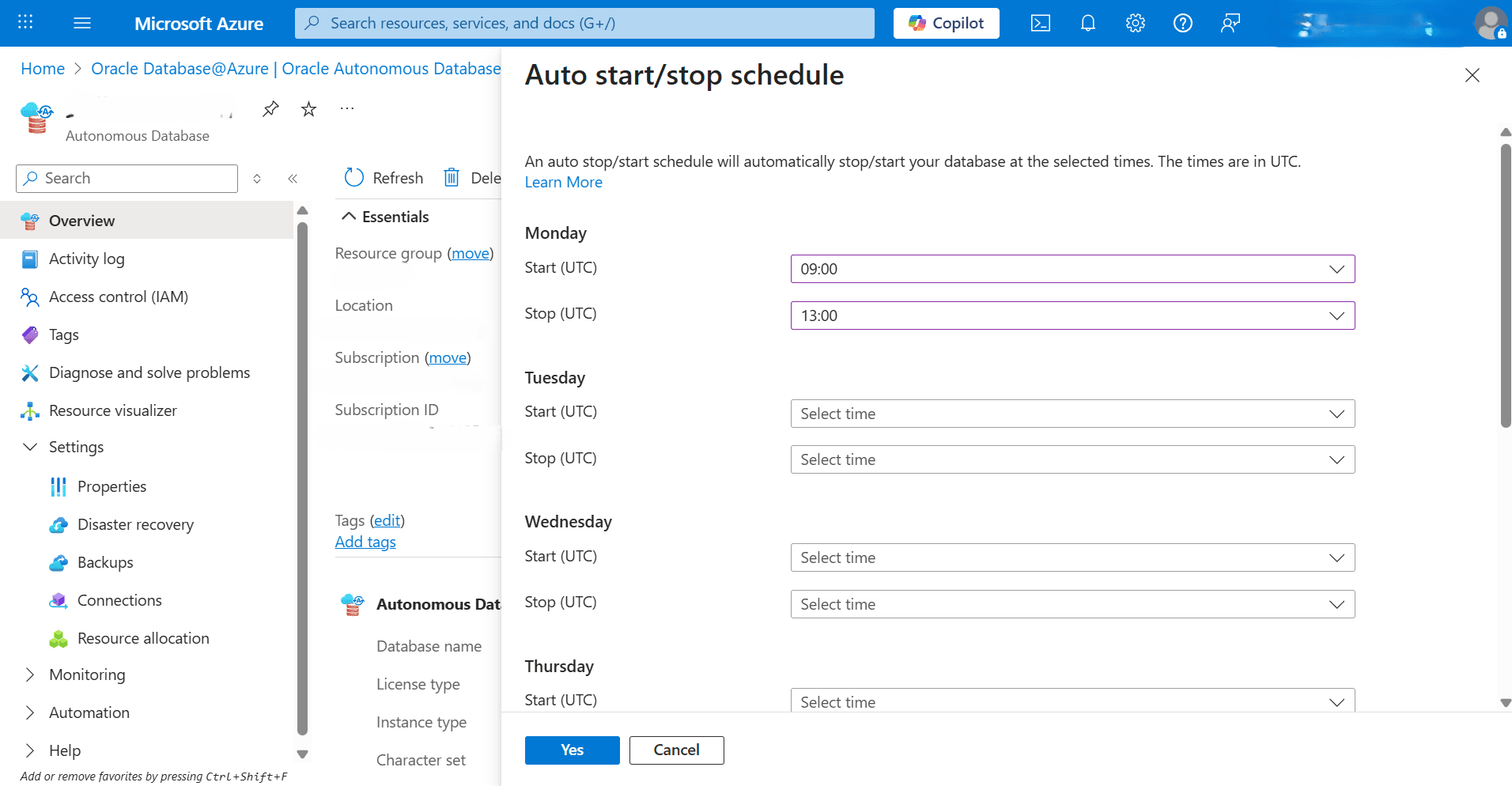
Select the Auto start/stop schedule button from the top menu, and then complete the following substeps:
-
From the Auto start/stop schedule page, you can configure the auto start/stop schedule by selecting the days and the times from the dropdown lists. For each day of the week:
-
Start (UTC): Select the start time for the schedule on this day.
-
Stop (UTC): Select the stop time for the schedule on this day.
-
-
Select the Yes button to save your changes.
-
Change Administrator Password
These are the steps to change your administrator password of your Autonomous AI Database from the Azure portal.
-
From the Azure portal, select Oracle AI Database@Azure.
-
From the left menu, select Oracle Autonomous AI Database.
-
From the Name column, select the database for which you want to change the administrator password.
-
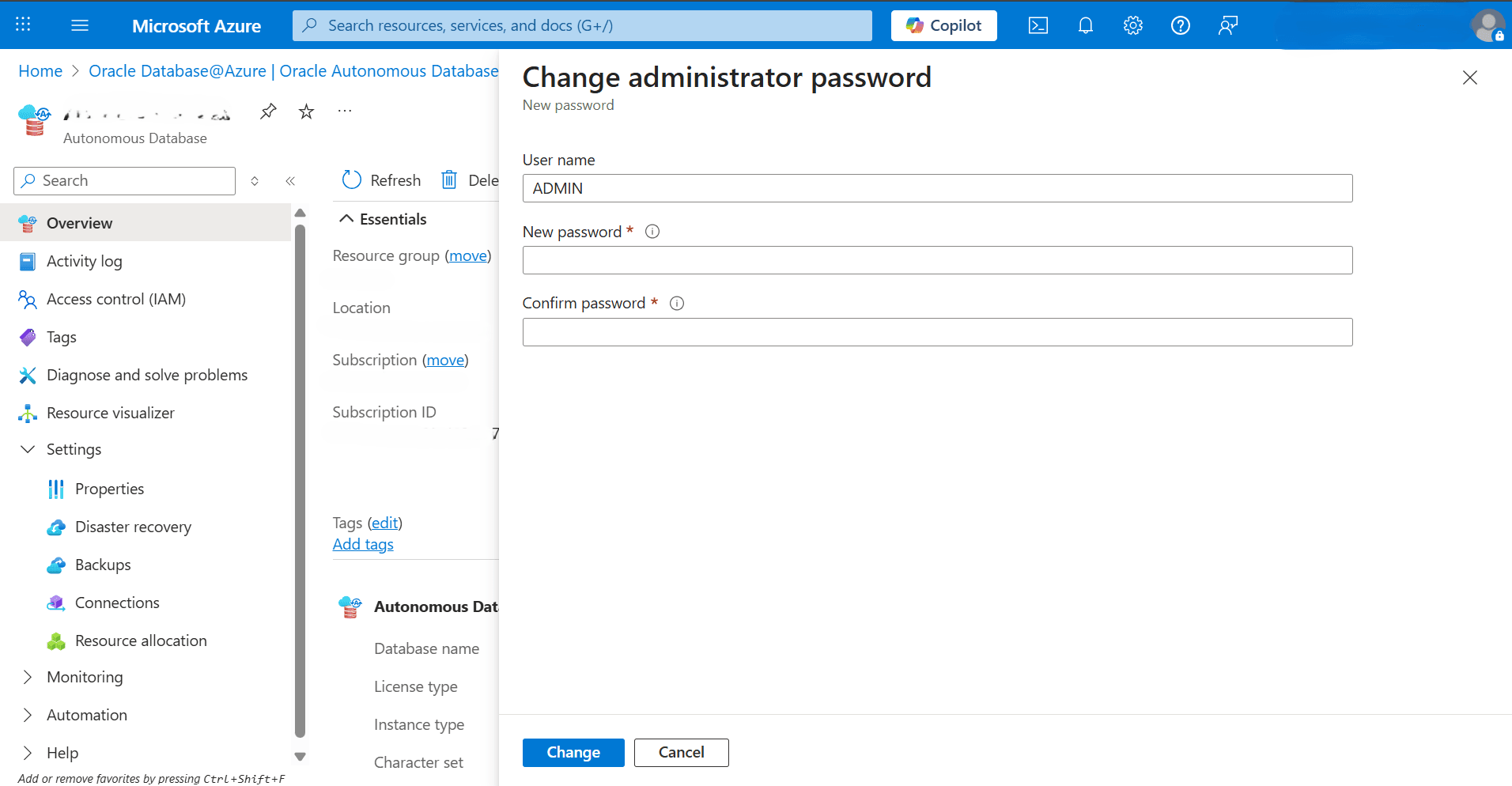
From the Overview page, select the Change Administrator Password button, and then enter the following information.
-
The User name field is read-only.
-
Enter your New password. The password must be 12–30 characters long and include at least one uppercase letter, one lowercase letter, and one number. It cannot contain spaces, double quote (“) or single quote (‘) characters, or the username “admin”. The password must be different from your last four passwords, cannot be reused within 24 hours, and cannot be used in conjunction with OCI Vault secrets.
-
Enter your password in the Confirm password field.
-
Select the Change button to apply the changes.
-
Change Maintenance Patch Level
These are the steps to change the maintenance patch level of your Oracle Autonomous AI Database.
-
From the Azure portal, select Oracle AI Database@Azure.
-
From the left menu, select Oracle Autonomous AI Database and then select your Autonomous AI Database.
-
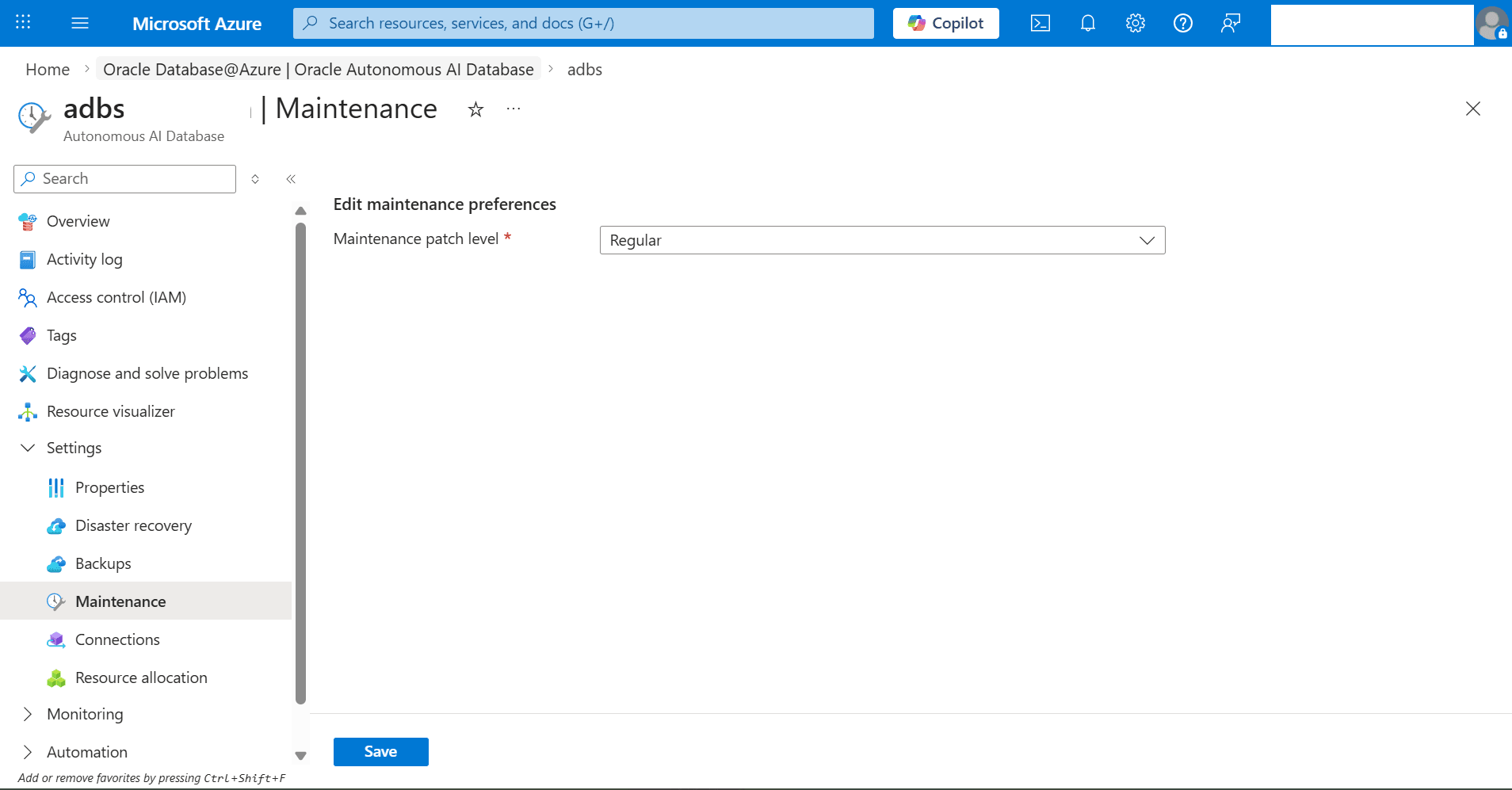
Expand the Settings section and then select Maintenance.
-
From the Maintenance patch level dropdown list, select the option. You can update the maintenance preference for your existing Autonomous AI Database from Regular to Early, or from Early to Regular.
-
Select the Save button.
-
-
Navigate back to the Oracle Autonomous AI Database page to review the State of your Autonomous AI Database.
-
There is currently no content for this page. Oracle AI Database@Azure team intends to add content here, and this placeholder text is provided until that text is added. The Oracle AI Database@Azure team is excited about future new features, enhancements, and fixes to this product and this accompanying documentation. We strongly recommend you watch this page for those updates.
You can modify an Oracle Autonomous AI Database Serverless in Azure using the Azure CLI .
Prerequisites
-
Azure CLI installed
-
Azure CLI configured
-
Azure CLI version >= 2.87.0.
-
oracle-database(extension) version >= 2.0.4
Sample Azure CLI Command (Start, Stop and Restart)
# Define variables for the Autonomous AI Database Serverless RESOURCE_GROUP="demo-rg-azcli" AUTONOMOUS_DB_NAME="demoadbsazcli" LOCATION="eastus" ## Change the ECPU count az oracle-database autonomous-database update --resource-group $RESOURCE_GROUP \ --name $AUTONOMOUS_DB_NAME \ --compute-count <(new value) > ## Stop the Database az oracle-database autonomous-database action --resource-group $RESOURCE_GROUP \ --autonomousdatabasename $AUTONOMOUS_DB_NAME \ --action Stop --output json ## Start the Database az oracle-database autonomous-database action --resource-group $RESOURCE_GROUP \ --autonomousdatabasename $AUTONOMOUS_DB_NAME \ --action Start --output json ## Restart the Database az oracle-database autonomous-database action --resource-group $RESOURCE_GROUP \ --autonomousdatabasename $AUTONOMOUS_DB_NAME \ --action restart --output json ## Change administrator password az oracle-database autonomous-database update --resource-group $RESOURCE_GROUP \ --name $AUTONOMOUS_DB_NAME \ --admin-password "<new-password>" ## Create auto start/stop schedule for the Database az oracle-database autonomous-database update --resource-group $RESOURCE_GROUP \ --name $AUTONOMOUS_DB_NAME \ --scheduled-operations-list "[{day-of-week:{name:Sunday},scheduled-start-time:'03:00',scheduled-stop-time:'04:00'}]" ## Modify auto start/stop schedule for the Database az oracle-database autonomous-database update --resource-group $RESOURCE_GROUP \ --name $AUTONOMOUS_DB_NAME \ --scheduled-operations-list "[{day-of-week:{name:Sunday},scheduled-start-time:'04:00',scheduled-stop-time:'05:00'}]" ## Add tags to the Database az oracle-database autonomous-database update --resource-group $RESOURCE_GROUP \ --name $AUTONOMOUS_DB_NAME \ --tags "azcli-command-test=created" ## Delete tags for the Database az oracle-database autonomous-database update --resource-group $RESOURCE_GROUP \ --name $AUTONOMOUS_DB_NAME \ --tags "{}" ## Modify tags for the Database az oracle-database autonomous-database update --resource-group $RESOURCE_GROUP \ --name $AUTONOMOUS_DB_NAME \ --tags "azcli-command-test=modified" ## Resize storage for the Database az oracle-database autonomous-database update --resource-group $RESOURCE_GROUP \ --name $AUTONOMOUS_DB_NAME \ --storage-tbs 1 --query "{storageTbs:properties.dataStorageSizeInTbs,provisioningState:properties.provisioningState}" \ --output json ## Modify storage unit size for the Database az oracle-database autonomous-database update --resource-group $RESOURCE_GROUP \ --name $AUTONOMOUS_DB_NAME \ --storage-gbs 1024 --query "{storageGbs:properties.dataStorageSizeInGbs,provisioningState:properties.provisioningState}" \ --output json ## Modify storage autoscaling for the Database az oracle-database autonomous-database update --resource-group $RESOURCE_GROUP \ --name $AUTONOMOUS_DB_NAME \ --store-auto-scaling false --query "{storageAutoScaling:properties.isAutoScalingForStorageEnabled,provisioningState:properties.provisioningState}" --output json ## Enable cpu auto scaling for the Database az oracle-database autonomous-database update --resource-group $RESOURCE_GROUP \ --name $AUTONOMOUS_DB_NAME \ --cpu-auto-scaling true ## Disable cpu auto scaling for the Database az oracle-database autonomous-database update --resource-group $RESOURCE_GROUP \ --name $AUTONOMOUS_DB_NAME \ --cpu-auto-scaling false-
There is currently no content for this page. Oracle AI Database@Azure team intends to add content here, and this placeholder text is provided until that text is added. The Oracle AI Database@Azure team is excited about future new features, enhancements, and fixes to this product and this accompanying documentation. We strongly recommend you watch this page for those updates.
There is currently no content for this page. Oracle AI Database@Azure team intends to add content here, and this placeholder text is provided until that text is added. The Oracle AI Database@Azure team is excited about future new features, enhancements, and fixes to this product and this accompanying documentation. We strongly recommend you watch this page for those updates.