Compare Data Across Multiple Data Sets in One View
This feature allows Oracle Enterprise Command Center Framework to bridge gaps between data sources, enabling variance analysis, mismatch highlighting, and advanced conditional logic.
Users can define calculated attributes that reference metrics across multiple data sets. Using a new, intuitive Formula Builder, administrators and analysts can create simple and compound expressions using standard operators to compare disparate data points—such as comparing Receivables balances against General Ledger totals.
Beyond simple math, this feature supports conditional formatting and filtering based on the results of these calculations. If a variance exceeds a specific threshold, the system can automatically highlight it, allowing users to drill down directly into the underlying details to investigate the root cause.
Key Capabilities:
-
Multi-Data Set Logic: Create attributes like
Variance = AR Net - GL Net. -
Integrated Formula Builder: A dedicated interface with operators for easy attribute creation.
-
Thresholds: Highlighting and filtering for mismatches.

Cross-Data Set Calculation
Business Benefits
- Cross-Data Set Insights: Enables calculations across multiple data sets without requiring manual data merging or preprocessing.
- Faster Decision-Making: Empowers users to instantly compare metrics (for example, actual vs. forecast) directly within the visualization.
- Flexible Metric Creation: Enables dynamic creation of business-driven metrics that combine data from different domains (for example, finance and operations).
- Enhanced Self-Service Analytics: Enables non-technical users to perform complex comparisons within a single pivot table.
Steps to enable and configure
To configure cross-data set calculation:
- Open the Aggregate Table Configuration panel and select Attributes > Metrics.
- Click Add Calculation.
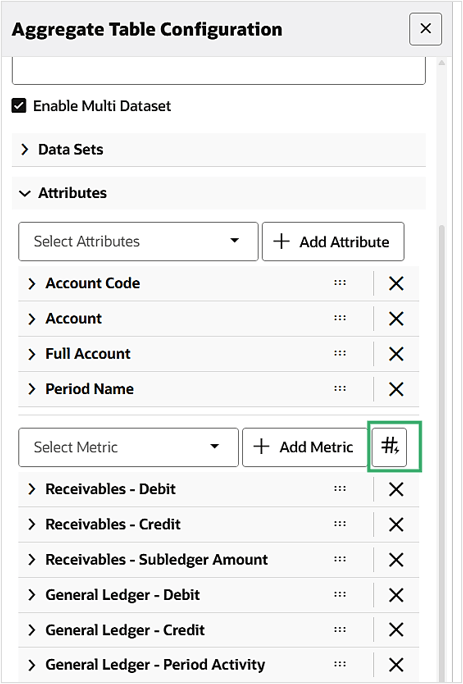
Add Calculation
- A new attribute is created with a default title. You can then change the label.
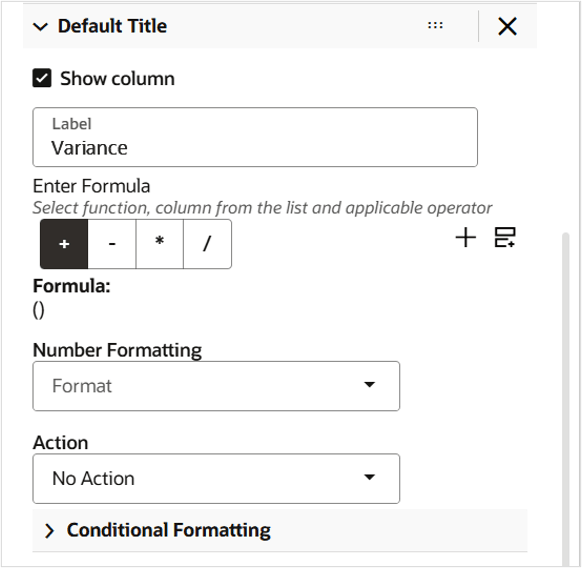
Default Title and Label
- Enter the formula, number formatting, and conditional formatting.
For detailed instructions, see Cross-Data Set Calculation in Pivot View, Oracle E-Business Suite Extending Enterprise Command Centers.
Key resources
- Cross-Data Set Calculation in Pivot View, Oracle E-Business Suite Extending Enterprise Command Centers
- Data Set, Oracle E-Business Suite Extending Enterprise Command Centers