Configure Waterfall Charts with Custom Labels and Legends
This feature offers enhanced flexibility, allowing designers to customize Waterfall Charts according to specific business needs. The update introduces two key visual improvements to the Waterfall Chart component:
- Custom Total Labels: Users can now create a meaningful, custom label for the Total bar. Instead of the generic label "Total," you can use specific terms that align with your business, such as "Year-End Revenue," "Ending Balance," or "Net Position".
- Legend Control: Dashboard designers now have the option to hide the chart legend. This feature is particularly beneficial for streamlined charts where the color coding is self-explanatory, or when it is essential to maximize the available screen space for the data itself.
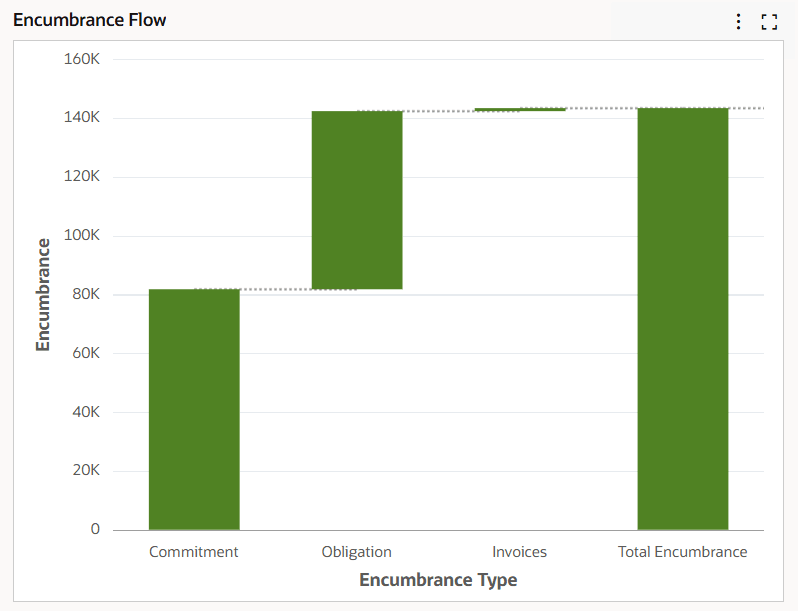
Waterfall Chart
Business Benefits
-
Improved Business Alignment: Ensures that the final cumulative result matches the exact naming conventions used in the business.
-
Clean and Focused Visuals: Hiding the legend reduces visual clutter, allowing stakeholders to focus entirely on the data trends and the "bottom line" without distraction.
Steps to enable and configure
- Open the Chart Configuration panel and select Visualization.
- Set the visualization options for the waterfall chart as desired:
- Hide chart legend
- Ending total custom label
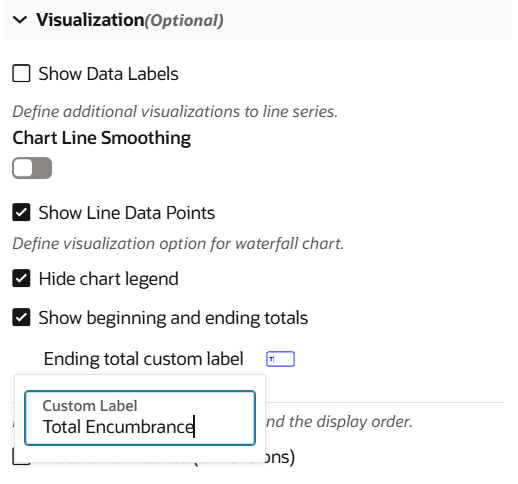
Visualization Configuration Options
Key resources
- Chart Configuration in Action with Examples, Oracle E-Business Suite Extending Enterprise Command Centers
- Dashboard Components, Oracle E-Business Suite User's Guide