Mass Update Contacts using Item Instance Mass Update
Simplify contact management with the enhanced Mass Update functionality for item instances. This feature provides the ability to view, update, and delete existing associations to party and item contacts, as well as add new contacts to both existing and new associations.
Use the mass update functionality to reduce administrative overhead and ensure that contact information remains current and accurate across Oracle Installed Base. This feature meets the industry demand for efficient data management in asset tracking and service operations, supporting use cases such as bulk updates during organizational changes or integrating new contact data after mergers and acquisitions.
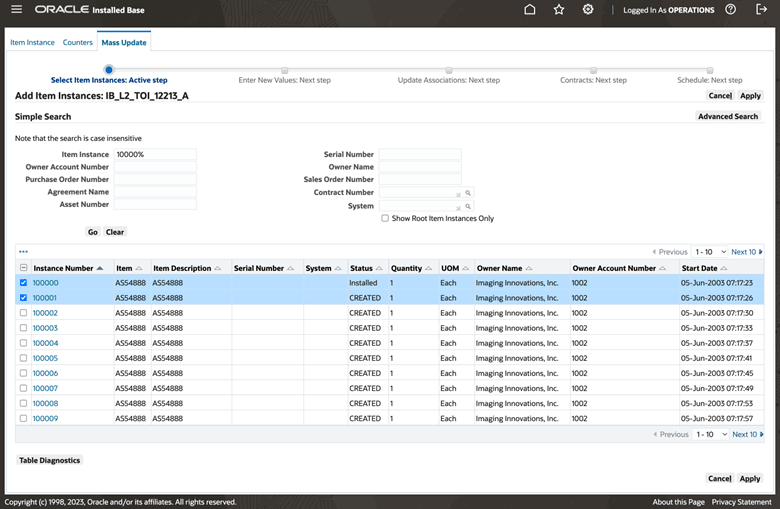
Creating a batch for mass update
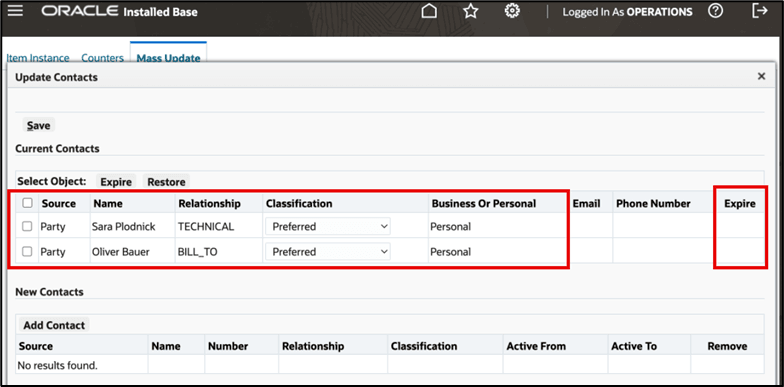
Expiring contacts
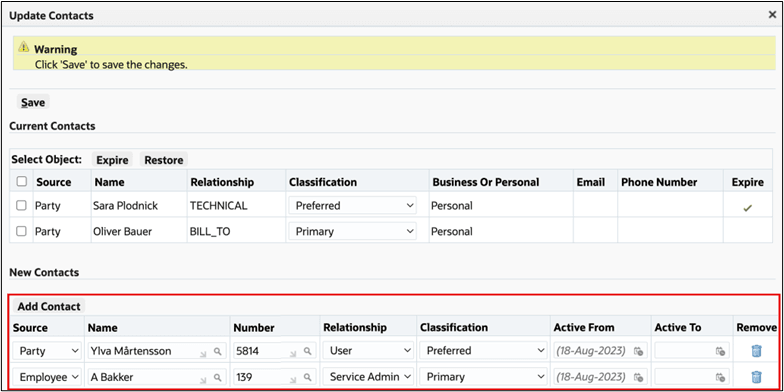
Adding contacts
Steps to enable and configure
You don't need to do anything to enable this feature.
Tips and considerations
Important: Schedule and run the Initiate Mass Edit concurrent program to apply the updates (Oracle Install Base Administrator responsibility, Others, Requests, Initiate Mass Edit).
- Implementation considerations include assessing the scope of contact data to be updated and planning for data validation to prevent errors during mass updates.
- Before performing mass updates, ensure that contact data is backed up to mitigate risks of unintended data loss or errors during the update process.
- Validate contact associations post-update to confirm that changes reflect accurately across related item instances, especially for large data sets
Key resources
- Oracle Installed Base Implementation Guide
- Implementation and Setup for New Users (chapter)
- Setup Steps within Oracle Installed Base (section)
- Implementation and Setup for New Users (chapter)
- Oracle Installed Base User's Guide
- Using the Mass Update Facility (chapter)