Personalize Layout using Mobile App Personalization Admin UI
A new Mobile Maintenance Administration responsibility in the Oracle E-Business Suite HTML application provides an administrator user interface for mobile app personalization. Administrators can select a mobile screen and configure the layout at the Responsibility, Organization, or Site level without performing personalization directly on a device.
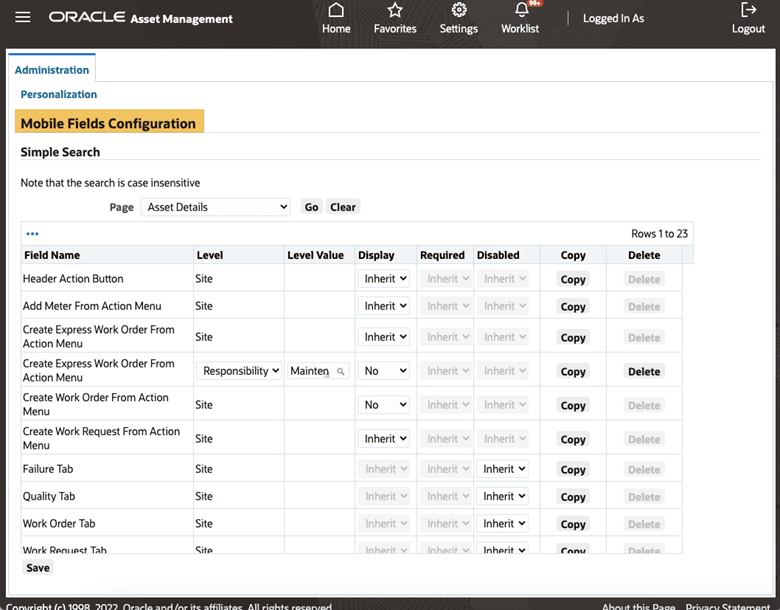
Mobile Fields Configuration
Steps to enable and configure
- Assign the Mobile Maintenance Administration responsibility to authorized administrators.
- Open the personalization administrator user interface and select the Mobile Maintenance screen to configure.
- Choose the appropriate Responsibility, Organization, or Site scope and apply the layout changes.
- Preview or test the personalized screen with a user in the target scope before releasing the change broadly.
Tips and considerations
- Centralize ownership of administrator UI personalizations so screen changes are consistent across teams.
- Preview or test personalizations before publishing them to field users.
- Review personalization priority when Site, Organization, and Responsibility-level changes overlap.
Key resources
- My Oracle Support Knowledge Document KB858915, Oracle Mobile Maintenance for Oracle E-Business Suite Release Notes
- Oracle E-Business Suite Mobile Apps Administrator's Guide
- Oracle Enterprise Asset Management Implementation Guide
- Setting Up (chapter)
- Oracle Enterprise Asset Management User's Guide