Search using Search Box for Asset-Related Work Orders, Work Requests, and Failure History
Search for asset-related work orders, work requests, and failure history using the mobile search box. Users can narrow the search for asset history and related work details without manually scanning long lists. This improves troubleshooting and research from the asset context when technicians need to review recent or historical work.
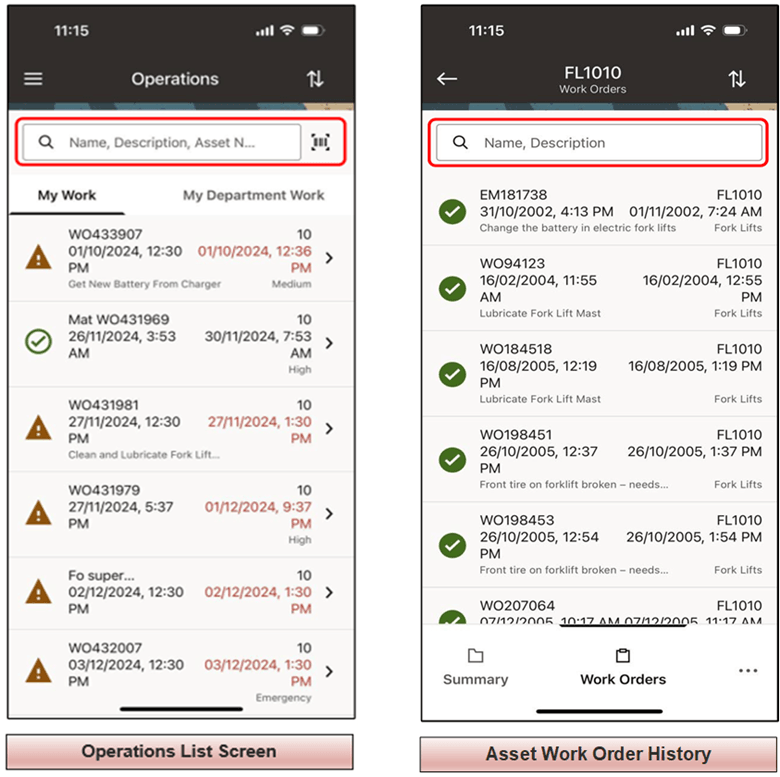
Searching Asset Work Orders and Associated Operations
Steps to enable and configure
- Confirm that related work orders, work requests, and failure history are available for the asset in Oracle E-Business Suite.
- Synchronize the mobile app and open the Asset Summary page.
- Use the search box on the related work or history list to filter by relevant identifiers, descriptions, or other searchable values.
- Open the matching item and review the details needed for the maintenance activity.
Tips and considerations
- Use consistent naming and descriptions on work orders and work requests so search results are meaningful.
- Encourage technicians to search failure history before creating duplicate follow-up work.
- Validate search behavior for assets with large amounts of related history.
Key resources
- My Oracle Support Knowledge Document KB858915, Oracle Mobile Maintenance for Oracle E-Business Suite Release Notes
- Oracle E-Business Suite Mobile Apps Administrator's Guide
- Oracle Enterprise Asset Management Implementation Guide
- Setting Up (chapter)
- Oracle Enterprise Asset Management User's Guide