View Attachments in Offline Mode
Mobile users can view attachments in offline mode when the required attachment data has been synchronized to the device. This keeps supporting information available in disconnected work areas. The feature is useful for field work that depends on instructions, documents, or context attached to the work order or related maintenance object.
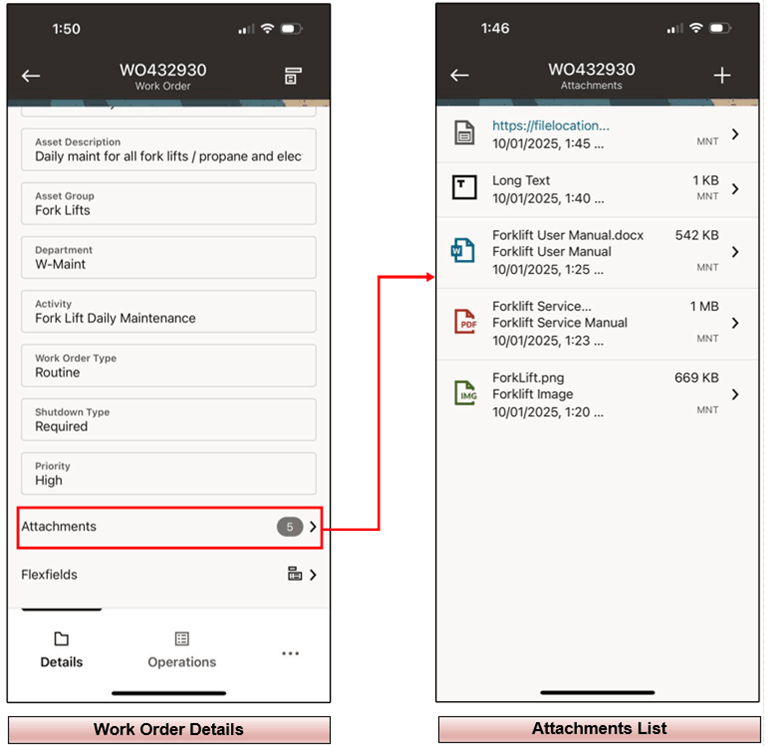
View Attachments in Offline Mode
Steps to enable and configure
- Review attachment setup and the offline synchronization rules for the mobile users and maintenance objects.
- Synchronize the device while online so required attachments are cached for offline use.
- Switch to offline mode and open the work order, operation, or asset that contains attachments.
- View the attachment and verify that it remains accessible while the device is disconnected.
Tips and considerations
- Consider attachment size and device storage when enabling offline access.
- Train users to synchronize before entering disconnected areas.
- Use clear attachment titles so technicians can identify the right file quickly.
Key resources
- My Oracle Support Knowledge Document KB858915, Oracle Mobile Maintenance for Oracle E-Business Suite Release Notes
- Oracle E-Business Suite Mobile Apps Administrator's Guide
- Oracle Enterprise Asset Management Implementation Guide
- Setting Up (chapter)
- Oracle Enterprise Asset Management User's Guide