Search using Search Box or Barcode Scan for Operations and My Department Work
Technicians can search Operations and My Department Work using the search box or barcode scan. This helps users find relevant work quickly when lists are long or when a barcode is available in the physical workspace. The enhancement supports faster navigation to the correct operation or department work item.
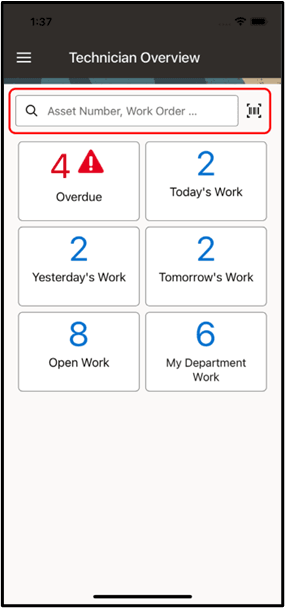
Use the Search Box or Barcode Scan for Operations and My Department Work
Steps to enable and configure
- Confirm that mobile users have access to the Operations and My Department Work lists.
- Review barcode values and searchable fields used by your maintenance process.
- Open the target work list, enter search text or scan a barcode, and review the filtered results.
- Open the correct operation or department work item and continue the required maintenance task.
Tips and considerations
- Standardize barcode labels and asset or work identifiers so scanning returns predictable results.
- Train users to clear search terms when returning to a full work list.
- Include barcode search in device testing because camera behavior can vary by model.
Key resources
- My Oracle Support Knowledge Document KB858915, Oracle Mobile Maintenance for Oracle E-Business Suite Release Notes
- Oracle E-Business Suite Mobile Apps Administrator's Guide
- Oracle Enterprise Asset Management Implementation Guide
- Setting Up (chapter)
- Oracle Enterprise Asset Management User's Guide