Select from Work Request Department LOV with Approver
Select the correct department and approver from the work request department list of values when submitting work requests. This enhancement helps mobile users to reduce approval routing errors and supports faster review of new work requests.
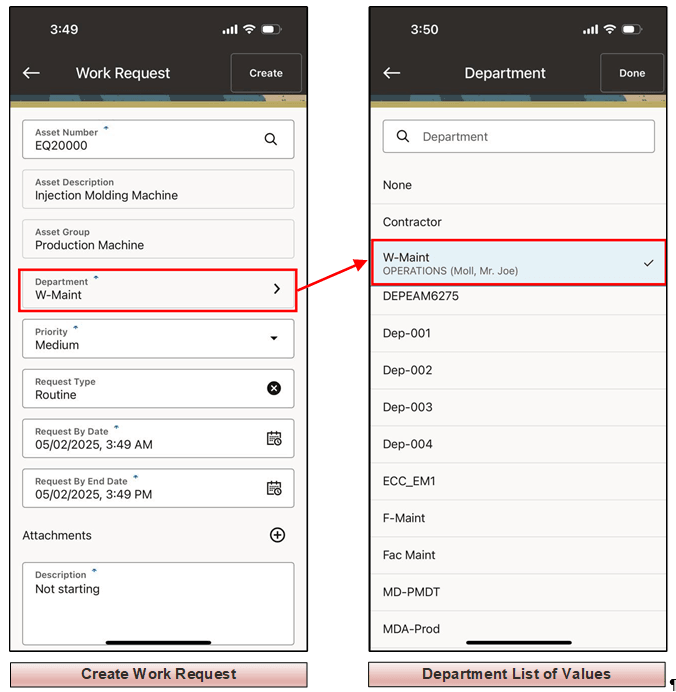
Department Approver List of Values
Steps to enable and configure
- Review department and approver setup used by work requests in Oracle Enterprise Asset Management
- Confirm that the mobile user has access to the departments that should be available for selection.
- Create a work request in the mobile app and open the Department list of values.
- Select the correct department, confirm the approver context, and submit the work request.
Tips and considerations
- Keep department names and approver assignments current so mobile users can route requests correctly.
- Use clear department naming conventions where multiple locations or maintenance groups have similar names.
- Include approver routing checks in mobile work request testing.
Key resources
- My Oracle Support Knowledge Document KB858915, Oracle Mobile Maintenance for Oracle E-Business Suite Release Notes
- Oracle E-Business Suite Mobile Apps Administrator's Guide
- Oracle Workflow User's Guide
- Oracle Enterprise Asset Management Implementation Guide
- Setting Up (chapter)
- Oracle Enterprise Asset Management User's Guide