Balances Dashboard
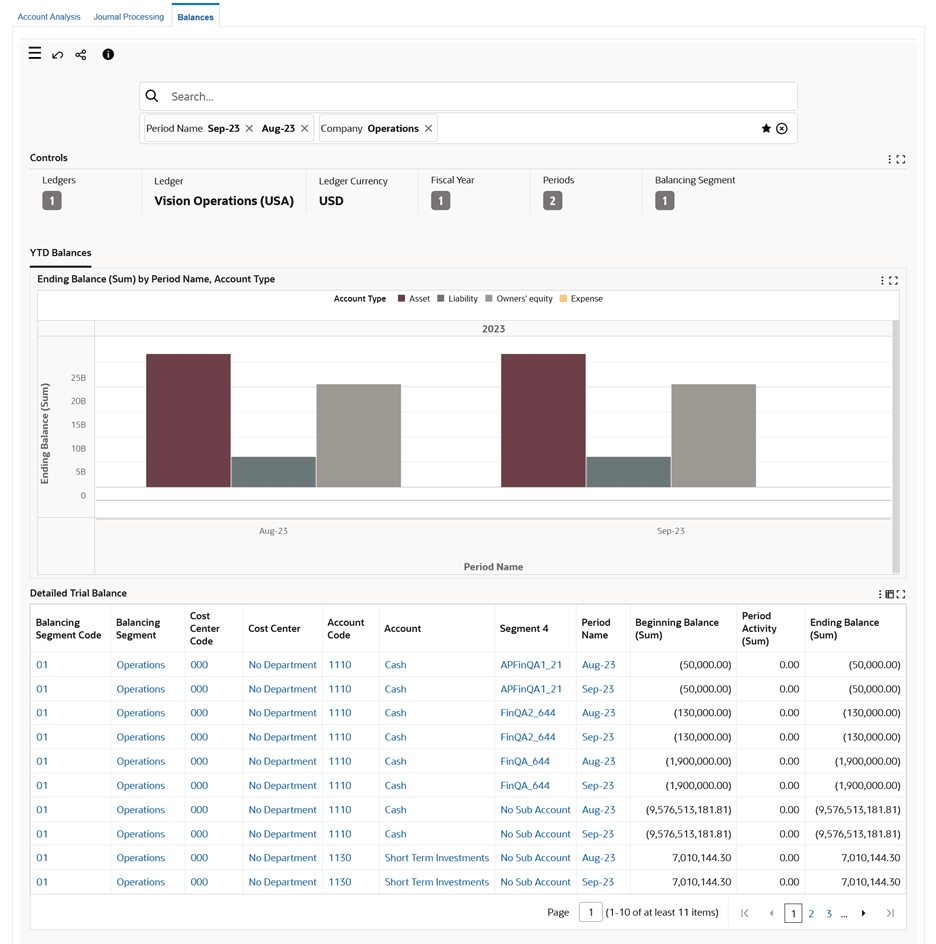
The Balances Dashboard provides discovery and visualization of year-to-date General Ledger balances for open and closed accounting periods. Users can review balances by ledger, fiscal year, period, balancing segment, account, and account type.
The dashboard requires Oracle Enterprise Command Center Framework Release 12.2 V11. It helps finance users track financial health, identify balance trends, troubleshoot balances, and review detailed trial balance results from the dashboard.
The Balances dashboard presents detailed data for year-to-date (YTD) balances and trial balances.
Use the dashboard to:
- Review year-to-date (YTD) balances.
- Examine the net period activities and closing balances across account types and natural accounts for an accounting period.
- Drill down to examine the ending balance for each account.
- Compare balances, for example, Cash and Accounts Receivable accounts to monitor cash flow and then drill down further to review accounts that contribute to the Cash and Accounts Receivables accounts such as Support Sales and Consulting Sales.
- Review detailed trial balance data.
- Monitor the financial activities of the organization by tracking account balances at the end of the fiscal period.
- Identify trends and patterns in your finances by comparing closing balances.
- Track changes to General Ledger account balances.
- Evaluate the organization's financial position by comparing the closing balance of a set of accounts with the same in the previous periods.
Important: The Balances dashboard displays balances data only for the "Actual" balance type.
Balances Dashboard
Steps to enable and configure
- Confirm Oracle Enterprise Command Center Framework Release 12.2 V11 or later.
- Apply the General Ledger Command Center update that delivers the Balances Dashboard.
- Grant access to finance users who review balances and detailed trial balance information.
- Run the General Ledger Command Center data load for balances and validate open and closed period results.
- Validate ledger, fiscal year, period, balancing segment, and account filters with representative users.
- Set the GL: Number of Latest Open Periods for ECC profile option. This site-level profile option controls the number of latest open periods that get displayed by default on the dashboard. The default value is 2. You can change the profile value as required. If the profile option is blank, then the default value is considered.
Tips and considerations
- The dashboard focuses on year-to-date balances, so use it alongside period activity views when users need movement details.
- Balance results depend on General Ledger balances and period status; reconcile dashboard timing with close and balance refresh activities.
- Use the detailed trial balance table when users need account-level support for chart results.
Key resources
Oracle General Ledger User's Guide
Oracle General Ledger Implementation Guide
Transfer of Information
R12.2.13 TOI: Implement and Use General Ledger - Oracle General Ledger Command Center - GL Balances Dashboard