Set 1099-R Delivery Preferences in Employee Self-Service
Employees can now use Self-Service Document Delivery Preferences to select how they want to receive their 1099-R Information Return. Employees can choose from the following delivery options:
- Online only
- Paper copy by mail
- Both online and paper copy
If employees select a paper copy option, they can also choose whether the return should be mailed to their home address or mailing address. Prior releases provided similar delivery preference functionality for employee W-2 forms and payslips.
Prior to this release, employees did not have self-service capabilities to manage delivery preferences specifically for 1099-R Information Returns. Organizations often relied on default delivery methods or manual administrative processes to manage distribution preferences for these tax documents.
This enhancement improves employee self-service capabilities by allowing individuals to manage their 1099-R delivery preferences directly within the application, increasing convenience and flexibility. It also helps organizations reduce printing, mailing, and administrative costs by encouraging electronic delivery and minimizing manual processing activities.
Process Flow in Self-Service
If only Online is checked, then 1099-R Information Return PDF will only be available online via Employee Self-Service.
If only Paper is checked, then physical 1099-R copy will be generated and printed for mailing (and no 1099-R Information Return available online) when ‘1099R Information Return – PDF’ process is run.
1099-R Document Delivery Preferences
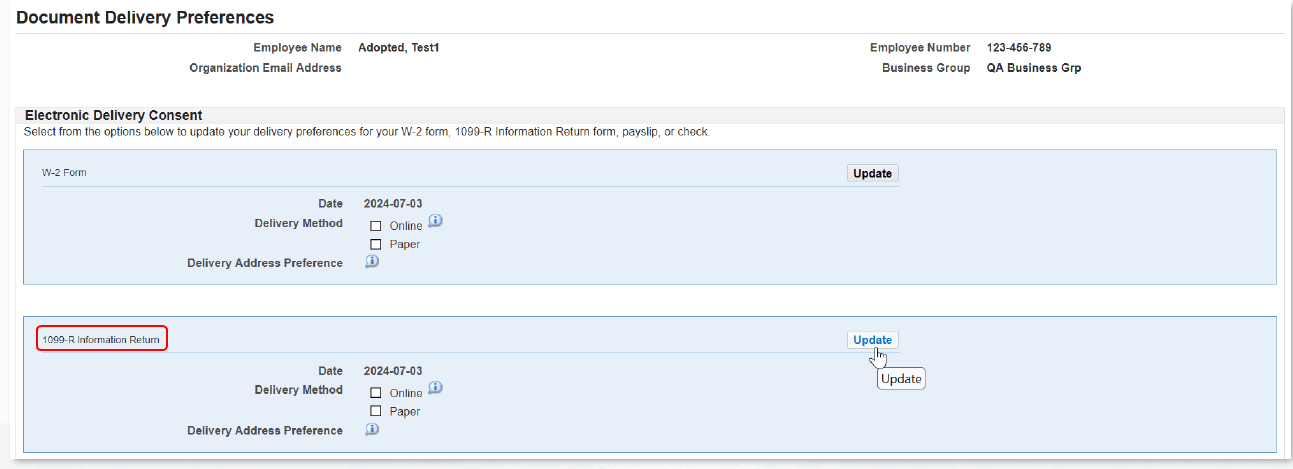
Delivery Address Preference

Selecting Paper also enables individual to select their preferred address for where the 1099-R copy should be mailed:
- Mailing Address
- Resident Address (this is the default Address option)
- Work Address
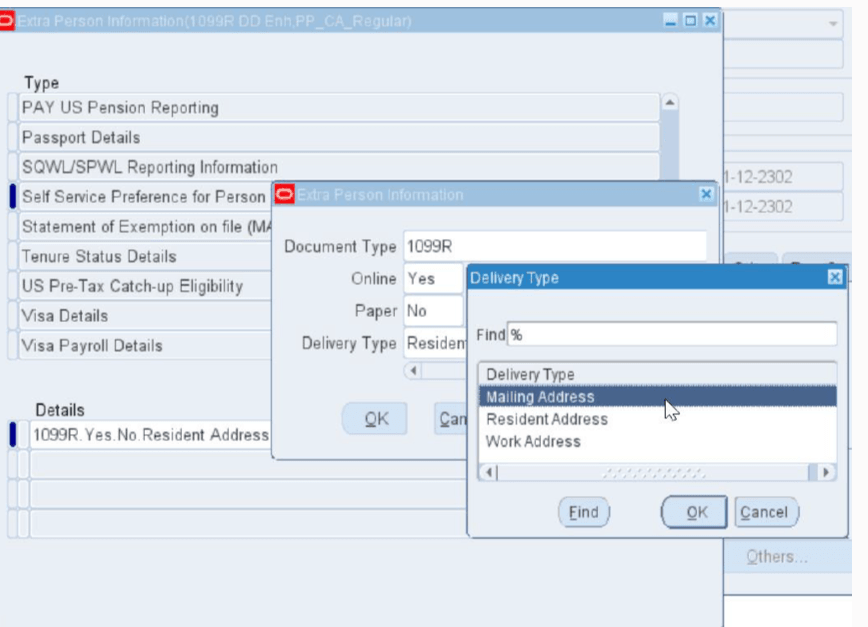
Any 1099-R Document Delivery Preferences updated in Self-Service are saved in Self Service Preference for Person in Person Extra Information in professional forms for the Document Type 1099R. Updates can also be made directly in Self Service Preference for Person in the professional form and will be reflected in Self-Service.
Self Service Preference for Person in Person Extra Information
Steps to enable and configure
- Set the document viewing and printing preferences using Self Service Preferences for professional forms as employees can navigate to the Document Delivery Preferences page in Self-Service.
- Select the preferred delivery method for the 1099-R Information Return:
- New options "1099R" and "Corrected 1099R" have been added to the existing Document Type list of values in Self Service Preference for Person EIT.
- When Document Type "1099R" or "Corrected 1099R" is selected by the professional user, they can see the employee's or individual's 1099-R Document Delivery Preferences in "Online" and "Paper" fields as well as "Delivery Type" (which corresponds to Delivery Address Preference selected in Self-Service).
- Select Yes or No for the "Online" and "Paper" fields as well as select Delivery Type if applicable. (If none is selected default Delivery Type is "Resident Address".)
Tips and considerations
- Ensure employee address records are accurate and up to date before enabling paper delivery options.
- Communicate electronic delivery enrollment deadlines and compliance requirements to employees.
- Review organizational policies regarding consent for electronic tax form delivery.
- Test document delivery configurations in a non-production environment prior to rollout.
- This enhancement extends existing self-service delivery preference capabilities already available for W-2 forms and payslips. When enabling delivery preferences for 1099-R Information Returns in Employee Self-Service, organizations should ensure employees are clearly informed about available delivery options, consent requirements for electronic statements, and deadlines for updating preferences. It is also important to validate secure access controls, maintain compliance with IRS electronic disclosure regulations, and provide support resources to help employees easily access, download, and retain their tax documents.
Key resources
Oracle SSHR Deploy Self-Service Capability Guide
Topic: Setting Document Delivery Preferences
Transfer of Information
R12.2.14 TOI: Implement and Use Advanced Benefits, Core Payroll and HRMS (US)