View Instructor-Led and Self-Paced Enrollments on Learner Home Page
The Learner Home page separates current enrollments into instructor-led and self-paced sections.
This makes the learner home page easier to scan because scheduled learning and self-paced learning have different planning implications. Learners can quickly distinguish classes with dates from learning they can complete independently.
The improvement supports a cleaner learner experience and reduces confusion when a learner has several active enrollments across delivery modes.
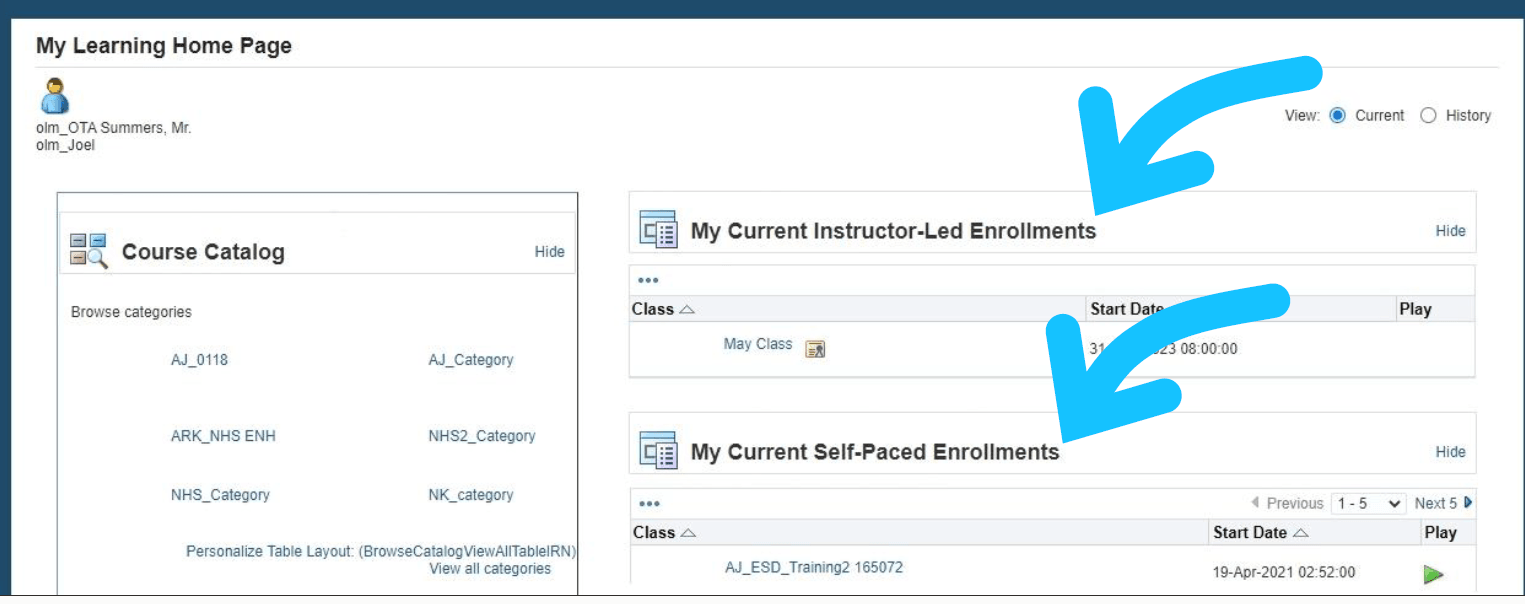
On the My Learning Home page for learners, the following changes are made.
- The My Current Enrollments section is now split into the following sections:
- My Current Instructor-Led Enrollments: This section shows details for synchronous learning, which is instructor-led offline and online enrollments.
- My Current Self-Paced Enrollments: This section shows details for asynchronous learning, which is self-paced offline and online enrollments.
- The My Enrollment History section is now split into the following sections:
- My Instructor-Led Enrollment History: This section shows the history of instructor-led offline and online enrollments.
- My Self-Paced Enrollment History: This section shows the history of self-paced offline and online enrollments.
My Learning Home Page Sections
Steps to enable and configure
You don't need to do anything to enable this feature.
Tips and considerations
- Test with realistic enrollment data; a learner with only one delivery mode will not demonstrate the full benefit.
- This page layout change may reduce support questions about where to find current class registrations.
- If learner communications reference a generic current enrollments section, update the wording to match the separated sections.
Key resources
Oracle Learning Management User's Guide
Transfer of Information
R12.2.13 TOI: Implement and Use Human Resources, HRMS (US and Canada) and Learning Management