Change Supply Status for Kanban Cards from Kanban Dashboard
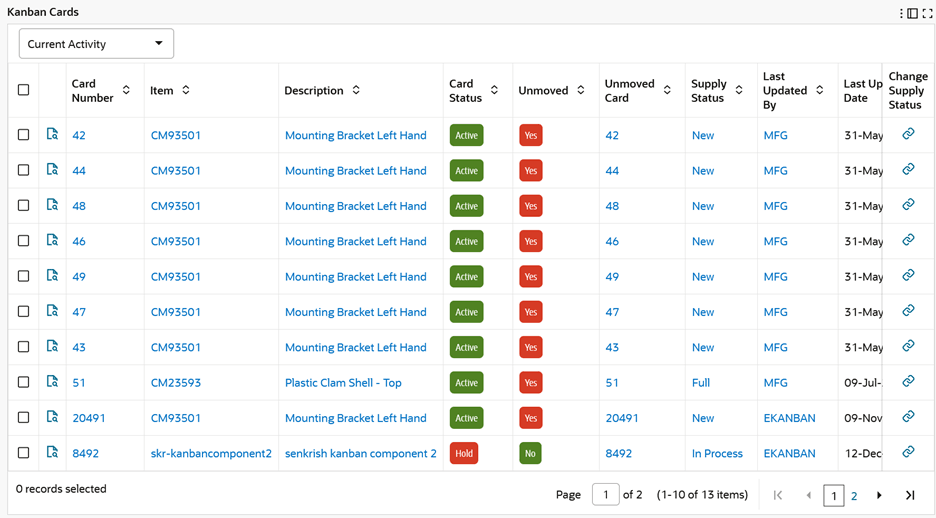
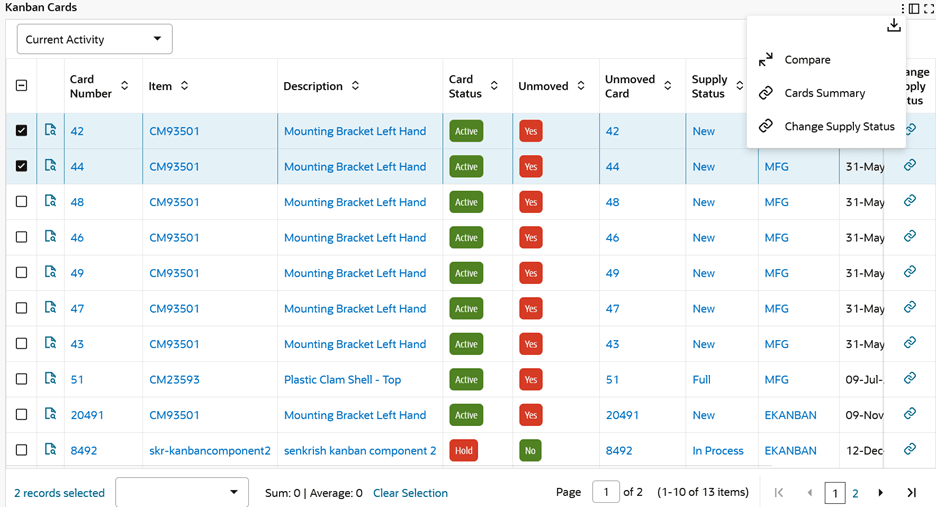
Change Kanban card supply status from the Kanban Dashboard. The Change Supply Status action link is enabled from the Kanban Cards results table so users can select one or more Kanban cards and navigate to the Oracle Application Framework HTML page to perform the manual status change.
This improves planner productivity because users can move from dashboard exception review to supply-status action without manually searching for the same cards in a separate page.
Kanban Cards – Change Supply Status for a Card
Kanban Cards – Change Supply Status for Multiple Cards
Steps to enable and configure
You don't need to do anything to enable this feature.
Tips and considerations
- Confirm that manual supply-status changes are consistent with the organization's Kanban operating policy.
- Use selected card result rows carefully when changing multiple Kanban cards at the same time.
Key resources
Oracle Electronic Kanban User's Guide
Oracle Inventory User's Guide