Track Kanban Cards by All Supply Statuses in Kanban Dashboard
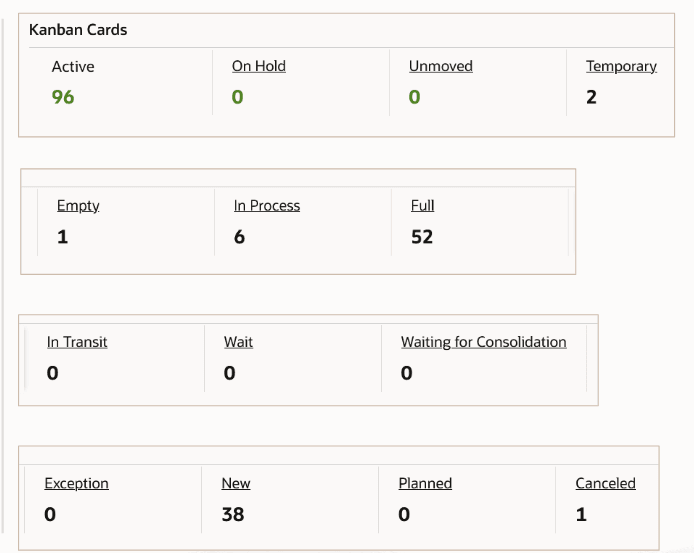
Track Kanban cards by all supply statuses in the Kanban Dashboard. The dashboard now includes cards in In Transit, Wait, Waiting for Consolidation, Exception, and New statuses.
Before this enhancement, the dashboard tracked Kanban cards in Empty, In Process, and Full statuses. The additional statuses give planners a more complete picture of card movement and help identify replenishment work that is waiting, delayed, or in exception.
Kanban Dashboard – Card Supply Statuses
Steps to enable and configure
- Apply the Oracle Inventory Management Command Center update that delivers additional Kanban card supply-status metrics and confirm the required Oracle Enterprise Command Center Framework level is installed and enabled.
- Grant the Inventory Management Command Center pages, actions, function security, and data access to the Logistics users who will use the dashboard.
- Run the applicable Command Center data load as a full load for initial population, then schedule incremental refreshes that match the operational review cycle.
- Validate the dashboard metrics, refinements, result tables, and action links with representative organizations, subinventories, items, orders, and transactions.
- Validate that Kanban cards in In Transit, Wait, Waiting for Consolidation, Exception, New, Empty, In Process, and Full statuses appear correctly in the dashboard
Tips and considerations
- Confirm that organization, subinventory, item, and responsibility security match the business audience for the dashboard before broad rollout.
- Use selected refinements and result-table drilldowns during testing so users can move from a summary metric to the transaction or setup page where action is taken.
- Use Exception and Waiting for Consolidation counts as operational signals because they usually require planner or warehouse follow-up.
- Review status definitions with Kanban planners so the meaning of each metric is clear.
Key resources
Oracle Electronic Kanban User's Guide
Oracle Inventory User's Guide
Transfer of Information
R12.2.14+ TOI: Implement and Use Inventory Management - Oracle Inventory Management Command Center - Kanban Dashboard