Movement Statistics Exceptions Dashboard
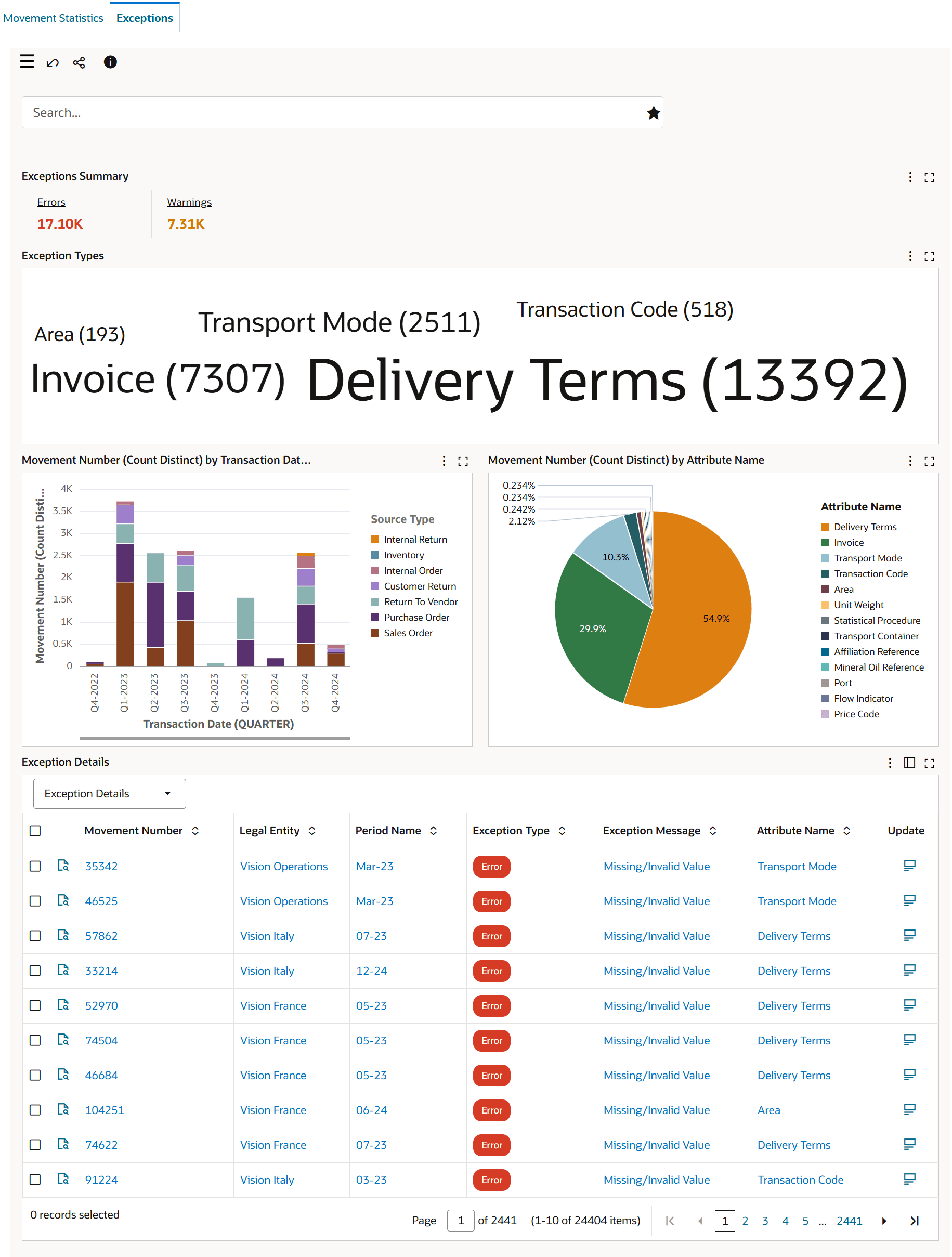
The Exceptions dashboard is an operational dashboard that provides exception resolution process for movement records.
Resolve movement statistics reporting issues earlier with the Movement Statistics Exceptions Dashboard. Trade reporting managers can view and prioritize exceptions that prevent Intrastat reporting for the current period, including errors and warnings generated for movement records.
Use the Exceptions dashboard to:
- View and prioritize exceptions that prevent Intrastat reporting for the current period. You can address errors and warnings generated for movement records.
- Efficiently resolve reporting data errors using the Update or Mass Update actions. Fix invalid or missing values in movement records for Oracle EBS transactions. An example for such an exception may be related to an incorrect movement statistics reporting custom mapping of the transport mode to a new freight carrier shipment mode used for sales orders.
- Review warnings for missing associated transactions, such as pending invoices. These warnings will automatically resolve upon invoicing, or you can defer the transaction to the next reporting period.
Exceptions Dashboard
Steps to enable and configure
- Apply the Oracle Inventory Management Command Center update that delivers the Movement Statistics Exceptions Dashboard and confirm the required Oracle Enterprise Command Center Framework level is installed and enabled.
- Grant the Inventory Management Command Center pages, actions, function security, and data access to the Logistics users who will use the dashboard.
- To process and load data from Oracle E-Business Suite (EBS) to the Movement Statistics and Exceptions dashboards of the Inventory Management Command Center, run the Movement Statistics ECC Data Load concurrent program. Note: System administrators must assign the Movement Statistics ECC Data Load concurrent program to the request group associated with a responsibility.
- Prerequisite: For the Movement Statistics and Exceptions dashboards to display accurate data, schedule the following programs to run periodically in Oracle Inventory:
- Movement Statistics Processor, Oracle Inventory User's Guide
- Movement Statistics Exception Report, Oracle Inventory User's Guide
- Movement Statistics Report, Oracle Inventory User's Guide
- Validate the dashboard metrics, refinements, result tables, and action links with representative organizations, subinventories, items, orders, and transactions.
- Confirm exception rules, reporting custom mappings, movement record attributes, associated transaction checks, and Update or Mass Update access for the users responsible for exception resolution.
- Validate the correction path for invalid or missing values and the deferral path for transactions that should move to the next reporting period
Tips and considerations
- Confirm that organization, subinventory, item, and responsibility security match the business audience for the dashboard before broad rollout.
- Use selected refinements and result-table drilldowns during testing so users can move from a summary metric to the transaction or setup page where action is taken.
- Prioritize errors that block current-period Intrastat reporting before warnings that are expected to clear after invoicing.
- Review custom mappings such as transport mode mappings when exceptions point to values introduced by new freight carrier shipment modes.
Key resources
Oracle Inventory Movement Statistics User's Guide
Transfer of Information
R12.2.14+ TOI: Implement and Use Inventory Management - Oracle Inventory Management Command Center - Movement Statistics and Exceptions Dashboards