Movement Statistics Dashboard
Analyze statistical data associated with trade movement through the Movement Statistics Dashboard. Trade reporting managers can review historical trade statistics across legal entities and periods, visualize trade volume and trends across commodities, and examine top trading partners by product, volume, and geography.
The dashboard helps users review trade concentrations, spikes, or declines in trade volume, customer and vendor returns, and key trade attributes for reporting systems such as Intrastat and Extrastat. This improves visibility into trade activity before reporting deadlines.
Movement Statistics Dashboard
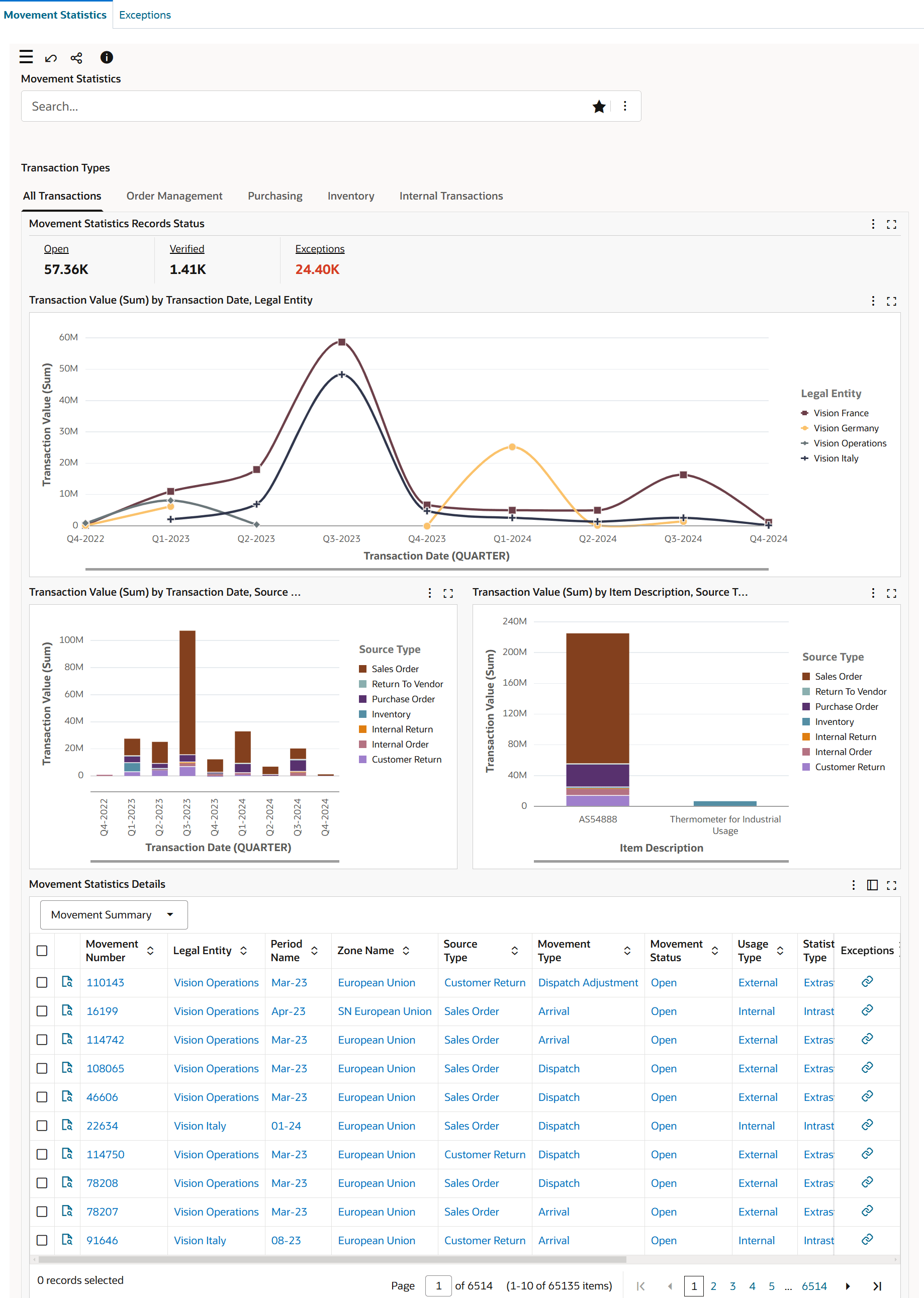
Use the Movement Statistics dashboard to:
- Review the status of movement records by all transactions and specific transaction types.
- Find the number of movement records that are open, verified, or have an exception.
- Analyze trade volumes and trend.
- Analyze trade volume across legal entities by source types using the time dimension.
- Perform detailed analysis of trade volumes and trends using different dimensions such as vendors and customers.
- Review transactions using attributes such as item description, commodity description, dispatch country, and destination country.
- Get insight into the trade direction.
- Focus on trade statistics in a specific quarter for a specific country, and for a particular transaction type.
- Review trade trends and find the items that contribute to the spike or fall in trade volumes.
- Review trade concentration in geographical locations.
- Review source and destination of goods.
- Perform returns analysis.
- Focus on records with exception errors to resolve and clear reporting bottlenecks.
- Use the movement statistics data to streamline your supply chain process.
Movement Statistics Dashboard Tabs
- All Transactions tab displays:
- Order Management, Purchasing, Inventory, and Internal transactions
- Order Management tab displays:
- Order Management transactions – Sales Order, Customer Return
- Purchasing tab displays:
- Purchasing transactions – Purchase Order, Return to Vendor
- Inventory tab displays:
- Inventory transactions - Inter-org Transfer and Returns
- Internal Transactions tab displays:
- Internal transactions - IR / ISO and Returns
Steps to enable and configure
- Apply the Oracle Inventory Management Command Center update that delivers the Movement Statistics Dashboard and confirm the required Oracle Enterprise Command Center Framework level is installed and enabled.
- Grant the Inventory Management Command Center pages, actions, function security, and data access to the Logistics users who will use the dashboard.
- To process and load data from Oracle E-Business Suite (EBS) to the Movement Statistics and Exceptions dashboards of the Inventory Management Command Center, run the Movement Statistics ECC Data Load concurrent program. Note: System administrators must assign the Movement Statistics ECC Data Load concurrent program to the request group associated with a responsibility.
- Prerequisite: For the Movement Statistics and Exceptions dashboards to display accurate data, schedule the following programs to run periodically in Oracle Inventory:
- Movement Statistics Processor, Oracle Inventory User's Guide
- Movement Statistics Exception Report, Oracle Inventory User's Guide
- Movement Statistics Report, Oracle Inventory User's Guide
- Set the INV: MVT ECC Full Load Days profile option to determine the age of movement records that the Full Load option of the Movement Statistics ECC Data Load program selects.
- Validate the dashboard metrics, refinements, result tables, and action links with representative organizations, subinventories, items, orders, and transactions.
- Confirm Movement Statistics setup for legal entities, periods, commodities, trading partners, product attributes, geography, returns, and reporting attributes used for Intrastat and Extrastat review.
- Validate movement statistics data by legal entity and period before using the dashboard for trade reporting review.
Tips and considerations
- Confirm that organization, subinventory, item, and responsibility security match the business audience for the dashboard before broad rollout.
- Use selected refinements and result-table drilldowns during testing so users can move from a summary metric to the transaction or setup page where action is taken.
- Use period and legal entity refinements to align dashboard review with the reporting period.
- Review spikes or falls in volume with transaction detail before interpreting them as business changes.
Key resources
Oracle Inventory Movement Statistics User's Guide
Transfer of Information
R12.2.14+ TOI: Implement and Use Inventory Management - Oracle Inventory Management Command Center - Movement Statistics and Exceptions Dashboards