View Kanban Cards in Tile Format in Kanban Dashboard
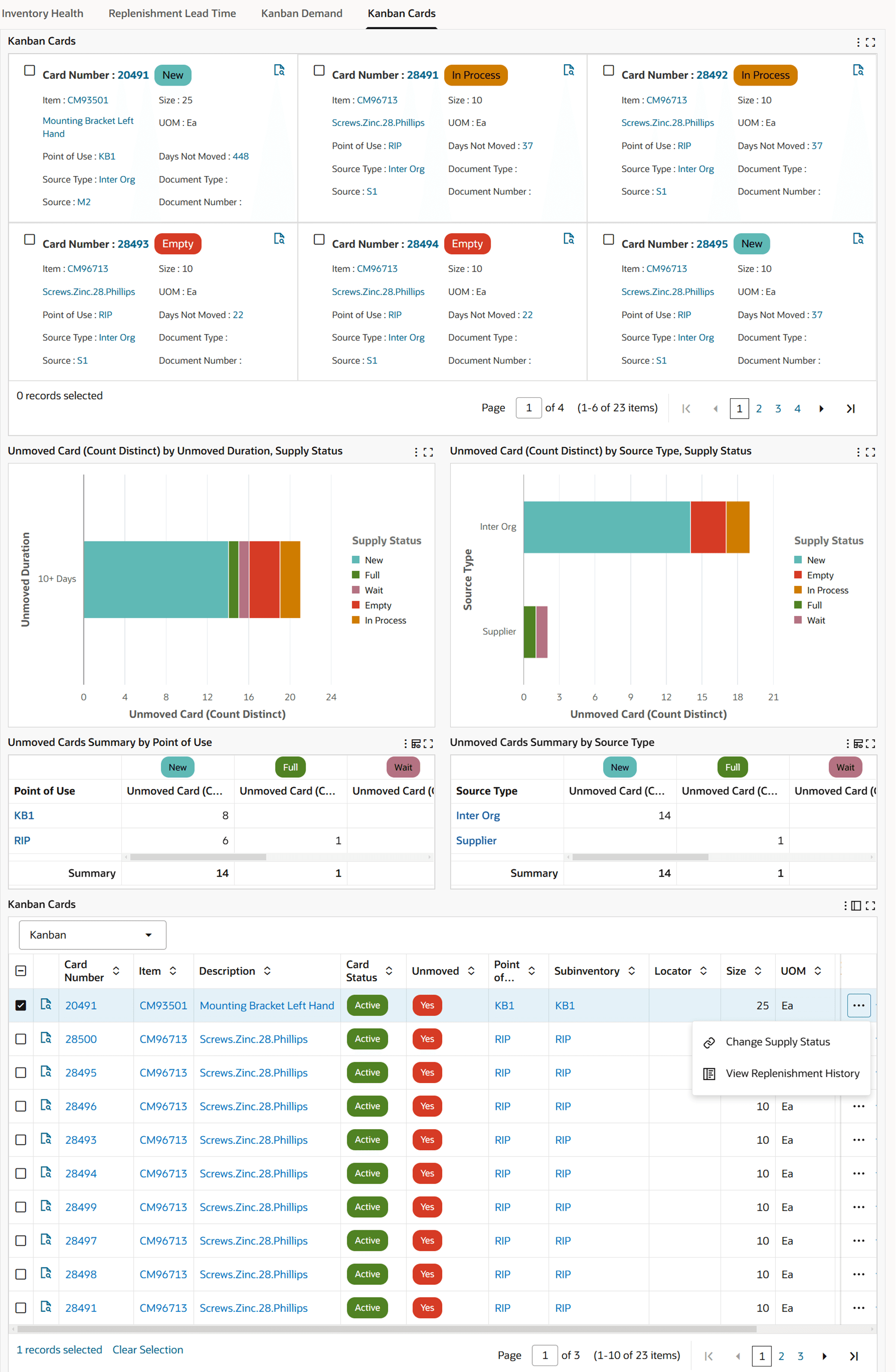
View Kanban cards in a tile format that displays key attributes and uses color-coded supply status for quick identification. Users can drill down from a tile into a popup window that shows all attributes for the Kanban card.
Before this enhancement, Kanban cards and attribute details were available in table format. The tile view improves scanability for planners who need to identify cards by status and then review detail quickly.
Use the tile view to review details of Kanban cards and compare one or more Kanban cards by different attributes.
Kanban Cards Tile View
Steps to enable and configure
You don't need to do anything to enable this feature.
Tips and considerations
Use tile view for status-oriented review and table view when users need dense comparison across many attributes.
Key resources
Oracle Electronic Kanban User's Guide
Oracle Inventory User's Guide
Transfer of Information
R12.2.14+ TOI: Implement and Use Inventory Management - Oracle Inventory Management Command Center - Kanban Dashboard