View Associated Rework Batches in Genealogy and Trace Dashboard
You can now view associated rework batches in the Process Manufacturing Command Center's Genealogy and Trace dashboard. The Process Batch node in the Genealogy and Trace dashboard's network diagram now displays the Rework icon to indicate a rework batch. The reworked Process Batch node along with the reworked batch flag displays the batch number, product, and organization.
Reworked Process Batch Node in the Genealogy and Trace Dashboard:
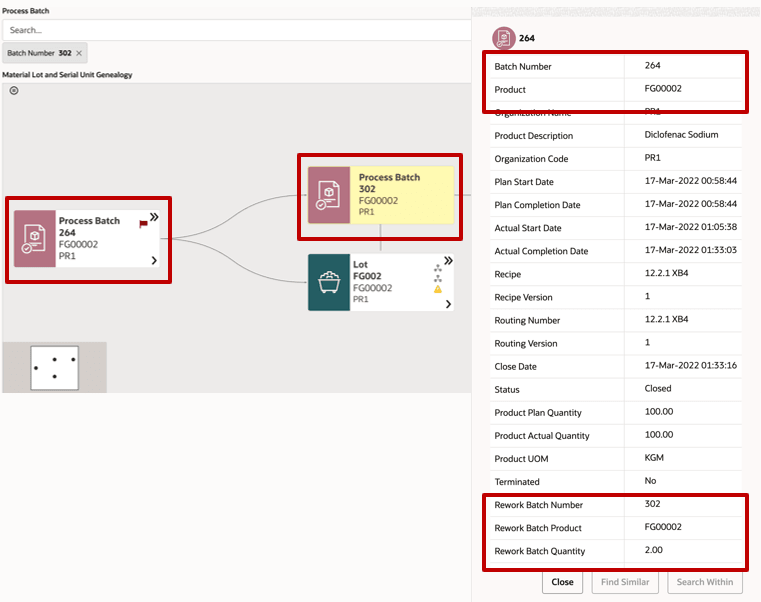
Including rework batches gives a more complete traceability picture when material is reprocessed, remediated, or linked to downstream production and customer demand.
Steps to enable and configure
Ensure Oracle Enterprise Command Center Framework Release 12.2 V14 or later is available for this functionality and complete the setups to enable the Process Manufacturing Command Center.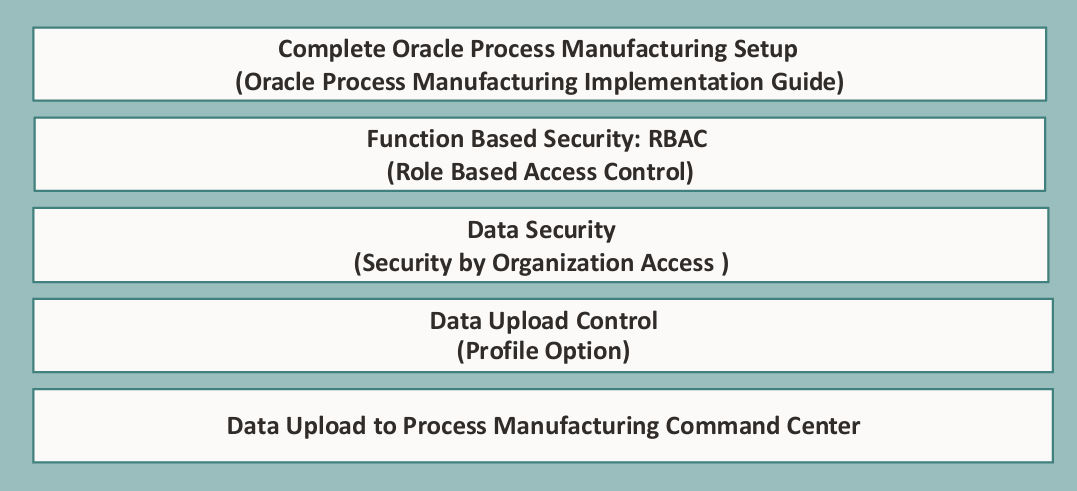
Tips and considerations
- Use the Process Manufacturing Command Center's selected refinements and result-table drilldowns during testing to move from a metric to the transaction or setup page where you can take action for a batch.
- Rework visibility depends on accurate links between original and rework batches - include rework-heavy scenarios in testing.
Key resources
- Oracle Process Manufacturing Process Execution User's Guide
- Chapter: Oracle Process Manufacturing Command Center
- Topic: Genealogy and Trace Dashboard
- Chapter: Oracle Process Manufacturing Command Center
- Oracle E-Business Suite User's Guide:
- Chapter: Enterprise Command Centers
- Topic: Overview of Oracle Enterprise Command Center
- Chapter: Enterprise Command Centers
- R12.2.14+ TOI: Implement and Use Process Manufacturing - Oracle Process Manufacturing Command Center