Associate Serial Numbers to Work Orders Using WIP Mass Load
You can now use the WIP Mass Load concurrent program to associate serials in certain statuses for non-standard discrete jobs. This feature enables you to:
- Associate serial numbers to non-standard discrete jobs that reside in stores or are issued out of stores.
- Replace or change the serial numbers in non-standard discrete jobs that reside in stores or are issued out of stores.
- Delete serial numbers from the non-standard discrete jobs that are issued out of stores.
To associate serial numbers to work orders using WIP Mass Load concurrent program:
- Create non-standard discrete jobs
- Insert Data into WIP_JOB_SCHEDULE_INTERFACE table.
- Insert serial numbers for the discrete jobs into WIP_JOB_DTLS_INTERFACE table.
- Run the WIP Mass Load concurrent program
- View serial numbers in the non-standard discrete job.
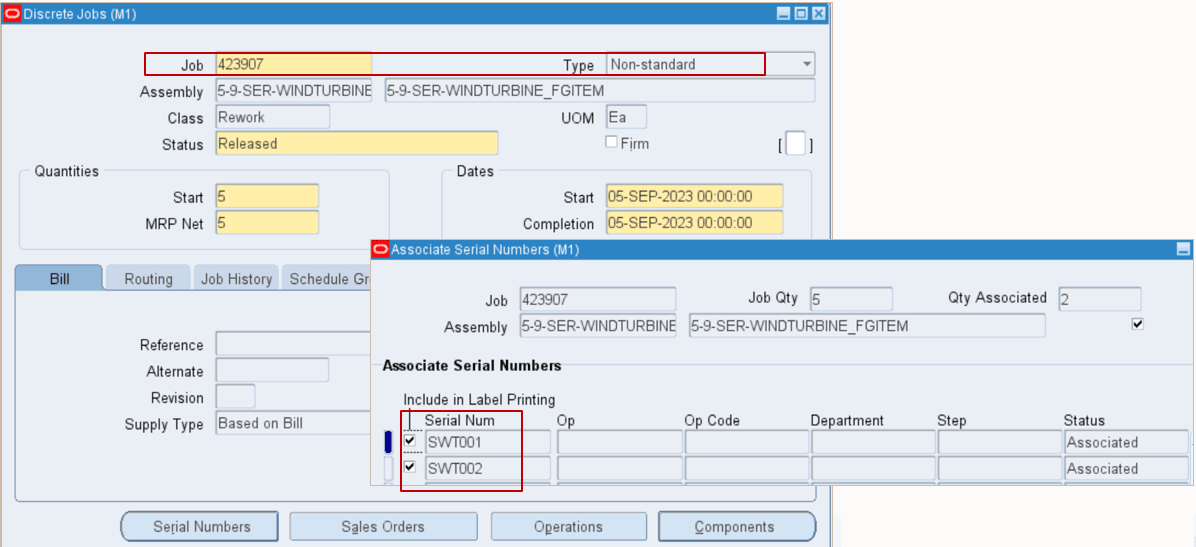
Prior to this release, assigning serial numbers to non-standard discrete jobs was limited to manual entry via the Forms user interface.
The ability to associate serial numbers to work orders using the WIP Mass Load concurrent program enables you to efficiently associate serial numbers to work orders in bulk, reducing manual effort and ensuring accuracy in serialization.
Steps to enable and configure
You don't need to do anything to enable this feature.
Tips and considerations
- When associating serial numbers to discrete jobs, note the following:
- Job type must be non-standard type
- Serial numbers with a status 3 (Resides in stores) can be associated with released non-standard jobs only. It creates a WIP Issue transaction for the job.
- Serials numbers with status 4 (Issue out of stores) can be associated with released or unreleased non-standard jobs.
- Serial numbers with status 3 (Resides in stores) and status 4 (Issue out of stores) cannot be associated to standard jobs.
- When deleting the associated serial numbers from the discrete job, note the following:
- Job type must be non-standard type.
- Delete serial numbers with status 4 (Issue out of stores) from the job. It creates a WIP Return transaction for the job
Key resources
- Oracle Work in Process User’s Guide:
- Chapter: Non-Standard Discrete Jobs
- Topic: Overview of Non-Standard Discrete Jobs
- Topic: Standard Versus Non-Standard Discrete Jobs
- Chapter: Non-Standard Discrete Jobs
- R12.2.13 TOI: Implement and Use Discrete Manufacturing - WIP, MES and CTO Enhancements