Inspect Receiving Transactions Using Skiplot and Sampling in Quality Workbench
Oracle Quality now integrates with the Receiving HTML UI to support:
- Sampling inspections
- Skip lot inspections
You can use the Inspect page in the Receiving HTML to view applicable skip lot collection plans that are available for quality results data entry based on the Skip Lot Association during Skip-Lot Criteria setup. Select the Enter Quality Results icon to add results for the plan.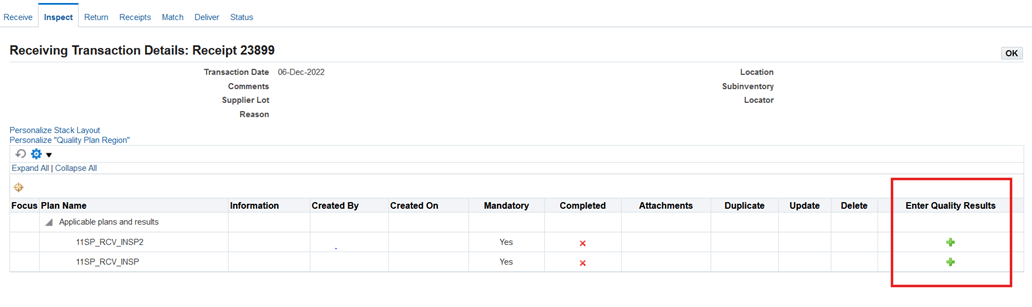
Additionally, you can enter quality results directly for an applicable single skip lot plan, based on the Skip Lot Association during Skip-Lot Criteria setup.
You can also use the Inspect page in the Receiving HTML UI to view and enter quality results for sampling plans. For applicable sampling plans, the Inspect page displays the sample size in the Sample Size field in the plan region. Select the Enter Quality Results icon to add results for the plan.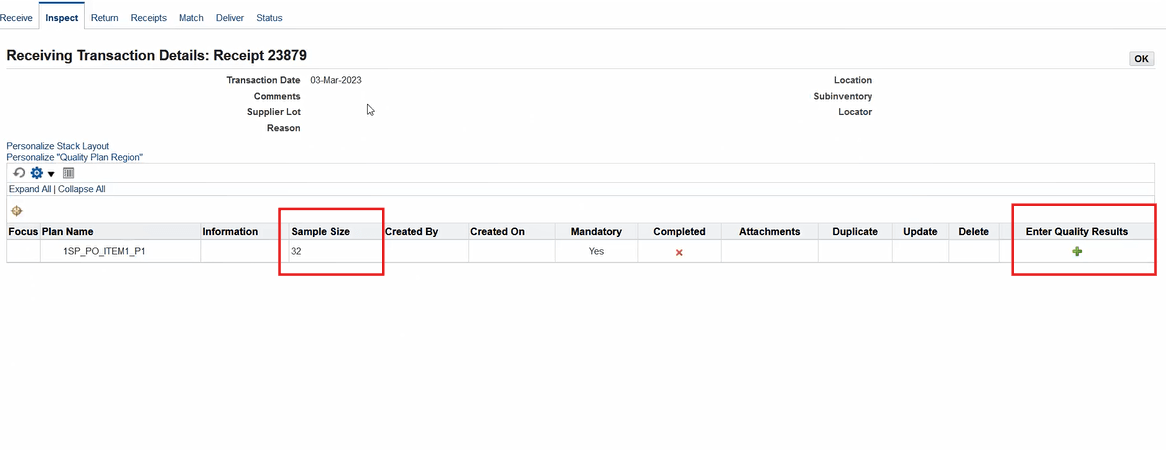
Steps to enable and configure
You don't need to do anything to enable this feature.
Tips and considerations
- Use Skip-Lot inspections to efficiently perform receiving inspections while saving cost, time, and effort.
- Use Sampling inspections when some items of the same unit that are manufactured through the same processes are extracted as a sample and are then inspected instead inspecting all items.
Key resources
- Oracle Quality User's Guide:
- Chapter: Manage Supplier Quality
- Topic: Performing Skip Lot Inspections
- Topic: Performing Sampling Inspections
- Chapter: Manage Supplier Quality
- Oracle Purchasing User's Guide:
- Chapter: Receiving
- Topic: Receiving HTML UI
- Chapter: Receiving