Purge and Archive Quality Transactions
Oracle Process Manufacturing System Administration now provides two additional purge types - QCDT and SUBR to enhance the archive and purge functionality.
To purge and archive quality transactions:
You can now use the new QCDT purge type to test, archive, and purge quality sample data related to OPM batches. The default retention period value for the QCDT purge type is 24 months. QCDT data eligible for archiving and purging must have a Last Modification Date older than (System Date - Retention Period). Define your retention policy and then select records that fall outside of that policy using the following parameters:
- Organization Code
- Sample Source
- Sample Disposition
- Earliest Modification Date
- Latest Modification Date
You can use the QCDT type to purge records from the following tables:
- GMD_COMPOSITE_RESULTS
- GMD_COMPOSITE_RESULT_ASSOC
- GMD_COMPOSITE_SPEC_DISP
- GMD_EVENT_SPEC_DISP
- GMD_RESULTS
- GMD_SAMPLES
- GMD_SAMPLE_SPEC_DISP
- GMD_SAMPLING_EVENTS
- GMD_SPEC_RESULTS
To purge and archive accounting data:
You can now use the new SUBR purge type to test, archive, and purge data from the OPM Accounting Preprocessor output tables. The default retention period value for the SUBR purge type is 120 months. SUBR data eligible for archiving and purging must have an End Date older than (System Date - Retention Period). Define your retention policy and then select records that fall outside of that policy using the following parameters:
- Legal Entity
- Calendar Code
- Period Code
- Cost Method Code
- Transaction Source
You can use the SUBR type to purge records from the following tables:
- GMF_XLA_EXTRACT_HEADERS
- GMF_XLA_EXTRACT_LINES
- GMF_TRANSACTION_VALUATION
In the Archive and Purge window, you can select the QCDT and SUBR and other valid purge types in the Type field: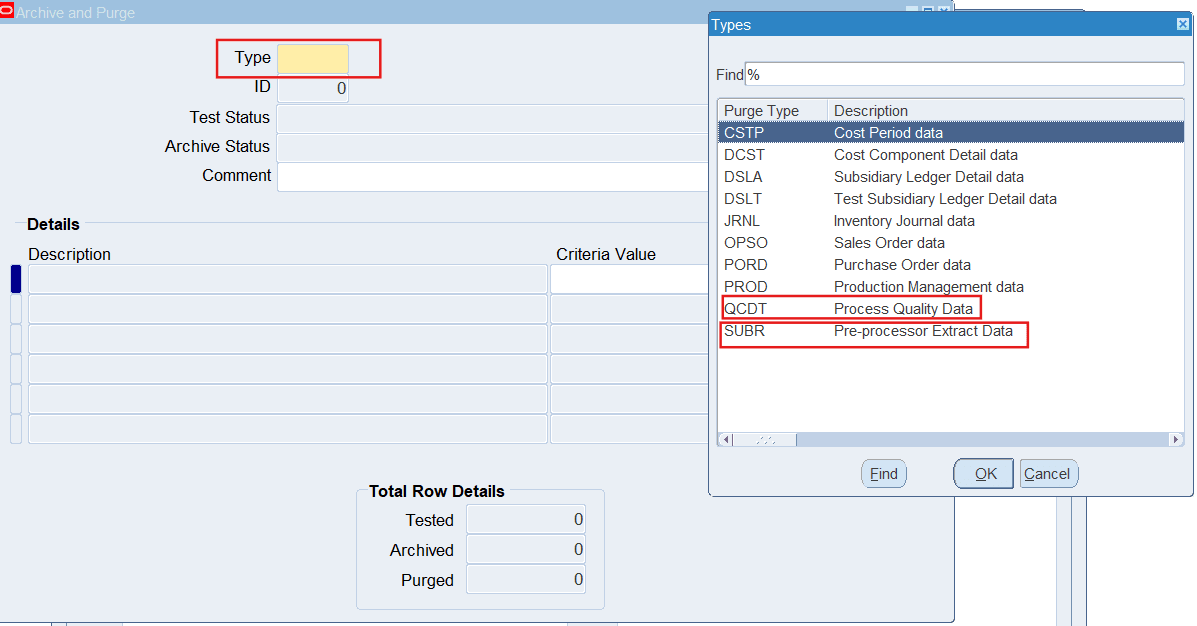
The QCDT and SUBR purge types provide more efficiency to the existing archive and purge functionality to purge unnecessary quality transaction data and archive essential historical records, ensuring that your system remains lean and responsive. This functionality delivers substantial business value by reducing database size, enhancing system performance, and minimizing storage expenses. It addresses a critical industry need for effective data lifecycle management.
Steps to enable and configure
Use the Archive and Purge Setup window to view purge types and their associated OPM production tables. The predefined types like QCDT and SUBR types enable you to test, archive, and purge selected records from OPM production tables associated with each type. You can change the record retention period for each type.
Tips and considerations
- Establish a comprehensive data retention policy before initiating purge or archive operations to prevent the accidental removal of critical quality transaction data.
- Consider scheduling purge and archive activities during low-usage periods to minimize any potential impact on system performance or user access.
- Ensure a full database backup is performed prior to executing purge operations as a precaution against data loss.
Key resources
- Oracle Process Manufacturing System Administration User's Guide:
- Chapter: Archive and Purge