New UI to Process Matches Interface Records
Gain enhanced expertise over Landed Cost Management processes with the introduction of a new user interface (UI) in Oracle E-Business Suite Release 12.2.13, specifically designed to process matches interface records. Prior to this release, handling matches interface records that failed to process due to missing, inaccurate, or inconsistent data was cumbersome, often requiring manual intervention or technical support to resolve issues. This new interface allows users to query held records based on criteria such as match status, invoice number, invoice dates, receipt dates, or receipt number, providing a direct and efficient way to manage these records.
This enhancement brings substantial business value by reducing downtime and operational inefficiencies associated with unprocessed matches interface records. You can update the status of records to "Pending" to resubmit or "Skip" to bypass processing, ensuring that financial data aligns accurately with procurement activities. This addresses a critical need in supply chain and cost management industries for precise cost tracking and error resolution. Use cases include correcting data discrepancies in invoice matching or managing high volumes of receipt transactions, while implementation considerations involve ensuring that relevant personnel are trained to utilize the new interface effectively for maintaining data integrity.
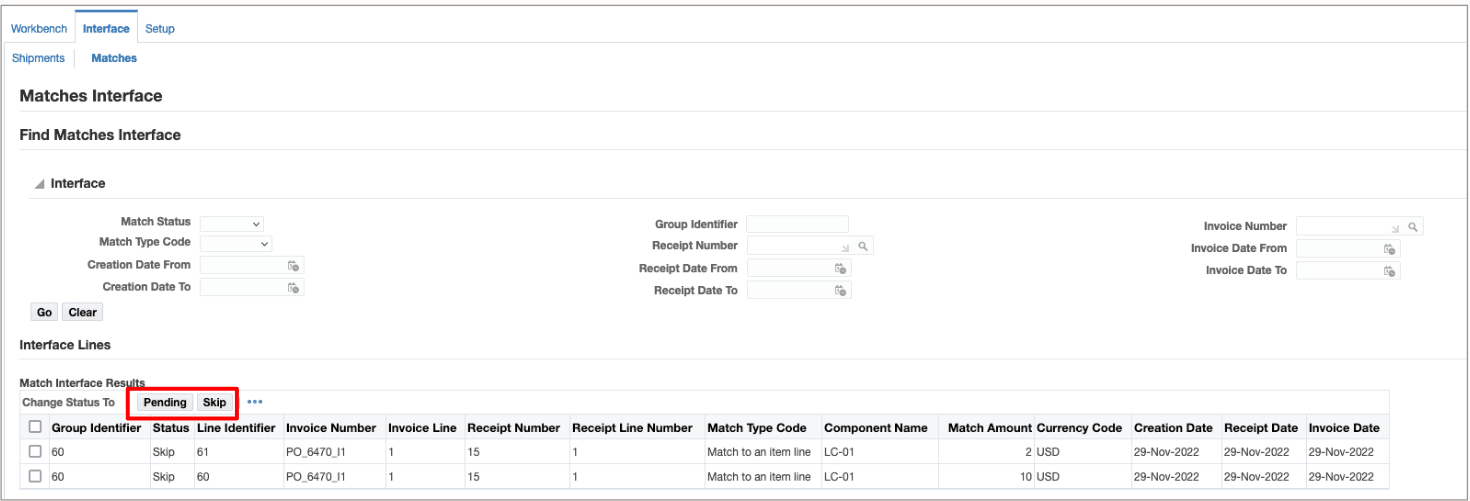
Matches Interface UI
Steps to enable and configure
You don't need to do anything to enable this feature.
Tips and considerations
- Train users on querying and updating matches interface records to ensure accurate handling of statuses such as "Pending" and "Skip".
- Establish protocols for reviewing held records regularly to prevent accumulation of unresolved issues that could impact financial reporting.
Key resources
Understanding the Matches Interface, Oracle Landed Cost Management Process Guide