Cost Partial Cancellations for Internal Sales Orders (ISO)
Partially cancel an internal sales order shipment or cancel at the line level instead of cancelling the entire shipment. The cancellation is captured through an Internal RMA Canceled Intransit Receipt transaction. Costing reverses accounting at original cost or price in proportion to the cancelled quantity.
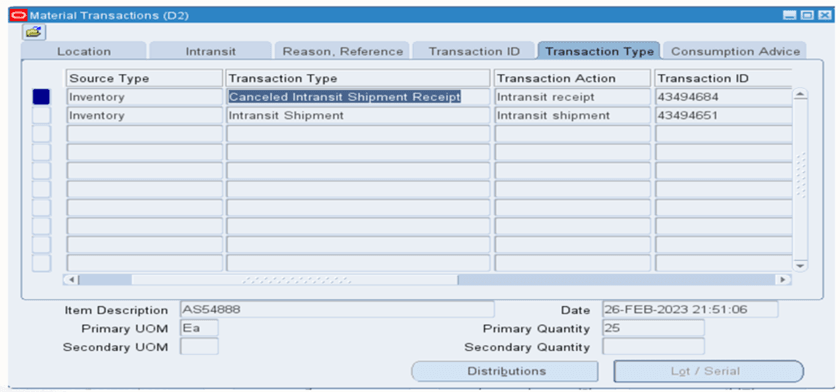
Cancel Intransit Shipment Form
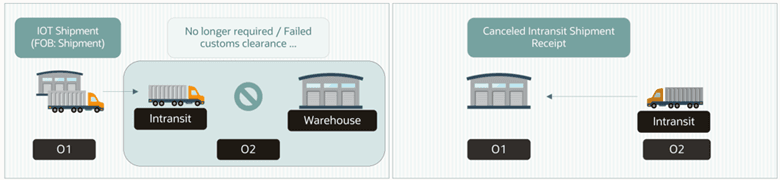
Partial Shipment Cancellation due to shipment not clearing customs
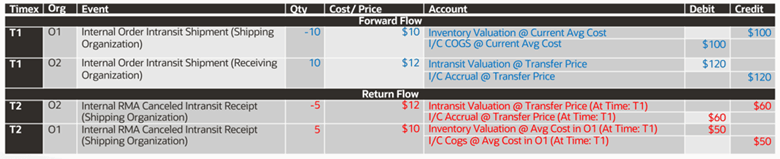
Example: Average-Average; Transfer Price as Incoming Cost; Across OU; Forward FOB: Shipment
Steps to enable and configure
- Confirm that the internal sales order shipment or shipment line is still in transit and eligible for partial cancellation.
- Enable the cancel action in the shipment flow, including the required Maintain Shipment form parameter where applicable.
- Cancel the selected shipment line or partial quantity.
- Process the Internal RMA Canceled Intransit Receipt transaction.
- Run cost processing and Create Accounting, then reconcile inventory and intransit balances.
Tips and considerations
- The accounting reversal is proportional to the cancelled quantity.
- Line-level cancellation helps correct partial fulfillment or receiving issues without unwinding the entire shipment.
- Validate return order type, intercompany invoice, transfer price, and shipping network setup when the Cancel action is unavailable.