View Order Credit Check Details Using Credit Check Analyzer in Orders Dashboard
The Credit Check Analyzer in the Orders Dashboard provides customer service representatives and order managers with a consolidated view of credit check results associated with sales orders. Users can review credit hold information, analyze credit evaluation outcomes, and understand the specific reasons that caused an order to fail a credit check, enabling faster resolution and order processing.
Prior to this enhancement, users had limited visibility into the details of credit check evaluations directly from the Orders Dashboard. Investigating credit-related order holds often required navigating to multiple screens or coordinating with credit management teams to obtain detailed information about the credit check results and hold conditions.
This enhancement improves operational efficiency by providing immediate access to detailed credit check information directly within the Orders Dashboard, reducing the time required to investigate credit-related order holds. By enabling faster identification and resolution of credit issues, organizations can accelerate order fulfillment, improve customer service responsiveness, and reduce order processing delays.
You can now view all the important details for an order on credit check hold using the new Credit Check Analzyer page in the Orders Dashboard.
Use this page to:
- Review the applicable credit check rule, credit limits, and transaction details such as invoices and sales orders that contribute to the credit exposure amount (calculated from open balances in Oracle Receivables and open orders in Oracle Order Management) for each Sales Order or Sales Order Line that is on credit check failure hold.
- Gain insight into the overall exposure and order level exposure amounts in credit limit currency for all the identified sales orders and sales order lines that are on credit check hold.
- Use the analytical data to take informed decisions about using the credit limits while honoring customer priority sales orders.
- Act on resolving credit check hold to fulfil priority sales orders.
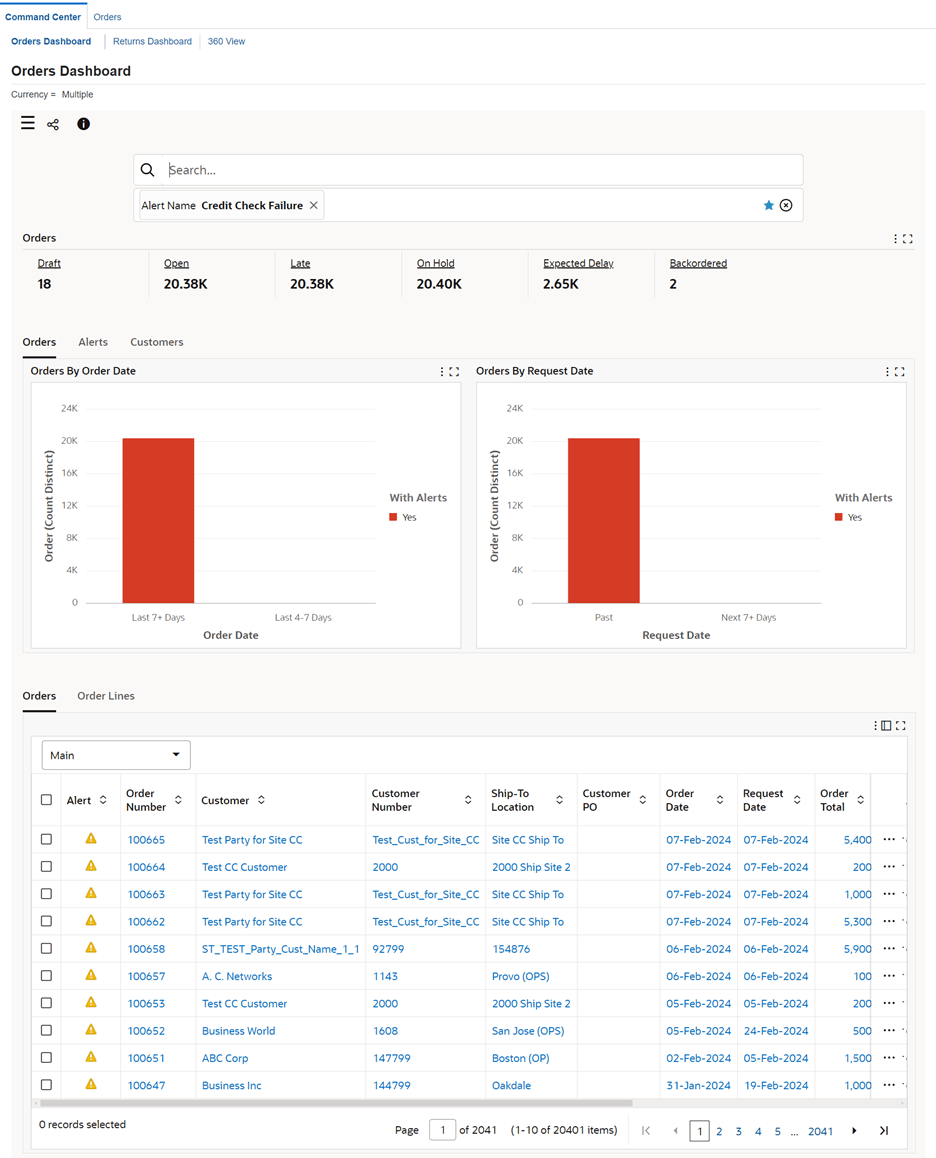
On the Orders dashboard, use the seeded search Orders on Credit Check Hold (alert name: Credit Check Failure) to search and review sales orders and sales order lines that are on hold for credit check failure.
Seeded Search Orders on Credit Check Hold
To review details for a sales order or a sales order line that is placed on hold for credit check failure, click Credit Check Hold Analysis.
Credit Check Hold Analysis Action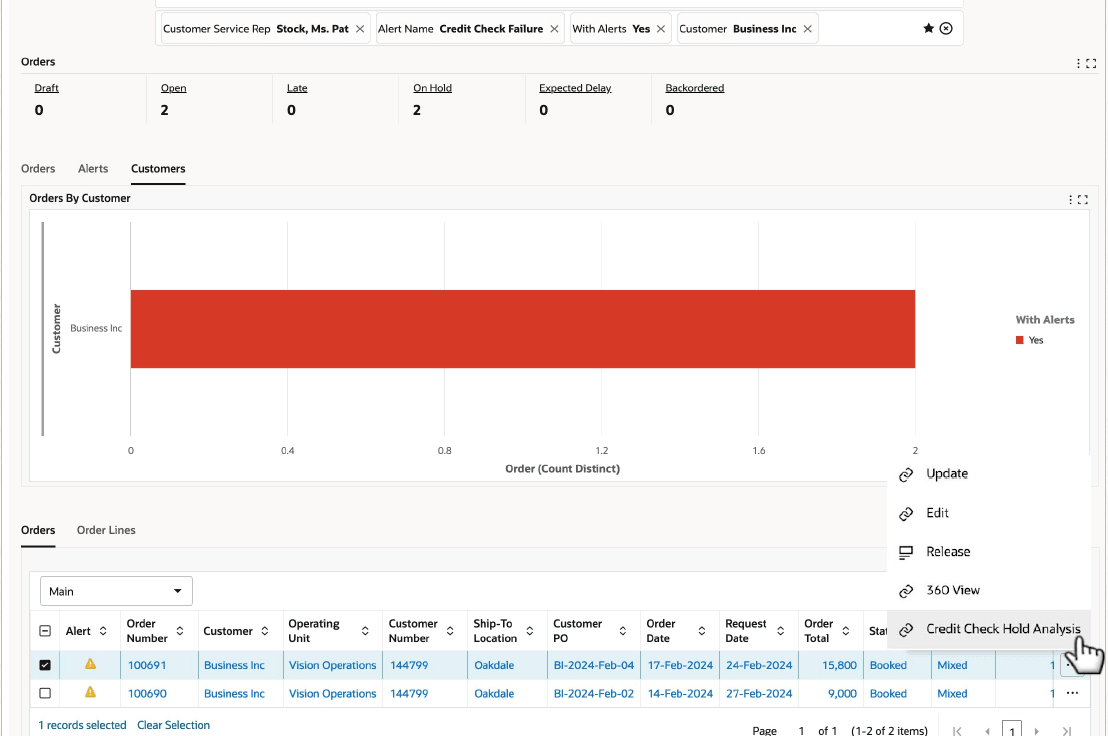
The Credit Check Hold Analysis page appears.
Credit Check Hold Analysis Page
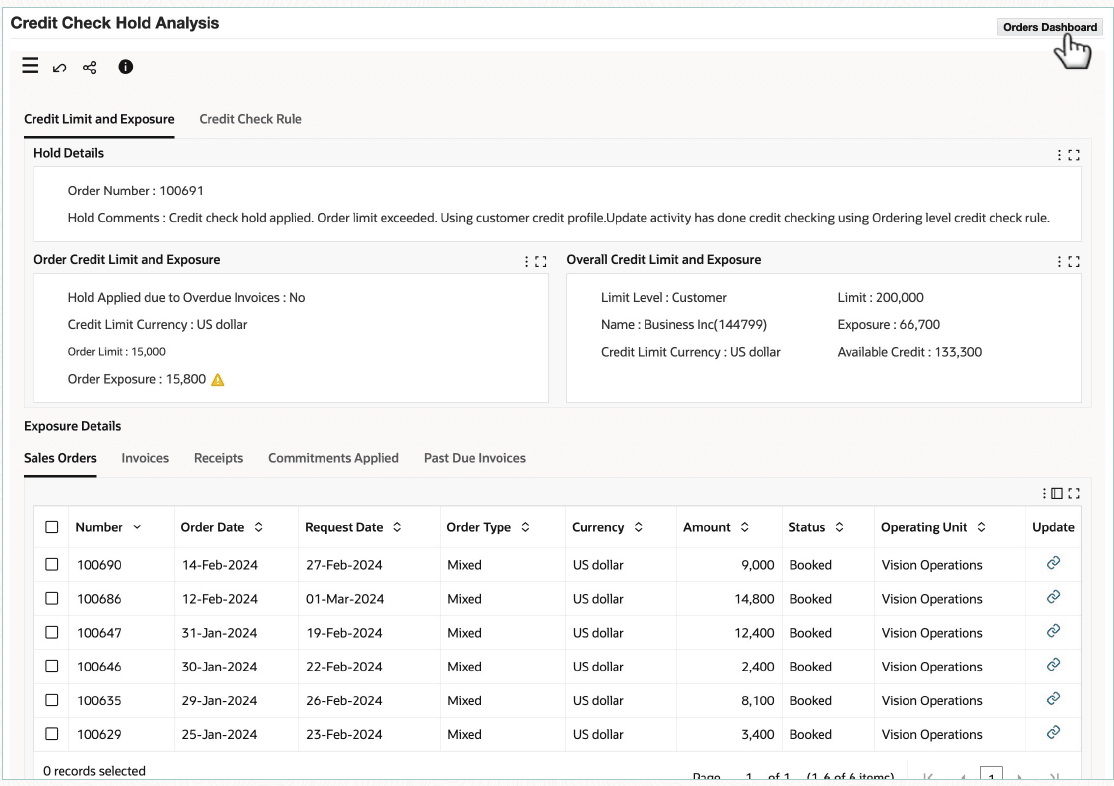
You can review credit limits, exposure summary, and exposure details. For the required order, you can select the Release action on the Orders dashboard to release the order from credit check hold.
Steps to enable and configure
- Run the following programs:
- Initialize Credit Summaries Table
- OM Command Centre Data Load
- OM Command Center Credit Check Data Load
- Review Multi-Org Access Control (MOAC) setup. The data security of the transaction details shown in the Exposure Details result tables is controlled by the Multi-Org Access Control (MOAC) setup. Based on the set up, Exposure Details from all the accessible operating units can be viewed.
Tips and considerations
- Ensure users have the necessary privileges to view order and credit-related information.
- The Credit Check Analyzer provides visibility into the credit evaluation results but does not replace credit policy configuration or maintenance activities.
- Review the analyzer details in conjunction with customer credit profiles and credit management processes when resolving credit holds.
- Organizations should establish clear procedures for handling credit exceptions and order release approvals.
- Credit check details displayed depend on the organization's configured credit management rules and policies.
Key resources
- Oracle Order Management User's Guide
- Oracle Order Management Command Center
- Credit Check Analyzer
- Oracle Order Management Command Center
- Oracle Order Management Implementation Manual
- Oracle Order Management Command Center Setup
- Setup and Configuration Steps for Order Management Command Center
- Loading Data for Credit Check Analyzer
- Setup and Configuration Steps for Order Management Command Center
Transfer of Information