Manage Return Orders Using Orders Dashboard
Customer service reps (CSRs) can now manage both return orders and outbound orders using the Orders Dashboard. With this complete view of orders for customers that they manage, CSRs can more effectively service their customers and quickly respond to customer queries such as the status of outbound shipments as well as the status of credit and replacement of return orders. You can also review returns by customer, by product, and by return reasons. Track and resolve return delays.
Prior to Release 12.2.14+, you could view and manage only outbound orders on the Orders Dashboard.
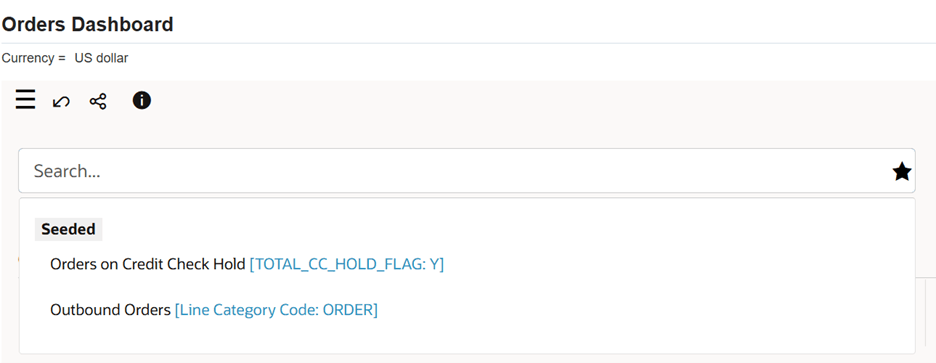
The Orders dashboard now includes a new seeded search Outbound Orders. Use this seeded search to review sales orders and sales order lines with at least one outbound line.
Seeded Search - Outbound Orders
New Attribute Group in Available Refinements: Return Information
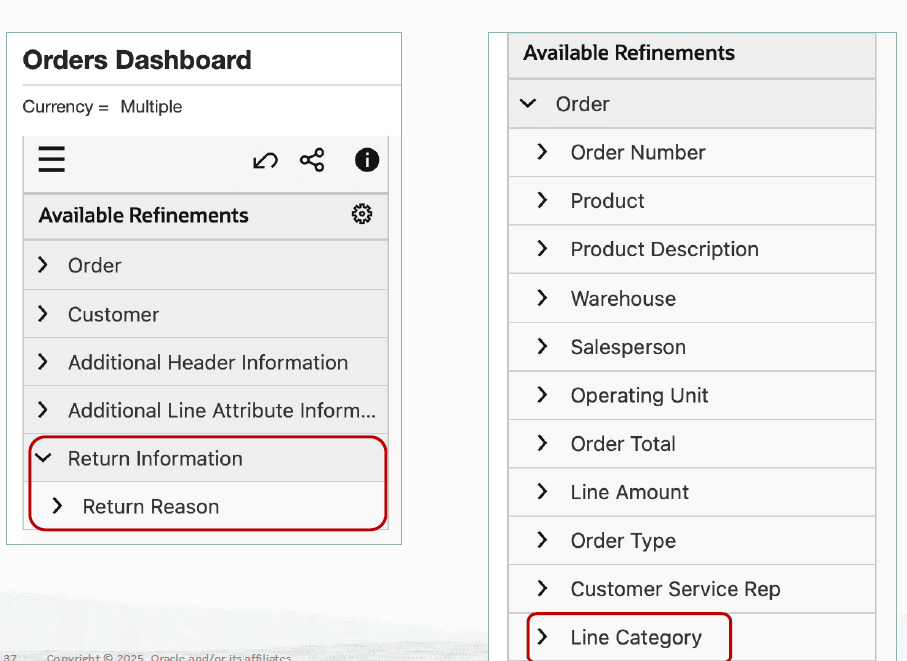
A new Return Information attribute group has been added to the Available Refinements section to help users more effectively identify and filter order and return transactions.
Within the Order attribute group, a new Line Category attribute is now available. The Line Category attribute supports the following values:
- Order
- Return
Review the Returns metric. This metric shows the number of sales orders with at least one open return line. If you click the Returns metric, then the Orders and Order Lines results tables display only those orders that have return lines.
The dashboard includes a new Returns tab.
Returns Tab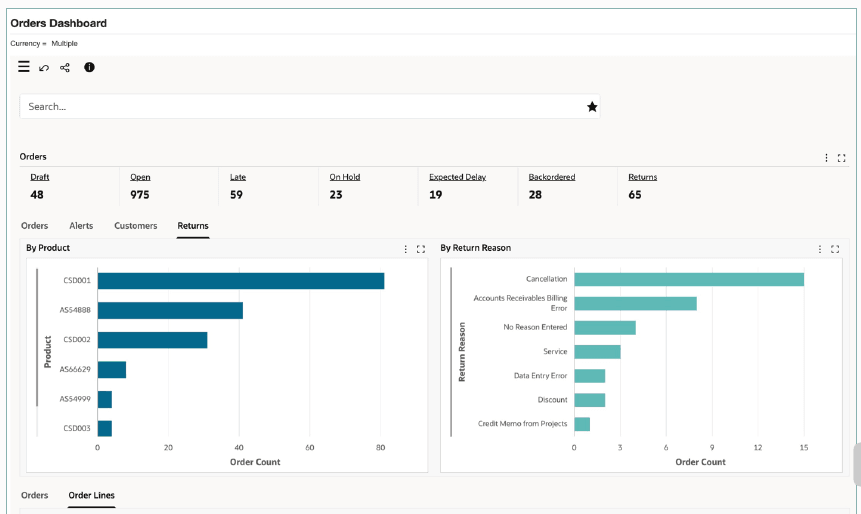
The Returns tab displays the following charts:
- By Product: This chart displays information about all orders with at least one return line for each product. Select a different metric to view the total line amount for each product.
- By Return Reason: This chart displays information about all orders with at least one return line for each return reason. Select a different metric to view the total line amount for each return reason.
Order Lines Results Table
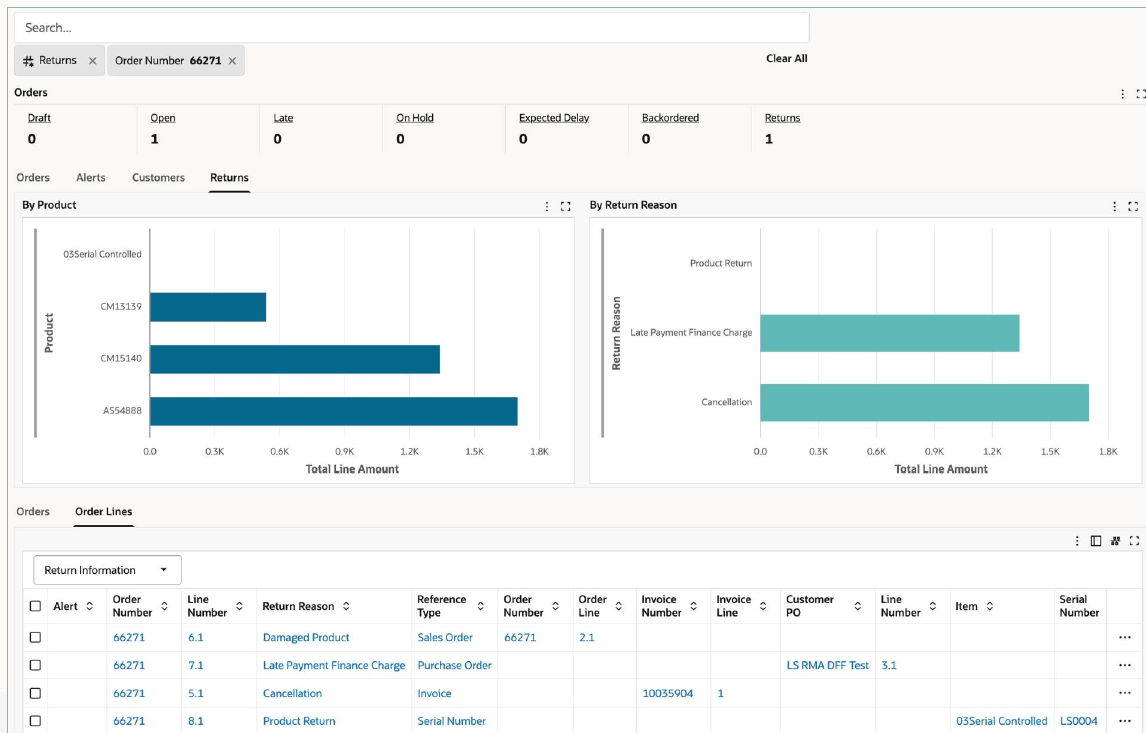
Select the Return Information option to view information for return lines such as return reason.
Steps to enable and configure
Set the following profile options:
- OM: ECC Show Return Orders in Orders Dashboard profile option. This site-level profile option determines the load of return lines by the OM Command Center Data Load program.
- No: Only the eligible outbound lines are loaded to the Orders Dashboard. This is the Default value
- Yes: All open outbound and returns lines are loaded. Additionally, the closed outbound and return lines are loaded based on the number of the days entered in the profile option OM: ECC Days for Full Data Load.
- OM: ECC Display Currency: This existing site level profile option controls the conversion of the transaction amounts into the specified currency in the Orders Dashboard.
- OM: ECC Bulk Load Size: This existing site level profile option determines the number of records that the data load program processes in memory at one time.
Tips and considerations
- Use dashboard filters and saved searches to quickly identify returns awaiting approval, receipt, credit, or requiring exception handling.
- Validate return eligibility by confirming the original order, shipped quantities, return window, and applicable return policies.
- Track return order status end-to-end to ensure timely approval, receipt, inspection, credit processing, and closure.
- Monitor exceptions proactively, such as quantity mismatches, missing receipts, inspection failures, or credit memo issues.
- Capture accurate return reasons and disposition actions to improve reporting, inventory management, customer satisfaction, and root-cause analysis.
Key resources
- Oracle Order Management User's Guide
- Oracle Order Management Command Center
- Orders Dashboard
- Oracle Order Management Command Center
- Oracle Order Management Implementation Manual
- Oracle Order Management Command Center Setup
- Setup and Configuration Steps for Order Management Command Center
- Loading Order Management Data
- Oracle Order Management Command Center Setup
Transfer of Information
R12.2.14+ TOI: Implement and Use Order Management - Oracle Order Management Command Center