Track 7600EZ Invoices in G-Invoicing Dashboard
This enhancement streamlines invoice tracking in the G-Invoicing Dashboard for 7600EZ invoicing.
Users can monitor 7600EZ-related invoice information in the same dashboard context used for GT&Cs, order, performance, advance, delivery, and settlement review.
This enhancement streamlines the invoicing process within the G-Invoicing Dashboard in compliance with 7600 EZ invoicing norms.
- Adds dashboard visibility for 7600EZ invoice activity.
- Helps users follow invoice progress without leaving the G-Invoicing dashboard context.
To track 7600EZ invoices, use the following components in the dashboard:
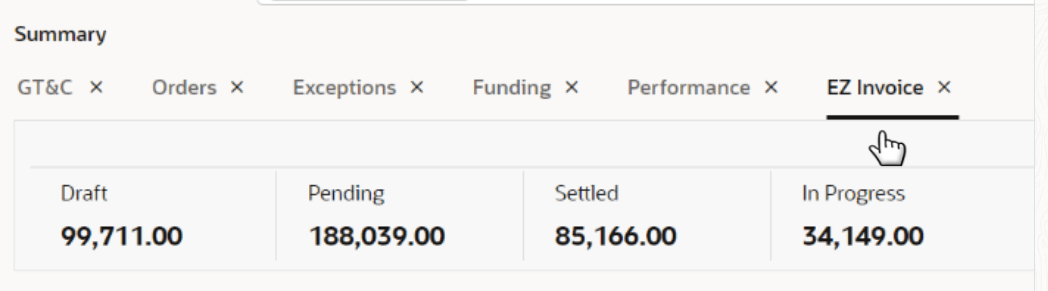
EZ Invoice Metric
The metric section displays the summarized value of the EZ invoices in various statuses: Draft, Pending, Settled, and In Progress.
EZ Invoice Chart
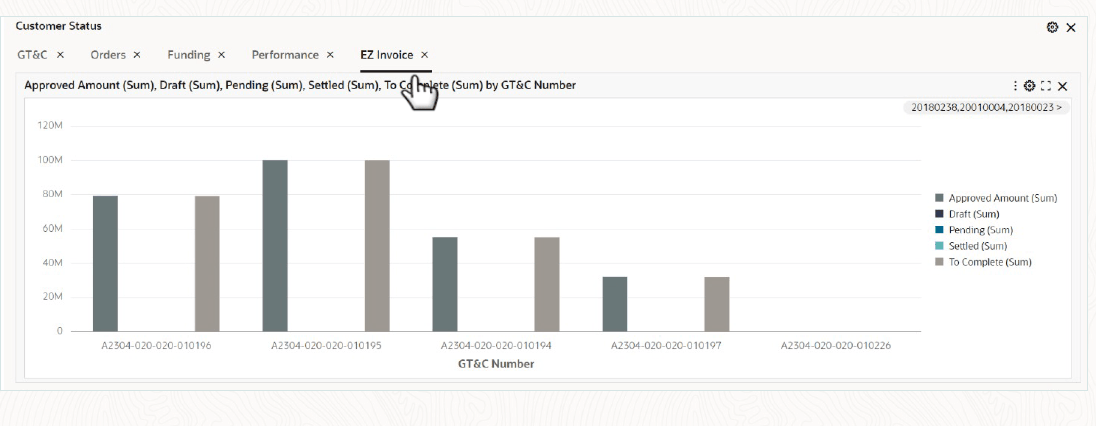
The EZ Invoice chart is a new chart to view the GT&Cs and the corresponding agreements with following attributes:
- Approved Amount
- Draft
- Pending
- Settled
- To Complete
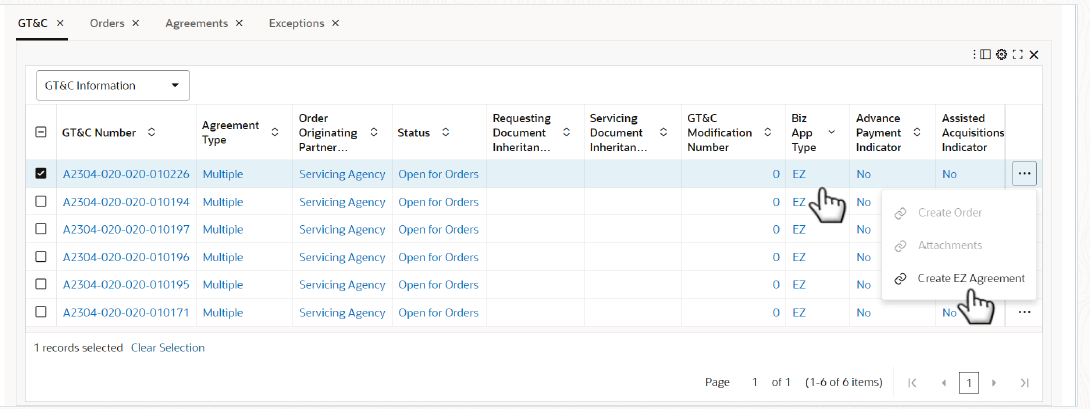
A new Business Application Type field is now available in the GT&C Information section.
- If the GT&C is EZ-enabled, then the Business Application Type will automatically display EZ.
- For standard GT&Cs, the field will display "STD" or remain blank, depending on the GT&C type.
Create EZ Agreement Action
A new Create EZ Agreement action is now available on the GT&C tab, allowing you to create an EZ Agreement directly from the selected GT&C.
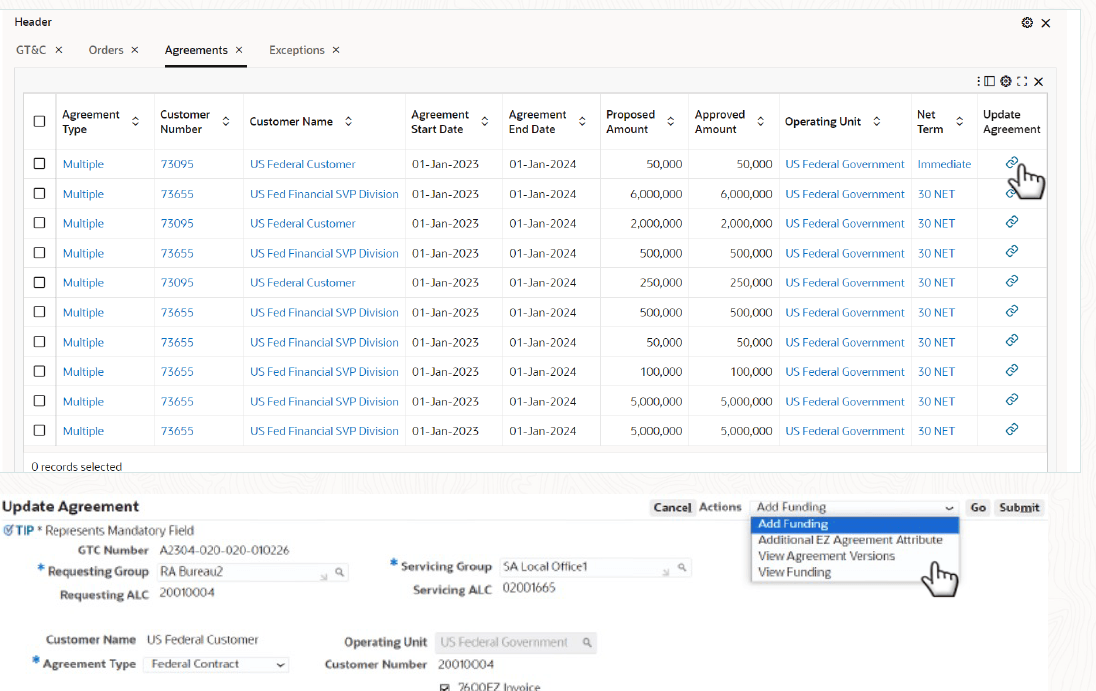
Once the agreement is successfully created from the associated GT&C, it will appear in the Agreements table for easy access and tracking.
You can also use the actions available in this table to view and update the agreement as needed.
Agreements Table
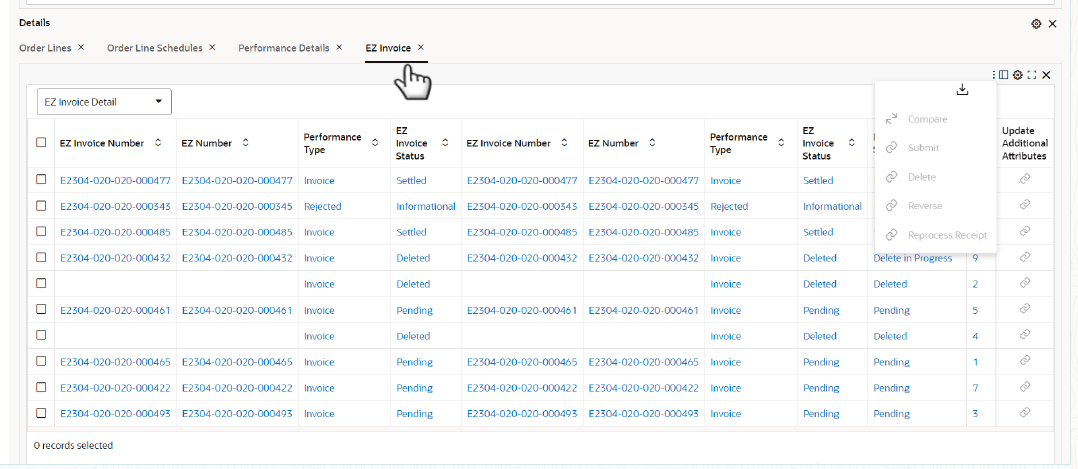
EZ Invoice Tab
Use the new EZ Invoice tab to view and manage all EZ Invoices in one place. Review invoice information through the following attribute groups:
- EZ Invoice Details
- Requesting Agency and Related Details
- Servicing Agency Details
Perform key invoice actions directly from the EZ Invoice tab, including Submit, Delete, Reverse, Reprocess Receipt, and Update Additional Attributes. Be aware that any adjustment made to an EZ Invoice automatically creates a corresponding negation adjustment on the associated EBS invoice or EZ invoice.
Steps to enable and configure
- Apply the R12.2.13 Projects Command Center update and confirm Oracle Enterprise Command Center Framework Release 12.2 V11 or later is installed.
- Complete 7600EZ-related G-Invoicing and Project Billing setup for the applicable seller-side business flows.
- Grant access to the G-Invoicing Dashboard EZ Invoice views and related invoice drilldowns.
- Refresh dashboard data so 7600EZ invoice attributes are available in dashboard metrics, tabs, and result tables.
- Enable the 7600EZ Invoice attribute in the Projects Setup page. Only EZ enabled projects can be associated with the EZ enabled agreements.
- In the G-Invoicing Setup page, enable the Next Cancelling Invoice Number attribute. This is used for Transaction numbers while releasing canceled invoices as part of Automatic cancellation process.
- Run the PRC: Process Mass Submission of EZ Performance for G-Invoicing concurrent process, which is batch process to submit multiple EZ Performance records to G-Invoicing in a single run rather than submitting them individually.
- Run the Intragovernmental 7600EZ Invoice Interface Program to pull transactions processed in G-Invoicing, including settlements, deletions, and reversals, into Oracle Projects.
- Validate EZ Invoice tabs, invoice identifiers, customer information, participation details when applicable, and navigation to invoice details using representative 7600EZ orders.
Tips and considerations
- Confirm which orders follow 7600EZ processing before validating dashboard results.
- Use invoice examples with known billing and Receivables outcomes so dashboard values can be reconciled.
- Review invoice visibility with billing users because 7600EZ processing may affect both order and invoice follow-up.
Key resources
Oracle E-Business Suite G-Invoicing Process Guide
- Chapter: Enterprise Command Center
- Topics:
- Projects Command Center Configuration
- G-Invoicing Dashboard
Transfer of Information
R12.2.13 TOI: Implement and Use Project Billing - Oracle Projects Command Center - G-Invoicing Dashboard - 7600 EZ Invoice Creation, Execution and Management