Manage Intragovernmental Transactions in G-Invoicing Dashboard
This feature adds enhanced visibility and management of communications between Oracle E-Business Suite and the G-Invoicing portal. The dashboard helps users identify exceptions quickly and review the transaction status needed to resolve communication or processing issues.
While the system ensures that nearly all transactions are successfully processed, a small percentage of communications may encounter exceptions. This feature provides a detailed view and quick identification of such exceptions through the G-Invoicing ECC dashboard, Header, Exceptions tab.
Use this feature to:
- Review G-Invoicing transaction communications and processing exceptions.
- Identify failed or delayed transactions quickly to correct setup, data, or process issues.
Exceptions Tab
The Exceptions tab displays all of the exceptions related to GT&Cs and orders that could not be pulled.
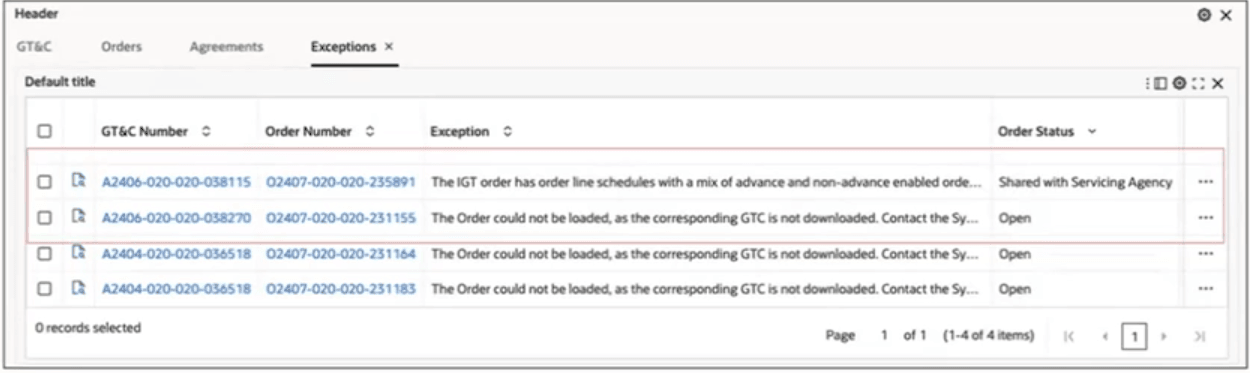
You can click the Record Details icon within a selected row to open and view the Exception details window.
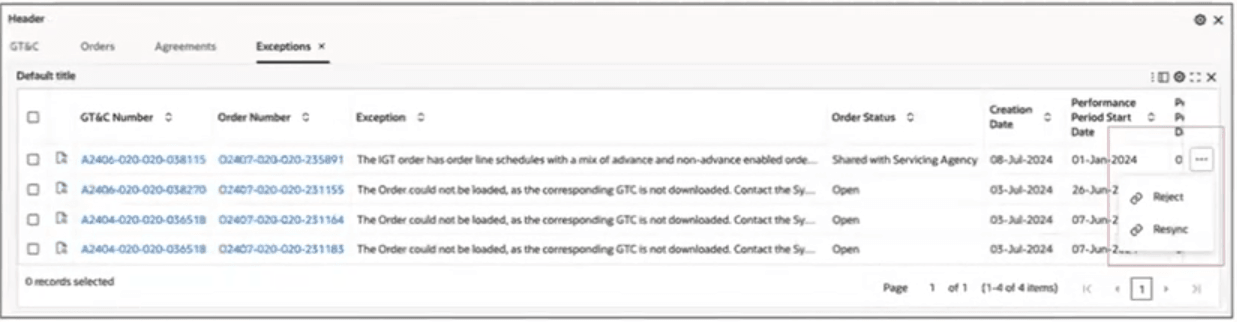
The following actions are available from the Exceptions tab:
- Reject
- Resync
Exceptions Tab Actions
Process Flow
- Pull the orders into Oracle Projects using the Intragovernmental Orders Interface Program.
- Run the Projects G-Invocing ECC Data Load.
- Search the order in G-Invoicing Dashboard.
- Check whether the order is in the Exceptions tab.
- Resolve issues.
Steps to enable and configure
- Apply the R12.2.13+ Projects Command Center cumulative patch and confirm Oracle Enterprise Command Center Framework Release 12.2 V12 or later is installed.
- Verify G-Invoicing integration setup, system IDs, certificates, schemas, concurrent programs, and dashboard security.
- Grant users access to transaction status, exception, request, and action views needed for troubleshooting.
- Refresh dashboard and transaction-status data so communications and processing exceptions are visible.
- Validate exception identification, request status, transaction status, resubmission or follow-up actions, and dashboard filters with successful and failed transactions.
Tips and considerations
- If an order has both advance and nonadvanced type of line schedules, only option is Reject. Resync is not applicable.
- If there are pull failures, resolve the root causes with resync or reject the order.
Key resources
Oracle E-Business Suite G-Invoicing Process Guide
- Chapter: Enterprise Command Center
- Topics:
- Projects Command Center Configuration
- G-Invoicing Dashboard
- Topics:
Transfer of Information