Manage Administrative Modifications for Orders in G-Invoicing Dashboard
This feature supports administrative attribute modifications on approved IGT orders through the G-Invoicing Dashboard.
Servicing agencies can update administrative details after approval and keep those changes reflected in G-Invoicing for requesting agency access.
The G-Invoicing Dashboard enhances collaboration between servicing and requesting agencies by allowing seamless incorporation of administrative attributes modifications on approved orders. It empowers servicing agencies to make necessary updates to administrative details post-approval and ensures these changes are promptly reflected in G-Invoicing for access by the requesting agency.
This feature:
- Improves collaboration between servicing and requesting agencies after order approval.
- Helps keep administrative attributes synchronized between EBS and G-Invoicing.
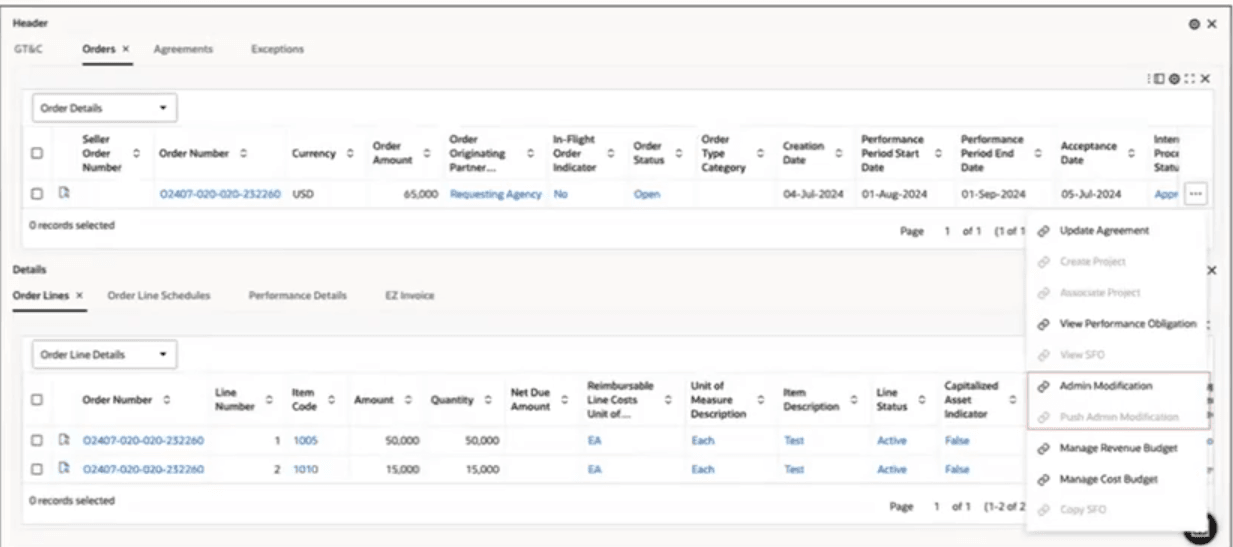
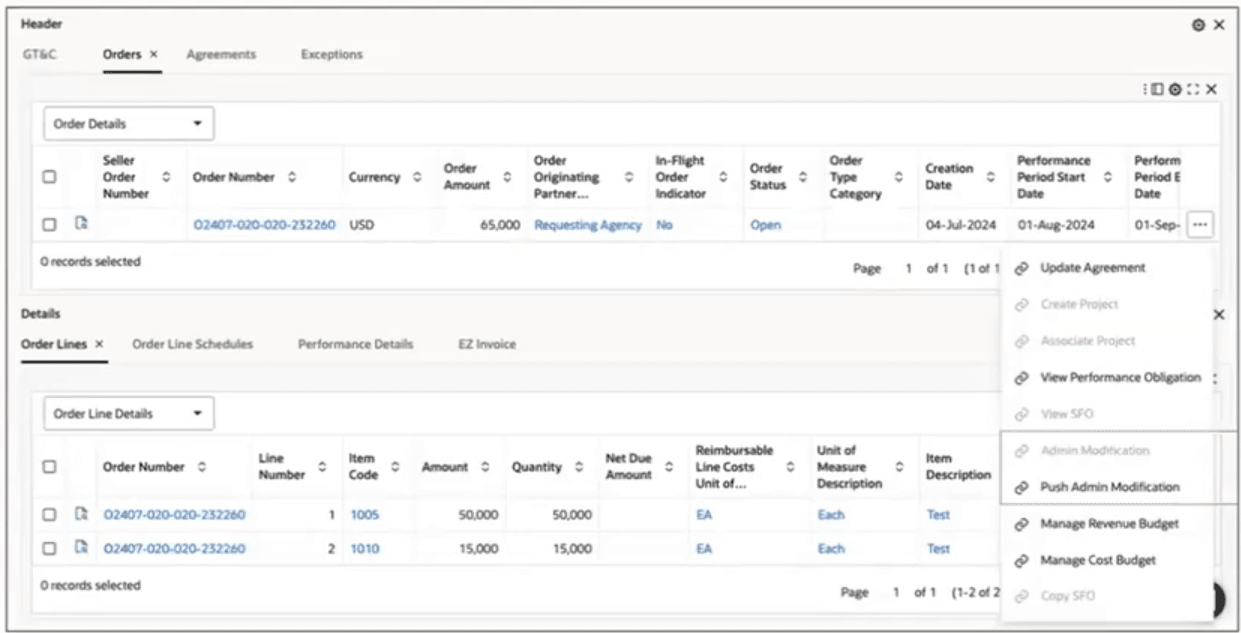
To manage administrative modifications for orders, the following actions are available in the Headers tab, Orders results table.
Admin Modification: This action is available only for orders in the Open status. Click this action to navigate to the Agreement Additional Attributes page for the SFO order. Depending on the order stage, you can edit certain attributes while in Admin mode.
Admin Modification Action
Push Admin Modification: This action is available only if the order is saved with the Admin Modification changes. Click this action to push the administrative modification updates to the G-Invoicing portal.
Push Admin Modification Action
Steps to enable and configure
- Apply the R12.2.13+ Projects Command Center cumulative patch and confirm Oracle Enterprise Command Center Framework Release 12.2 V12 or later is installed.
- Verify user access to IGT order modification actions, order detail pages, approval options, and G-Invoicing synchronization actions.
- Refresh dashboard and order data so current approved orders and modification status values are available.
- Create or uptake an administrative modification for an approved order and validate line, schedule, and administrative attribute changes.
- Confirm that the dashboard reflects the modification status and that the administrative updates are synchronized with G-Invoicing.
Tips and considerations
- Use approved orders for testing because administrative modifications apply after approval.
- Confirm which attributes are administrative before routing a change through this process.
- Review modification status and synchronization results before assuming the requesting agency can see the updated values.
Key resources
Oracle E-Business Suite G-Invoicing Process Guide
- Chapter: Enterprise Command Center
- Topics:
- Projects Command Center Configuration
- G-Invoicing Dashboard
- Topics:
Transfer of Information