Creating Rules for a VCN Security List
This section shows you how to create rules for virtual cloud network (VCN) security list in Oracle Cloud Infrastructure for use with JD Edwards EnterpriseOne One-Click Provisioning.
Prerequisite
- You must have created a Virtual Cloud Network as described in the preceding section of this Learning Path entitled: "Creating a Virtual Cloud Network".
- The user interface for the Oracle Cloud Infrastructure Console is constantly evolving. For the most up-to-date descriptions and navigation, refer to Get to Know the Console.
- You should have a fundamental understanding of Oracle Cloud Infrastructure. It is highly recommended that you review the extensive collateral information, including training, at this site: Oracle Cloud Infrastructure
- You must have a subscription to Oracle Cloud Infrastructure and an Administrator account in the platform. For more information, refer to Getting Started with Oracle Cloud.
- To access the Oracle Cloud Infrastructure Console, you must use a supported browser. See Supported Browsers in Troubleshooting Signing In to the Console.
You must create rules for the Public subnet that was automatically created by the workflow wizard when you created the VCN.
Important: If you have created a VCN using any other
method, you must destroy that VCN and follow the documented procedure in this
Learning Path.
Follow the below steps to create rules for a VCN security list:
- Navigate to Networking > Virtual Cloud Networks
- In the List Scope section, verify the correct COMPARTMENT is selected.
- Click the link for the VCN you created and click on Subnet
- On the list of subnets, click on the link to open the Public-subnet-<vcn_name> definition.
- In Subnet Details, click on Security section and click on the link Default Security List for <vcn_name>.
- On the Default Security List for <vcn_name> page click on security rules, where default rules are displayed, for the default rule for Port 22, it is recommended to edit the rule to specify a Source CIDR range of 123.123.123.123/32.
- On the Add Ingress Rules dialog, add rules for ports that should be open to the Private subnet as shown in the following table.
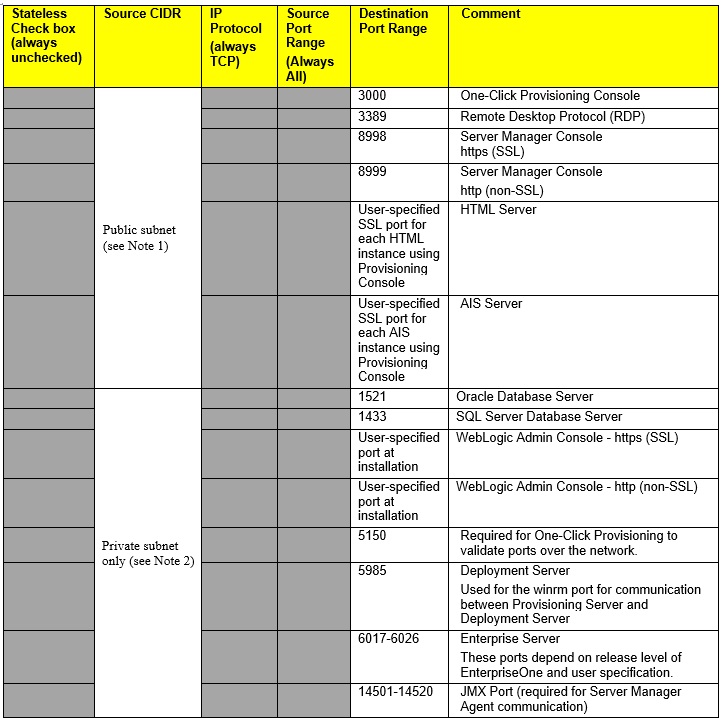
Note: Source CIDR. In this form, the IP address value
represented by Source CIDR (where CIDR means Classless Inter-Domain
Routing) is a function of the VCN. This is the source IP address from where
connection is allowed on a particular port. The syntax x.x.x.x/x provides an IP
address range. For example, 10.0.0.0/16 means 10.0.0.1 to 10.0.255.255 (where
/16 is the bit length of the subnet mask), while 0.0.0.0/0 means all IP
addresses.
Important: It is recommended to not open any port
for all IP addresses. Instead you should only open ports to specific Public IP
addresses by either setting your VCN or by using the OCI function allowlist
(formerly whitelist) to specify a CIDR (range of IP addresses). For example, to
open an IP port for a range of addresses such as 123.123.123.123, add
123.123.123.123/32 as source CIDR for the port.
Note: Private Network. These ports should not use CIDR
values that are open to the Internet. They should be specified on a Private
Network for machine-to-machine communications. For example, 10.0.0.0/16. Ensure
that your Private subnet is configured so that the ports list in the above table
are open.
For details, see Creating a Security List in Oracle Cloud Infrstructure Documentation.