Setting Up and Using Rule Groups
A rule group provides a way of grouping rules that share a common functional purpose. The rule group can serve as a template for creating a rule and determines how the rules that are based on it will operate. The Rule Group definition controls what the rule requires as inputs, that is, what types of data – what data elements – need to be passed into the rule in order for a determination to be made. Rule output is also determined by the rule group definition.
The following Rule Group definitions can be accessed in the Rules Engine Rule Group component ().
EMS Rating Component Calculation Rule Group
This example shows the Define Rule Group - Definition page for the EMS Rating Component Calculation Rule Group.
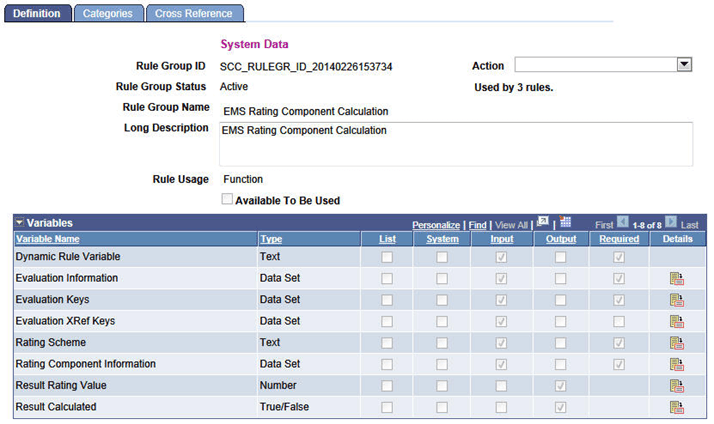
This Rule Group definition has been designed specifically for use in the creation of rules that will calculate a rating value for a Rating Component. When a rule using this Rule Group is invoked, the system populates the input variables with data from the evaluation that is being processed. The rule is responsible for setting values for the output variables Result Rating Value and Result Calculated. The Result Rating Value represents the Rating Value that has been calculated for the Rating Component. The Result Calculated variable indicates if the Rating Component should be updated with the Result Rating Value calculated by the rule. Result Calculated must be set to True in order for the Rating Component to be updated with the Rating Value calculated by the rule. The following variables are included in the Rule Group definition:
| Variable/Argument | Description |
|---|---|
|
Dynamic Rule Variable |
System created for all rule groups to facilitate usage of the Dynamic Rule Group statement by passing in the Rule ID that needs to be called. Value is blank and is not used for this rule group. |
|
Evaluation Information |
Data Set containing general information about the evaluation being processed (Instance, Category, Code, Setup EFFDT, ID, and Institution). Populated automatically by the system. |
|
Evaluation Keys |
Data Set containing the main keys for an evaluation (for example, Key 1 = Instance, Key 2 = ID, Key 3 = Institution). Populated automatically by the system. |
|
Evaluation XRef Keys |
Data Set containing the Cross Reference Keys for an evaluation. For example, an Admissions Evaluation using the SCC_GE_XRF_APPL Cross reference record will have fields mapped as follows:
Populated automatically by the system. |
|
Rating Scheme |
The Rating Scheme in which the Rating Component resides. Populated automatically by the system. |
|
Rating Component Information |
Data Set containing the current values for the Rating Component being evaluated. |
|
Result Rating Value |
The rating value calculated by the rule for the Rating Component. Defaults to zero. The rule is responsible for populating this variable. |
|
Result Calculated |
True/False indicator which the rule is responsible for setting. Defaults to False. If the rule returns a value of False, the Rating Component will not be updated (for example, the existing Rating Value for the Rating Component will not change). If the rule returns a value of True, and the value in Result Rating Value is valid, the Rating Component will be updated (for example, the Rating Value for the Rating Component will be updated with the value returned in the Result Rating Value variable.) |
A Rule Group also determines the data that can be accessed by a rule, according to the rule categories that are associated with it. A Rule Group must be associated with at least one Rule Category. The EMS Rating Component Calculation Rule Group has been associated with the delivered Rule Category Evaluation Management System and is therefore subject to the Entity Profile System Profile EMS.
This example shows the Define Rule Groups - Categories page for the EMS Rating Component Calculation rule group.
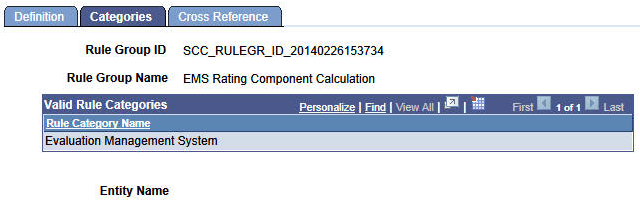
It is intended that this delivered Rule Group is used by users to create rules that calculate rating value results for rating components that are part of an EMS calculated rating scheme.
EMS Rating Scheme Calculation Rule Group
This example shows the Define Rule Group - Definition page for the EMS Rating Scheme Calculation Rule Group.
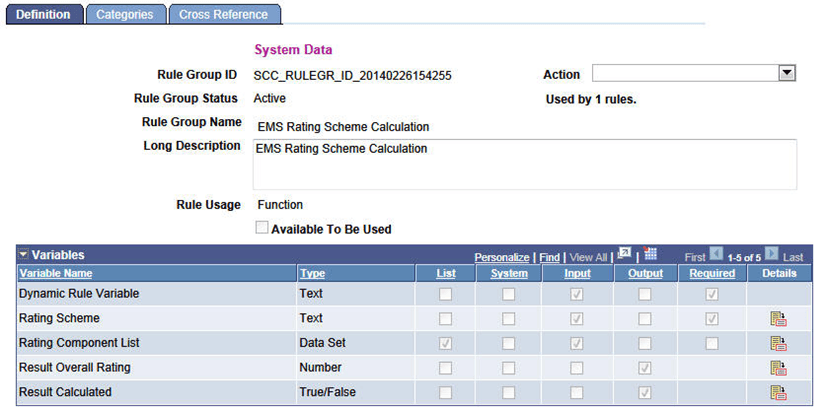
This Rule Group definition has been designed specifically for use in the creation of rules that will calculate the overall rating value for a Rating Scheme based on the rating component rating values. When a rule using this rule group is invoked, the system populates the input variables with data from the evaluation that is being processed. The rule is responsible for setting values for the output variables Result Overall Rating and Result Calculated. The Result Overall Rating represents the Overall Rating that has been calculated for the Rating Scheme. The Result Calculated variable indicates if the rating scheme should be updated with the Result Overall Rating calculated by the rule. Result Calculated must be set to True in order for the Rating Scheme to be updated with the Overall Rating calculated by the rule. The following variables are included in the Rule Group definition:
| Variable/Argument | Description |
|---|---|
|
Dynamic Rule Variable |
System created for all rule groups to facilitate usage of the Dynamic Rule Group statement by passing in the Rule ID that needs to be called. Value is blank and is not used for this rule group. |
|
Rating Scheme |
The Rating Scheme being evaluated. Populated automatically by the system. |
|
Rating Component List |
A list of Rating Component Information Data Sets. Each entry in the list represents a Rating Component that is in the Rating Scheme. Populated automatically by the system. |
|
Result Overall Rating |
The Overall Rating calculated by the rule for the Rating Scheme. Defaults to zero. The rule is responsible for populating this variable. |
|
Result Calculated |
True/False indicator which the rule is responsible for setting. Defaults to False. If the rule returns a value of False, the Overall Rating for the Rating Scheme will not be updated (for example, the existing Overall Rating will not change). If the rule returns a value of True, the Overall Rating for the Rating Scheme will be updated (for example, the Overall Rating will be changed to the value returned in the Result Overall Rating variable. |
It is intended that this delivered Rule Group is used by users to create rules that calculate the overall rating value for an EMS calculated rating scheme.
EMS Early Result Rule Group
This example shows the Define Rule Group - Definition page for the EMS Early Result Rule Group.
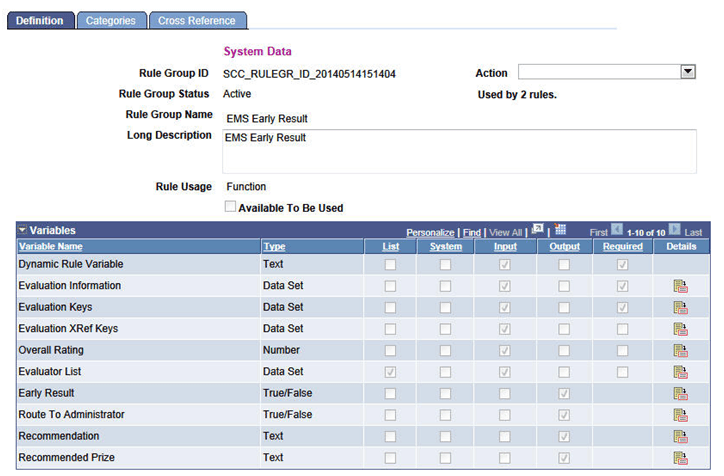
This Rule Group definition has been designed specifically for use in evaluating the result at a specific order in the evaluation to determine whether the workflow should stop or continue. When a rule using this rule group is invoked, the system will populate the input variables with data from the evaluation that is being processed. The rule is responsible for setting values for the output variables Early Result, Route to Administrator, Recommendation, and Recommend Prize. The following variables are included in the Rule Group definition:
| Variable/Argument | Description |
|---|---|
|
Dynamic Rule Variable |
System created for all rule groups to facilitate usage of the Dynamic Rule Group statement by passing in the Rule ID that needs to be called. Value is blank and is not used for this rule group. |
|
Evaluation Information |
Data Set containing general information about the evaluation being processed (Instance, Category, Code, Setup EFFDT, ID, and Institution). Populated automatically by the system. |
|
Evaluation Keys |
Data Set containing the main keys for an evaluation (such as Key 1 = Instance, Key 2 = ID, Key 3 = Institution). Populated automatically by the system. |
|
Evaluation XRef Keys |
Data Set containing the Cross Reference Keys for an evaluation. For example, an Admissions Evaluation using the SCC_GE_XRF_APPL cross reference record will have fields mapped as follows: Key 1 = Instance Key 2 = Academic Career Key 3 = Student Career Number Key 4 = Application Number Key 5 = Application Program Number Populated automatically by the system. |
|
Overall Rating |
The Overall Rating value from an evaluator (or committee member) result or from a scheme level result. |
|
Evaluator List |
A variable defined from the EMS Evaluator Decision Info Data Set. Aggregates all evaluators in the evaluation along with certain fields that can help determine the evaluation outcome. |
|
Early Result |
True/False indicator; the rule is responsible for setting. Defaults to False. If the rule returns a value of False, the workflow for the evaluations continues, creating worklist items and notifications (if set up) for the next evaluators in the order. If the rule returns a value of True, the workflow ceases; it creates no further worklist items or notifications. All remaining levels in the evaluation are greyed. The values indicated in the rule for Recommendation and Recommend Prize are populated at the high level of the evaluation (Evaluation Overview page in the Manage Evaluation component and the Evaluation Status is set to Final). |
|
Route to Administrator |
True/False indicator; the rule is responsible for setting. Defaults to False. Use this variable if the Early Result variable = True. While remaining levels of the evaluation are closed down, you do want the Evaluation Administrator to review. If the rule returns a value of False, no further action occurs and the evaluation is finalized. If the rule returns a value of True, a worklist item is created for the administrator and a notification can be sent. Recommendation and Recommend Prize fields will be populated if specified in the rule but not greyed down. The Evaluation Status field remains as set as determined for the Assigned default value in the Evaluation Code setup (in other words not changed to the Default for ‘final’ status). |
|
Recommendation |
The rule is responsible for setting this output variable. The value specified in the rule populates the Recommendation field on the Evaluation Overview page in the Manage Evaluation component. |
|
Recommend Prize |
The rule is responsible for setting this output variable. The value specified in the rule populates the Recommend Prize field on the Evaluation Overview page in the Manage Evaluation component. |