Understanding the Rules Engine and the Entity Registry
The Rules Engine accesses (that is, reads, creates, updates) data in the Campus Solutions database via a system object known as an Entity. An Entity can combine a set of system tables in a particular functional area, where a base entity can serve as the root of an entity tree representing the relationships between each element of a particular data structure. Each field in the actual table is represented as a property of the entity.
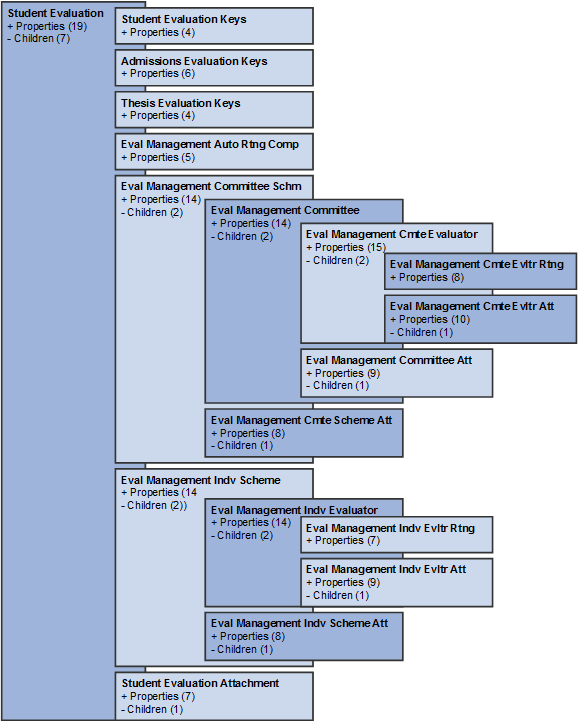
The structure and properties of an entity, as well as its relationships to other entities, are stored in the Entity Registry. Entities have been provided specifically for data encompassed by the EMS feature. In addition, a number of other entities exist in the Registry which may be leveraged for use in the Rules Engine. The following diagram illustrates the EMS hierarchical structure:
This example illustrates the EMS hierarchical structure.
Note:
We highly recommend that you do NOT update the EMS entities in your rules. The system is designed to handle evaluations in a specific manner and any outside updates could corrupt your evaluation data.
Entity Profiles
Because the Rules Engine always accesses data via the Entity Registry, the Entity Registry Entity Profile construct is used to restrict access to one or more entities, as well as the properties within a specific entity. An Entity Profile is an important attribute of a Rule Category, which is the Rules Engine feature that governs security.