Processing Steps for Posting a Subset of Staged Data for a Specific Transaction
Let’s say you only want to post test scores for those persons who received a minimum scores on a test you have loaded.
-
Run the File Parser process to populate staging records based on incoming data file.
Set SAD_PDL_HDR_STG.SCC_TRANS_STS = SB (Submitted).
-
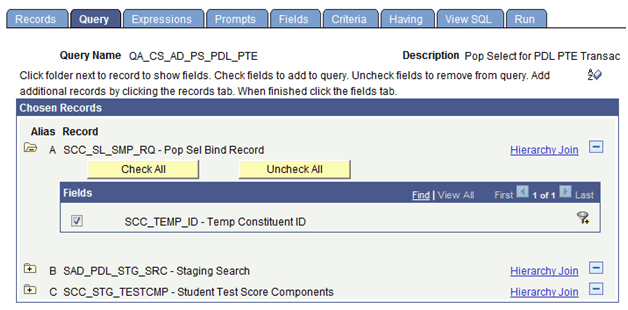
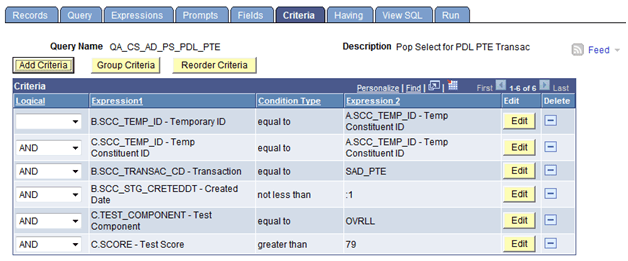
Build a query in Query Manager to select your population based on your criteria defined.
The Pop Select Bind Record of SCC_SL_SMP_RQ must be the first record in your query and SCC_TEMP_ID must be the first field returned in the query results. Add other staging records as needed to select your population. Test your query to make sure the correct population is returned.
This example illustrates the fields and controls on the Query page for chosen records.
This example illustrates the fields and controls on the Criteria page of Query Manager.
-
Run the Transaction Management process to perform search/match and post staging data for the transaction loaded.
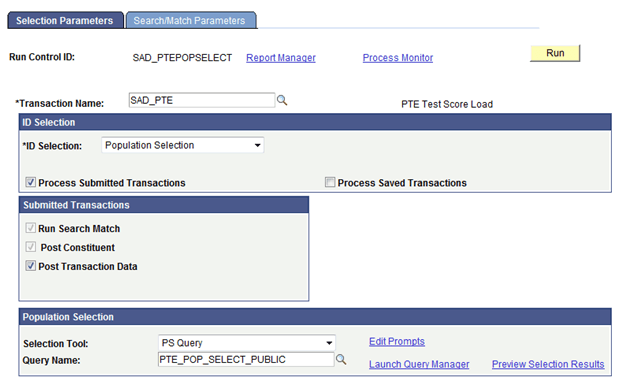
Set the ID Selection field to Population Selection. Select the Process Submitted Transactions, Run Search Match, Post Constituent, and Post Transaction Data check boxes. In the Population Selection section, enter PS Query in the Selection Tool field and select the query name defined in Step 2. Test your results once again before running the process. On clicking the Run button, the Process Scheduler Request page appears. Select the Prospect Data Load – SMP process on this page.
This example illustrates the fields and controls on the Selection Parameters page when posting a subset of test takers for a transaction.
-
Review staging records not posted based on search/match rules or validation errors.
Determine if new record should be created or existing record updated. Correct errors and save.
-
Manually post individual records or run the Transaction Management process again to post remaining records that were reviewed.