Adding the New Work Field to ChartField Security Pages
Add the new work field that you created for a customized ChartField to the ChartField Security SEC_CF_SBP sub page and the INV_SEC_CF_SBR secondary page using PeopleTools Application Designer. These pages are used by the online pages that support ChartField Security.
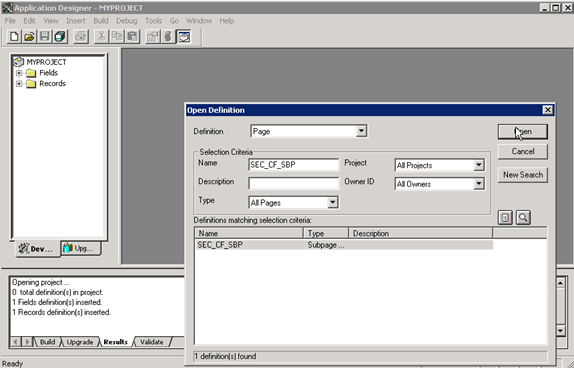
To add the new work field to the sub page and secondary page, access each within PeopleTools Application Designer - Open Definition:
This example illustrates the fields and controls on the Application Designer - Open Definition (Page). You can find definitions for the fields and controls later on this page.
| Field or Control | Description |
|---|---|
|
Definition |
Select Page to retrieve the sub page or secondary page. |
|
Name |
As your selection criteria, enter the page name, SEC_CF_SBP or INV_SEC_CF_SBR and click the Open button to retrieve the page. |
Double-click the page from the search result grid to open it. Expand the page to fill the window so that you can add the work field. Perform the following steps on each page to add the new work field:
-
From the Application Designer menu at top, select Insert, Edit Box.
-
Add the edit box to each page (SEC_CF_SBP) and (INV_SEC_CF_SBR).
-
Double-click the edit box to open the Edit Box Properties window and select the following values:
-
Record Name - DERIVED
-
Field Name - <new work field>
-
-
From the Label tab, select None for the Type.
-
From the Use tab, select the Display Only and Invisible check boxes.
-
Save the pages.