Configuring Prompt Table Field Properties
Within PeopleTools Application Designer, change the record field prompt table properties to use the derived work field instead of the edit table on the ChartField Security sub records. Configure all of the delivered Chartfield Security sub records:
-
CFS14_AN_SBR
-
CFS15_AN_SBR
-
CFS16_AN_SBR
-
CFS18A_AK_SBR
-
CFS21_AN_SBR
-
CFS29_AN_SBR
-
CFS9A_AK_SBR
-
CFS9B_AK_SBR
WARNING:
Be very careful to select the ChartField Security sub records to modify and NOT the regular ChartField sub records. The ChartField Security sub record prefix is CFS, whereas the regular ChartField sub record prefix is CF.
To configure the record field properties for the ChartField Security sub records, access each record within PeopleTools Application Designer - Open Definition:
This example illustrates the fields and controls on the Application Designer - Open Definition (Record). You can find definitions for the fields and controls later on this page.
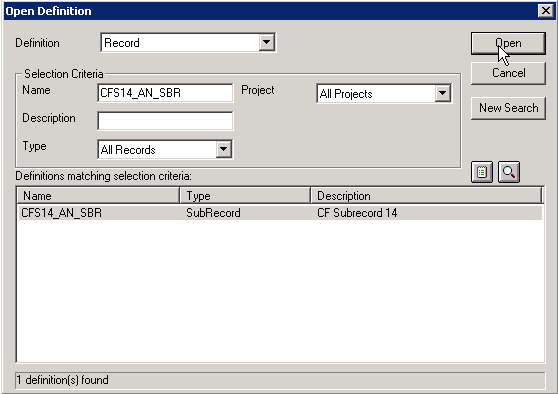
| Field or Control | Description |
|---|---|
|
Definition |
Select Record to retrieve the sub record to configure. |
|
Name |
As your selection criteria, enter the ChartField Security sub record name; for example, CFS14_AN_SBR or CFS15_AN_SBR and click the Open button to retrieve the record. Note: Be careful not to select CF14_AN_SBR by mistake. This is the corresponding ChartField sub record, which should not be altered. |
Double-click the record from the search result grid to open it. Complete the following steps to configure properties:
-
Double-click on the new ChartField (that was created by the ChartField Configuration Utility) within the sub record. This launches the Record Field Properties.
-
Select the Edits tab and replace the Prompt Table field value with the work field value that you created. Be sure to preface the work field value with a %. For example, if the new ChartField value is CFQ, the work field that you created (in step 1) might be EDIT_CFQ. In this case, you would replace the original Prompt Table field value of CFQ_TBL with the new work field value %EDIT_CFQ. Do not change any other field values within Record Field Properties.
-
Click OK and save.
-
Repeat these steps for all of the other ChartField Security sub records as listed at the beginning of this section.